Relative Change Calculator
- Last formula update:

Values will be saved between your sessions.
Decimal & Rounding Policy
- Calculations use full internal precision and are rounded only for display.
- Relative change is displayed with up to 4 decimal places.
- Percentage results are displayed with up to 2 decimal places.
- Permille results are displayed with up to 1 decimal place.
- Unnecessary trailing zeros are removed for cleaner, easier-to-read results.
- Decimal inputs may use either a period or comma without changing calculation accuracy.
Valid range
- Initial value (A): Accepts any finite real number except zero, because relative change is undefined when A = 0.
- Final value (B): Accepts any finite real number, including positive, negative, and zero values.
- Relative change (R): Accepts any finite real number, where positive values indicate an increase, negative values indicate a decrease, and zero means no change.
- Relative change display (C): Accepts any finite percentage or permille value and must represent the same relative change as R.
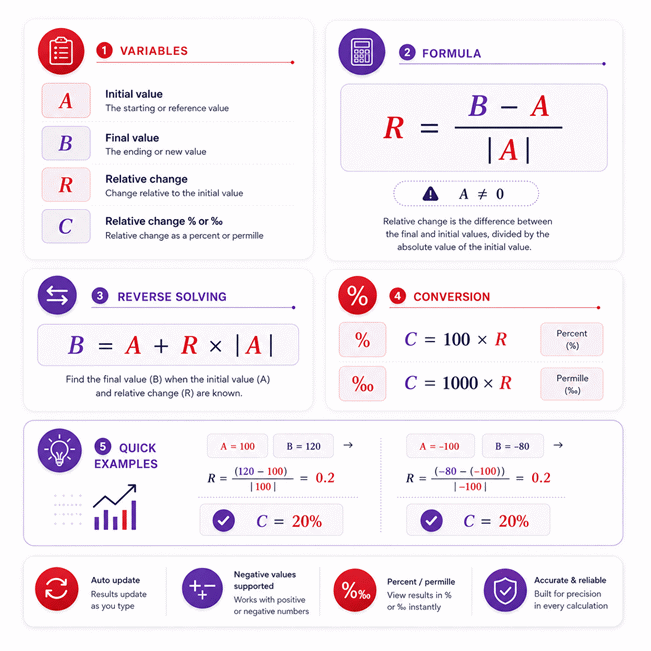
- Calculation method: R = (B – A) / abs(A), with A != 0; reverse calculation uses B = A + R × abs(A).
- Unit conversion: C = 100 × R for percent and C = 1000 × R for permille.

Cerelia Daxbourne
Reviewers:
Melovia Pexford
Iskren Lumthorne
Check our editorial policy
August 29, 2026
1.0.0
Initial calculator and formula release.
Our engineers are here to help you get it right.
How Does the Relative Change Calculator Work and What Should You Know?
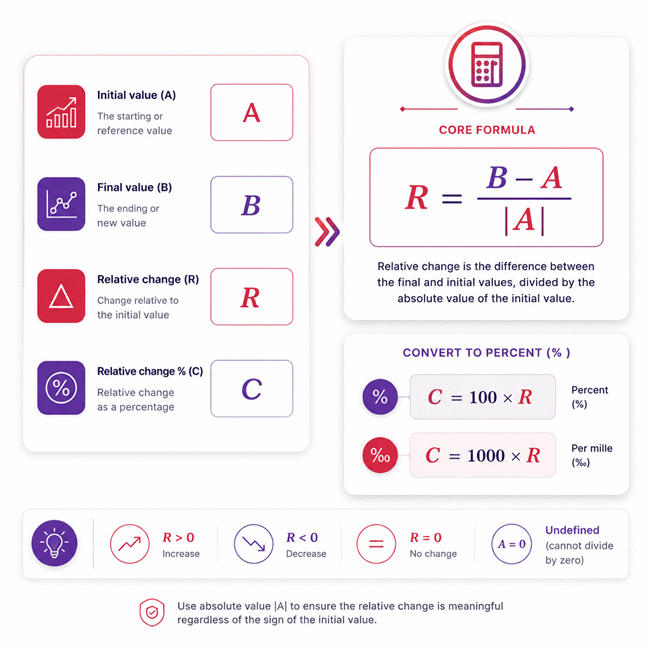
Relative Change Calculator measures how much a final value changes compared with the absolute magnitude of its initial value. It uses R = (B – A) / |A|, where A is the initial value, B is the final value, and A cannot equal zero. A positive result shows an increase, a negative result shows a decrease, and zero means the values are equal. The Relative Change Calculator also supports reverse solving when the initial value and relative change are known.
- Relative change compares the signed difference with the absolute initial magnitude.
- The initial value must be nonzero for a valid relative change.
- Negative initial values are handled using |A| to preserve change direction.
- The final value can be reverse-solved using B = A + R × |A|.
- Relative change can be displayed as a decimal, percent, or permille.
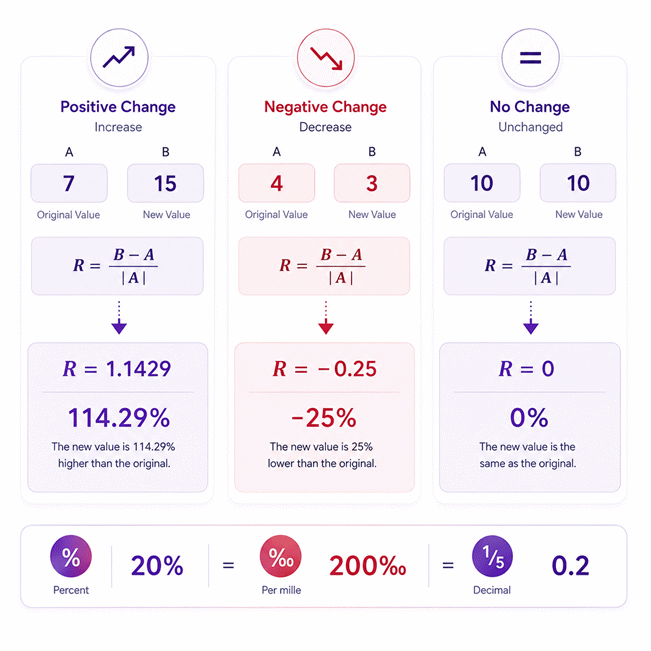
- A relative change of 0.2 represents 20% or 200‰.
- Crossing zero can produce changes greater than 100% in magnitude.
- Relative change is useful when proportional scale matters more than raw difference.
- Initial and final values should represent the same comparable quantity.
- Always interpret the result together with its sign, baseline, and measurement context.
Assumptions used in this calculator
- Initial and final values represent the same physical or conceptual quantity.
- Initial value must be nonzero because zero makes relative change undefined.
- Relative change uses the absolute initial value as the reference magnitude.
- Positive results indicate an increase relative to the initial reference value.
- Negative results indicate a decrease relative to the initial reference value.
- Zero relative change means the initial and final values are equal.
- Relative change is dimensionless when both values use compatible units.
- Percent and permille are display forms of the same relative change.
- Input values are assumed finite, numeric, and free from transcription errors.
- Measurement uncertainty is not included unless reflected directly in entered values.
- Calculated results do not replace engineering judgment, calibration, or validated procedures.
- Industrial users should verify units, reference conditions, and measurement traceability independently.
- Rounded display values may differ slightly from full-precision internal calculations.
Results are rounded for display.
Internal calculations use full precision.
Formulas Used in Relative Change Calculator :
1. Relative Change
The difference between the final and initial values is divided by the absolute value of the initial value. Using |A| preserves the correct direction of change when the initial value is negative.
2. Reverse Calculation of the Final Value
When the initial value and relative change are known, the final value is calculated directly from the same relative-change relationship.
3. Relative Change Display Conversion
The same dimensionless relative change is displayed as either percent or permille without changing its underlying value. When C is entered directly, the calculator applies the inverse of this conversion to recover R.
A = Initial or reference value
B = Final or measured value
R = Dimensionless relative change
C = Displayed relative change in percent or permille
k = Display conversion factor
Variables & Definitions
View a complete list of all variables used in this calculator, including definitions and units
Relative Change Calculator Variables and Definitions
| Variable | Name | Definition | Valid Range | Unit | Calculation Role |
|---|---|---|---|---|---|
| A | Initial value | The initial or reference value used as the calculation baseline. | Any finite real number except 0 | Same unit as B | Reference value in R = (B - A) / |A| |
| B | Final value | The final or measured value compared with the initial value. | Any finite real number | Same unit as A | Final value in the forward calculation or B = A + R × |A| |
| R | Relative change | The dimensionless change between the final and initial values relative to |A|. | Any finite real number | Dimensionless | Calculated as R = (B - A) / |A| |
| C | Relative change display | The displayed form of relative change expressed as percent or permille. | Any finite real number | % or ‰ | Calculated as C = k × R |
| k | Display conversion factor | The factor used to convert dimensionless relative change into the selected display unit. | 100 or 1000 | Conversion factor | k = 100 for percent and k = 1000 for permille |
Unit Conversion Table
Percent (%) Unit Conversion Table
| Unit Group | Unit Name | Symbol | Equivalent in Relative Change | Used For |
|---|---|---|---|---|
| Relative Change Display | Percent | % | 1% = 0.01 R | Displaying relative change as parts per hundred |
| Relative Change Display | Percent | % | 10% = 0.1 R | Expressing moderate increases or decreases |
| Relative Change Display | Percent | % | 100% = 1 R | Representing a relative change equal to the reference magnitude |
Permille (‰) Unit Conversion Table
| Unit Group | Unit Name | Symbol | Equivalent in Relative Change | Used For |
|---|---|---|---|---|
| Relative Change Display | Permille | ‰ | 1‰ = 0.001 R | Displaying relative change as parts per thousand |
| Relative Change Display | Permille | ‰ | 100‰ = 0.1 R | Expressing smaller relative changes with finer scaling |
| Relative Change Display | Permille | ‰ | 1000‰ = 1 R | Representing a relative change equal to the reference magnitude |
Example Calculation
The final value moves from -240 to -162, producing a positive relative change because the numerical increase is 78. The calculation uses the absolute magnitude of the initial value, so the denominator is 240 rather than -240. The resulting relative change is 0.325, which corresponds to 32.5%. In permille form, the same relative change would be displayed as 325‰.
The percentage input is first converted to the dimensionless relative change of 0.1875. The calculator then reverse-solves the final value using the known initial value and the absolute magnitude of that reference. Because |-320| equals 320, the calculated change is +60. Adding this change to -320 gives a final value of -260.
Results are rounded for display.
Internal calculations use full precision.
Calculations Disclaimer
What Is Relative Change and What Does It Reveal About Two Values?
A raw difference can look important while hiding the true scale of change. Relative change solves that problem by comparing the difference with the starting magnitude. This makes small and large baselines easier to compare fairly. The result shows both direction and proportional size. A positive result means the value moved upward numerically. A negative result means the value moved downward numerically. A zero result means both values are equal.
A Relative Change Calculator is useful when the starting value matters. Suppose two systems both change by ten units. That difference alone tells only part of the story. Ten units from a baseline of twenty is significant. Ten units from a baseline of ten thousand is much smaller proportionally. Relative change exposes that difference immediately.
This idea supports many everyday and technical decisions. It helps compare measurements, performance values, costs, production data, laboratory readings, and business indicators. The calculation stays meaningful because it uses the starting magnitude as the reference. That reference is the key to understanding the result correctly.
How Does the Relative Change Formula Work?
A common problem appears when users compare values with different signs. The calculation must preserve the direction of change correctly. This calculator uses the starting magnitude as a positive reference. The core relationship is:
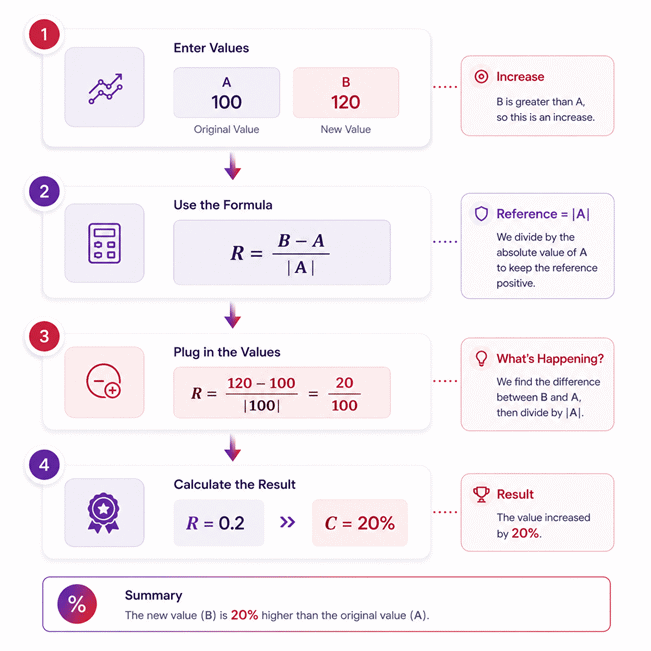
R = (B – A) / |A|
Here, A is the initial value. B is the final value. R is the relative change. The vertical bars mean the absolute magnitude of A. This detail matters when A is negative.
The numerator shows the numerical movement from A to B. The denominator scales that movement against the starting magnitude. The result is a dimensionless ratio. It can then be interpreted directly or displayed in another familiar form.
The starting value cannot be zero. A zero starting magnitude creates division by zero. The calculator therefore stops dependent calculations in that state. This prevents meaningless results from appearing.
Why Is the Absolute Value of the Initial Value Essential?
A negative starting value can easily produce a misleading sign. Using A directly in the denominator may reverse the interpretation. The absolute value prevents that problem.
Consider movement from -100 to -80. The numerical difference is +20. The value has moved upward toward zero. The reference magnitude is 100. Therefore, the relative change is +0.2. That represents a positive twenty-percent movement.
Without the absolute value, the denominator would be -100. The result would become negative. That would conflict with the actual numerical direction. The absolute reference keeps the sign tied to the numerator. This creates consistent behavior for positive and negative starting values.
This rule also makes comparisons easier across mixed-sign datasets. Users can focus on movement direction without mentally correcting the denominator sign.
What Do Initial Value, Final Value, Relative Change, and Display Value Mean?
Many calculation errors begin with assigning the wrong role to each value. The initial value is the reference point. It represents where the comparison starts. The final value represents where the measurement ends.
Relative change describes the movement between those values. It does not carry the original measurement unit. Instead, it expresses the change as a ratio of the starting magnitude.
The display value presents that same ratio in a familiar scale. A decimal relative change of 0.25 represents a twenty-five-percent change. The underlying relationship remains unchanged.
The calculator treats these values as connected quantities. Users can edit calculated fields when reverse solving is possible. This makes the tool useful for both forward analysis and planning tasks. The initial value remains the fixed reference for supported reverse calculations.
How to Calculate Relative Change Between Two Values Step by Step
A quick calculation can become confusing when signs or large values are involved. A simple sequence prevents most mistakes. Start by identifying the initial value. Then identify the final value. Keep their meanings consistent throughout the calculation.
Subtract the initial value from the final value. This gives the signed numerical movement. Next, take the magnitude of the initial value. Divide the signed movement by that positive reference magnitude.
The sign of the result now tells the direction. Its size tells the proportional importance. A result near zero means a small movement relative to the baseline. A larger magnitude shows a stronger proportional change.
The Relative Change Calculator performs these steps automatically. It also updates dependent fields immediately. This helps users test several scenarios without repeating the full process manually.
How to Convert Relative Change into Percent and Permille
A decimal result may be correct but difficult to scan quickly. Percent and permille make the same change easier to read. The important point is that the underlying relative change does not change.
A relative change of 0.2 represents twenty percent. The same value represents two hundred permille. These are different display scales for one quantity.
This matters when comparing reports from different fields. Business reports often favor percentages. Some technical datasets may use parts per thousand. Converting the display does not change the original relationship between A and B.
The calculator keeps that connection synchronized. Changing the display scale should only change the shown number. The relative change itself remains stable. This prevents accidental changes to the actual calculation.
How to Interpret Positive, Negative, and Zero Relative Change
A calculated number has little value until its direction is understood. Positive relative change means B is numerically greater than A. Negative relative change means B is numerically smaller than A. Zero means there is no numerical movement.
This interpretation still applies when both values are negative. Moving from -100 to -80 produces a positive result. Moving from -100 to -120 produces a negative result. The first movement rises toward zero. The second movement falls farther below zero.
Large magnitudes also need context. A result above one means the numerical movement exceeds the starting magnitude. Such results are valid when the values support them. The sign and magnitude should always be interpreted together.
How Does Reverse Solving Find the Final Value?
Sometimes the final value is unknown, but the desired change is already known. This situation appears in planning, targets, budgets, measurements, and performance analysis. Reverse solving handles that case directly.
When A and R are known, the final value follows this relationship:
B = A + R × |A|
The calculation first finds the size of the intended movement. It multiplies R by the magnitude of A. That signed movement is then added to the original value.
This approach works with positive and negative starting values. The absolute magnitude keeps the direction controlled by R. Users can therefore test target changes without manually rearranging the entire calculation.
How to Find the Final Value from Initial Value and Relative Change
A target may be expressed as a decimal change instead of a final number. Enter the known starting value first. Then enter the relative change. The calculator can determine the resulting final value immediately.
A positive R adds a positive movement to A. A negative R adds a negative movement. The size of that movement depends on |A|.
This behavior is especially useful with negative starting values. A positive R moves a negative A upward. A negative R moves it farther downward. The calculation remains consistent because the reference magnitude stays positive.
Reverse solving also reduces transcription mistakes. Users can change the target ratio directly. The final value then updates without another manual calculation.
How to Find the Final Value from a Known Percentage or Permille Change
Targets are often written as percentages rather than decimal ratios. The calculator can still use them directly. The entered display value is first interpreted as the same underlying relative change.
A twenty-percent change represents R = 0.2. A two-hundred-permille change represents the same R. Once R is known, the final value follows the same reverse relationship.
This creates a simple workflow for planning. Users can work in the format they already understand. The calculator keeps the decimal relationship synchronized behind the interface.
The important detail is direction. Positive values move numerically upward. Negative values move numerically downward. This remains true even when the starting value itself is negative.
Why Is Reverse-Solving the Initial Value Restricted?
A tempting shortcut can create more uncertainty than clarity. Knowing only the final value and relative change does not always identify one initial value. The absolute term creates separate sign possibilities.
This means reverse-solving A may require extra information about its sign. Automatically choosing one branch could produce an answer the user never intended.
The calculator therefore keeps the initial value as the required reference. It does not invent A from B and R alone. This restriction is deliberate. It protects the meaning of the result.
Once A is supplied, the ambiguity disappears for supported operations. The calculator can then determine the dependent value using the selected second input.
What Happens When the Initial Value Is Negative?
Negative baselines are where many simple calculators become confusing. The correct interpretation depends on numerical direction, not just magnitude.
If A is -100 and B is -80, the value increased numerically. The difference is +20. The starting magnitude is 100. The relative change is therefore positive.
If B becomes -120 instead, the difference is -20. The resulting relative change becomes negative. This shows movement farther below zero.
The same rule applies during reverse solving. A positive relative change added to a negative starting value moves it upward. A negative change moves it downward. Using the absolute reference magnitude keeps this behavior consistent and easy to audit.
How Does Relative Change Work When Values Cross Zero?
Crossing zero often creates results that surprise users. Suppose a positive starting value ends as a negative value. The numerical movement can exceed the original magnitude. The relative change may therefore be below -100%.
The opposite can also occur. A negative starting value may end as a positive value. The movement can exceed the starting magnitude in the positive direction. A result above +100% can then be valid.
These outcomes are not calculation failures. They reflect how far the final value moved relative to |A|. The result should therefore be read with both sign and context. Crossing zero changes the interpretation more sharply than ordinary same-sign movement.
Why Is Relative Change Undefined When the Initial Value Is Zero?
A zero starting point creates a fundamental comparison problem. Relative change asks how large the movement is compared with the starting magnitude. When that magnitude is zero, no finite reference exists for division.
This is why a transition from zero to ten cannot receive an ordinary relative-change ratio. The absolute movement is known, but the proportional baseline is missing.
The calculator should stop dependent calculations when A equals zero. It should not show an infinite result. It should not preserve an older result either.
Users can still report the absolute movement separately. However, relative change requires a nonzero starting reference. This distinction protects both mathematical accuracy and practical interpretation.
Why Can Near-Zero Initial Values Produce Extremely Large Relative Changes?
A tiny baseline can turn a modest movement into a huge ratio. This can surprise users during quality checks or data analysis.
The reason is simple. The numerical difference is divided by a very small reference magnitude. Even a small numerator can therefore produce a large result.
This does not automatically mean the calculation is wrong. It means the starting scale is extremely small. The result should be interpreted with that scale in mind.
Near-zero baselines deserve special attention in experimental and operational data. A large relative change may reflect a tiny reference rather than a dramatic absolute movement. Reading both the original values and the relative result prevents overreaction.
Relative Change vs Percentage Change vs Absolute Change: What Is the Difference?
Several change metrics can describe the same movement differently. Choosing the wrong one can distort a comparison.
Absolute change reports the direct numerical difference between B and A. It keeps the original unit. Relative change compares that difference with the starting magnitude. It creates a normalized ratio.
Percentage change is a familiar display of relative change. It scales the ratio into parts per hundred. The underlying comparison remains tied to the same baseline.
Use absolute change when raw quantity matters most. Use relative change when proportional scale matters. Use percentage form when the audience benefits from a familiar presentation. The best choice depends on the decision being made.
Relative Change vs Relative Difference: Which Method Should You Use?
Two values may need comparison even when neither is a natural starting point. That situation is different from relative change.
Relative change is directional. It treats A as the reference and B as the new value. Swapping them can change the result.
Relative difference is designed for comparisons where both values have similar status. It commonly uses a shared reference based on both values rather than one starting point.
Use relative change for before-and-after analysis, targets, growth, decline, and baseline tracking. Use a symmetric comparison when neither value should control the denominator. Choosing the correct concept prevents misleading conclusions from mathematically valid numbers.
How Accurate Is a Relative Change Calculation?
Accuracy problems usually begin with the entered values, not the arithmetic. The calculator can only analyze the numbers it receives. Incorrect measurements create incorrect conclusions.
Users should confirm that A and B describe the same quantity. They should also confirm that the values represent comparable conditions. A temperature reading from one operating state may not fairly compare with another state.
Accuracy also depends on understanding the baseline. A small starting value can magnify the ratio. A negative starting value changes interpretation if the reference magnitude is handled incorrectly.
A reliable result therefore needs three things: correct values, correct roles, and correct context. The calculator handles the arithmetic. The user still controls the quality of the data.
Decimal Precision, Result Stability, and Reliable Interpretation
Small numerical differences can become important when the baseline is also small. That makes stable calculation behavior essential.
The safest workflow is simple. Enter the original values as accurately as available. Avoid manually shortening them before calculation. Then interpret the displayed result within the accuracy of the source data.
More displayed digits do not automatically create more real-world accuracy. A measurement recorded to two meaningful digits cannot become laboratory-grade data through calculation alone.
This distinction matters in engineering, science, accounting, and operations. The calculator can preserve mathematical consistency. It cannot improve the quality of the original measurements. Good decisions require both reliable arithmetic and realistic data quality.
Where Is Relative Change Used in Engineering, Science, Finance, and Data Analysis?
Raw differences often fail when teams compare systems with different scales. Relative change creates a common proportional view.
Engineers can compare changes in measured performance across operating conditions. Analysts can compare metrics with different starting sizes. Scientists can review movement between reference and measured values. Finance teams can compare changes in costs, revenue, or other numeric indicators.
The method is also useful for production monitoring. A ten-unit change may be serious in a small process. The same difference may be minor in a large process.
AxiCalculator helps reveal that scale quickly. Users can move between forward and supported reverse calculations without rebuilding the math each time. That makes scenario testing faster and easier to review.
What Are the Most Common Relative Change Calculation Mistakes?
A plausible-looking result can still be wrong. The most common mistake is reversing the initial and final values. Relative change depends on direction, so the order matters.
Another mistake is ignoring the sign of negative values. Removing signs from the numerator changes the meaning. Only the reference magnitude uses the absolute value.
Users also sometimes treat a zero baseline as a normal starting value. That creates an undefined comparison. Another error is comparing values that describe different quantities or conditions.
Confusing absolute change with relative change also causes trouble. A large raw difference may be proportionally small. A small raw difference may be proportionally large. Always check both the baseline and direction.
How Can You Verify a Relative Change Result Before Using It?
A quick check can catch many mistakes before a result enters a report. First, inspect the direction. If B is greater than A, the result should normally be positive. If B is smaller, it should normally be negative.
Next, compare the raw difference with the starting magnitude. A movement near half the starting magnitude should produce a ratio near one-half.
Then inspect special cases. Equal values should produce zero change. A zero starting value should not produce a normal result. Negative baselines should still follow numerical direction.
These checks take seconds. They can prevent incorrect numbers from reaching decisions, dashboards, presentations, or technical documents.
Real-World Relative Change Calculation with Positive and Negative Values
A maintenance team may track a signed sensor correction value over two inspections. The reading first shows -240 units. A later reading shows -162 units. The value has moved upward numerically by 78 units.
The starting magnitude is 240. Dividing 78 by 240 gives a relative change of 0.325. This represents a positive proportional movement of 32.5%.
The positive sign is important. Both readings are negative, yet the second reading is numerically greater. A calculation that divides directly by -240 would reverse that interpretation.
This type of check is useful when signed process values, offsets, balances, or corrections move toward zero. The absolute reference magnitude keeps the result aligned with actual numerical direction.
Real-World Reverse Relative Change Calculation from a Known Percentage
A planning team may know the starting value and desired relative movement. The final target can then be calculated directly.
Assume the starting value is -320. The intended relative change is +18.75%, which corresponds to 0.1875. The starting magnitude is 320.
The required movement is 0.1875 × 320, which equals 60. Add that signed movement to the initial value. The final value becomes -260.
This result often surprises users because the starting value is negative. A positive change moves the number upward, toward zero. The calculation remains consistent because the change uses the positive magnitude of the reference.
Use AxiCalculator when you need to test this type of scenario quickly. The editable result fields make supported reverse analysis immediate.
Frequently Asked Questions
How should I choose the correct baseline when several historical values are available?
What if the calculated relative change is smaller than normal measurement noise?
Can I compare relative changes across different months, quarters, or project stages?
When is relative change more useful for comparing systems with very different sizes?
How should an engineer handle measurement uncertainty when using relative change?
Can a reverse-solved final value be used directly as an engineering operating target?
Can several stage-by-stage relative changes be added to find one overall change?
Engineering Resources
Our engineers are here to help you get it right.