Face Shape Calculator
- Last formula update:
Decimal & Rounding Policy
- Measurements are converted to centimeters before face proportions are calculated.
- Ratios and shape scores use unrounded values; only displayed ratios show up to four decimal places.
- Trailing zeros are omitted, and a shape is chosen before display rounding.
- Unit changes preserve the measurement; Excel retains formulas and unrounded input values.
Valid range
- Forehead width: a positive, finite measurement from 0.1 to 50 cm after conversion.
- Cheeks width: a positive, finite measurement from 0.1 to 50 cm after conversion.
- Jawline length: a positive, finite measurement from 0.1 to 50 cm after conversion.
- Face length: a positive, finite measurement from 0.1 to 50 cm after conversion.
- Editable proportion results: a positive, finite ratio from 0.2 to 5.
- Feature sharpness: Sharp, Somewhat, or Round; Somewhat is the initial selection.
- Sex: Female, Male, or unselected; this optional choice does not change the shape calculation.

Brinelle Lumquell
Reviewers:
Cavarine Pexmont
Yeldric Vossbourne
Check our editorial policy
September 27, 2026
1.0.0
Initial calculator and formula release.
Our engineers are here to help you get it right.
Assumptions used in this calculator
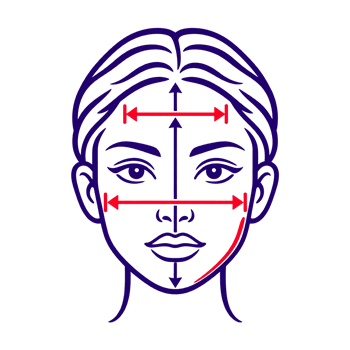
- Measurements come from the same face and the same measuring session.
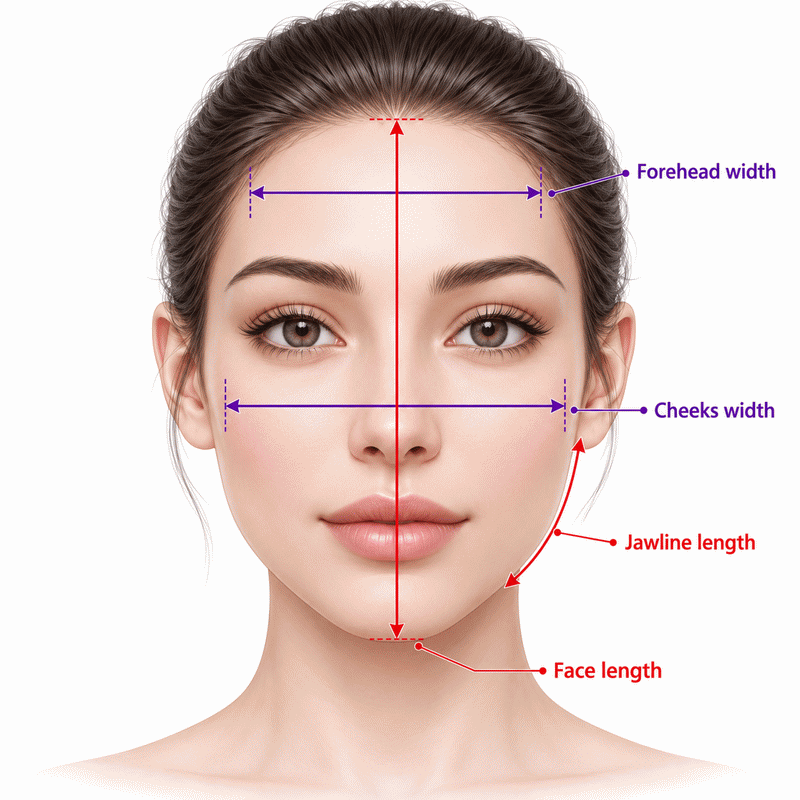
- Forehead width is measured at its widest practical point.
- Cheeks width is measured between the widest cheekbone points.
- Jawline length runs from chin toward the outer ear edge.
- Face length runs from hairline to chin tip.
- Measurements are positive, finite, and entered with the selected unit.
- Each unit selector changes display values while preserving physical length.
- Centimeters are the internal base unit for all four measurements.
- Sharpness describes visible contour, with Somewhat selected initially.
- Sex selection is optional and does not change the classification.
- Jawline length is a proxy, not a measured jaw width.
- The closest profile defines a styling category, not a diagnosis.
- Inverse solving assumes exactly one related measurement is unknown.
Results are rounded for display.
Internal calculations use full precision.
Formulas Used in Face Shape Calculator :
Convert a measurement to centimeters
Calculate the three proportions
Encode feature sharpness
Score each shape profile
| Profile | ak | bk | dk | sk |
|---|---|---|---|---|
| Oval | 1.37 | 0.92 | 0.84 | 1 |
| Round | 1.10 | 0.95 | 0.88 | 1 |
| Oblong | 1.58 | 0.98 | 0.95 | 0.25 |
| Square | 1.12 | 0.99 | 1.02 | 0 |
| Triangle | 1.25 | 0.82 | 1.12 | 0.30 |
| Diamond | 1.39 | 0.79 | 0.74 | 0 |
| Heart | 1.32 | 0.99 | 0.75 | 0.50 |
Select the closest shape
F: forehead width; C: cheeks width; J: one-side jawline length; L: face length. Each is in centimeters after conversion. xu: any entered measurement in unit u; ku: centimeters per unit (cm: 1, in: 2.54, mm: 0.1). A, B, and D: dimensionless proportions; S: sharpness value. K: the seven profiles; ak, bk, dk, and sk: their listed values; Ek: weighted distance score.
Variables & Definitions
View a complete list of all variables used in this calculator, including definitions and units
Face Shape Calculator Variables and Units
| Symbol | Meaning | Unit or value |
|---|---|---|
| xu | Any entered facial measurement in its selected unit | cm, in, or mm |
| ku | Multiplier converting the selected unit to centimeters | 1, 2.54, or 0.1 cm per unit |
| F | Forehead width after conversion | cm |
| C | Cheeks width after conversion | cm |
| J | One-side jawline length after conversion | cm |
| L | Face length after conversion | cm |
| A | Face length divided by cheeks width | Dimensionless |
| B | Forehead width divided by cheeks width | Dimensionless |
| D | Jawline length divided by cheeks width | Dimensionless |
| S | Feature sharpness value | 0, 0.5, or 1 |
| K, k | The set of seven shape profiles and one profile identifier | Categories |
| ak, bk, dk, sk | Fixed proportions and sharpness value for profile k | Dimensionless |
| Ek | Weighted distance from the entered proportions to profile k | Dimensionless |
Unit Conversion Table
Face Shape Calculator Unit Conversion Table
| Unit Group | Unit Name | Symbol | Equivalent in cm | Used For |
|---|---|---|---|---|
| Popular Units | Centimeter | cm | 1 cm | All four facial measurements |
| Popular Units | Inch | in | 2.54 cm | All four facial measurements |
| Scientific Units | Millimeter | mm | 0.1 cm | All four facial measurements |
Example Calculation
Forehead width: 12 cm · Cheeks width: 14 cm · Jawline length: 11 cm · Face length: 19 cm · Features: Somewhat
A = 19 ÷ 14 = 1.3571; B = 12 ÷ 14 = 0.8571; D = 11 ÷ 14 = 0.7857; S = 0.5
EHeart = 3(19 ÷ 14 − 1.32)2 + 2(12 ÷ 14 − 0.99)2 + 2(11 ÷ 14 − 0.75)2 + 0.18(0.5 − 0.5)2 ≈ 0.0419918
Closest face shape: Heart
The forehead is narrower than the cheeks, while the jawline measure is smaller still.
All seven profiles are scored using the unrounded proportions.
Heart has the lowest score for these entries.
The category describes a styling resemblance, not a medical finding.
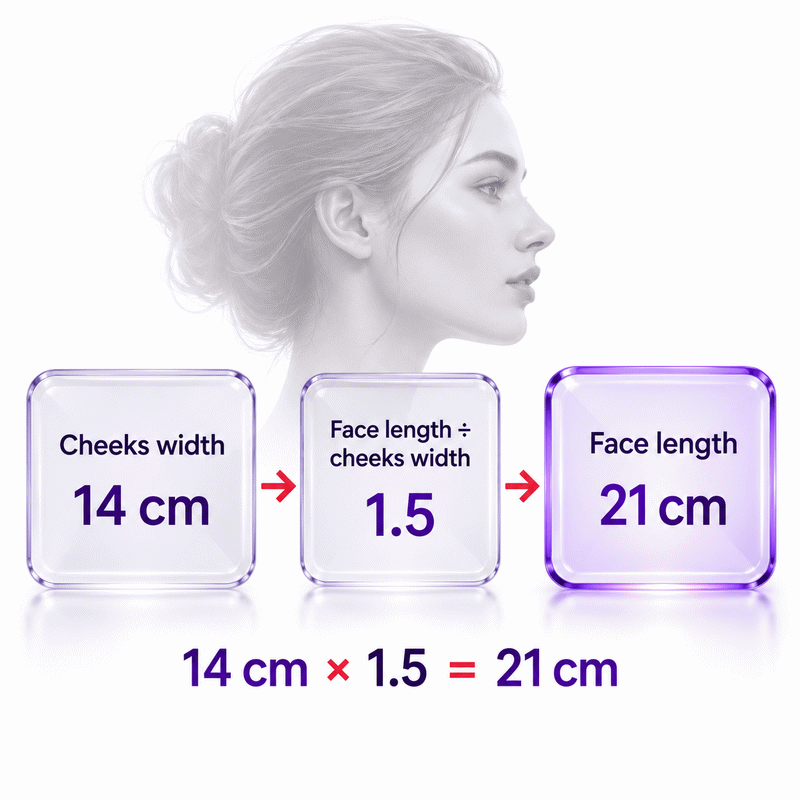
Cheeks width: 14 cm · Forehead width: 12 cm · Jawline length: 11 cm · Face length: unknown · Features: Somewhat
Enter the editable face length / cheeks width result as A = 1.5.
A = L ÷ C, so L = A × C = 1.5 × 14 = 21 cm.
B = 12 ÷ 14 ≈ 0.8571; D = 11 ÷ 14 ≈ 0.7857; EDiamond ≈ 0.0944959.
Solved face length: 21 cm · Closest face shape: Diamond
The entered ratio supplies one equation for the single missing measurement.
The face length field fills automatically, and the shape updates immediately.
Full precision is used before the displayed ratios are shortened.
A shape label alone cannot determine a unique face length.
Results are rounded for display.
Internal calculations use full precision.
Calculations Disclaimer
What can a face shape calculator tell you?
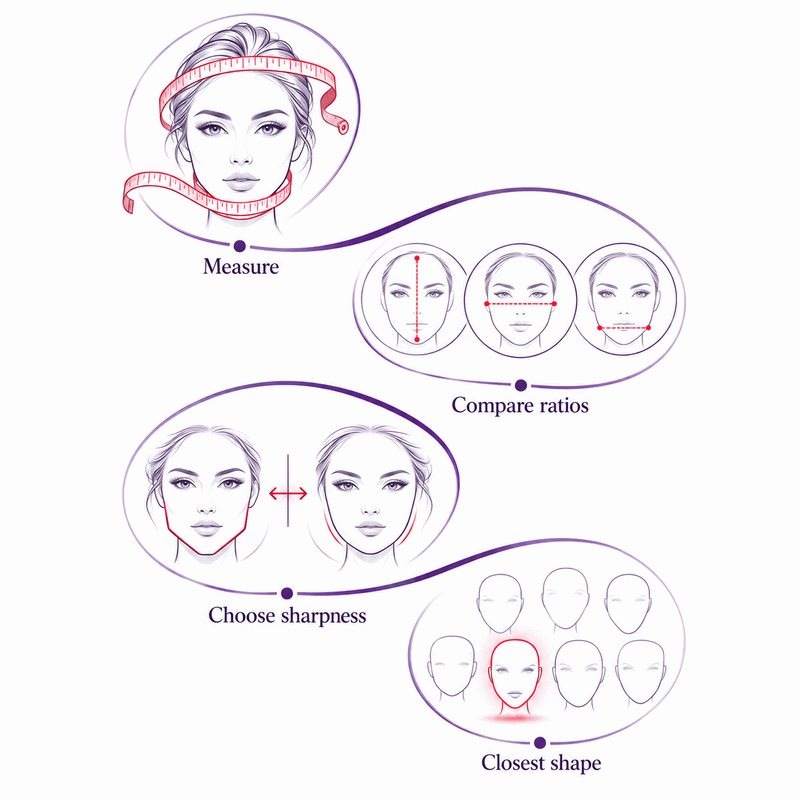
You may see an oval face in one mirror and a round one in another. A face shape calculator gives that impression a consistent starting point. It compares your measurements and feature softness with seven common outlines. The result is the closest styling category under this tool’s method. It is useful for exploring hair, frames, and accessories. It is not a permanent verdict about your appearance. Start with four careful measurements, then compare the result with what you see.
Which four measurements matter?
One number rarely tells the whole story. Record forehead width, cheeks width, one-side jawline length, and face length. Forehead and cheeks are straight horizontal distances. Face length runs from your hairline to your chin. Jawline length follows one side from your chin toward your ear. The calculator compares each dimension with cheek width. That keeps a small face and a large face comparable. It also stops a long face from being labeled by width alone. You can choose centimeters, inches, or millimeters for each entry.
Why is jawline length different from jaw width?
A familiar measuring guide may ask for jaw width across the lower face. This tool asks for a different distance. Follow one side of the jaw from the chin to the outer ear edge. Do not enter a cross-face width or double the one-side value. Both methods can describe a lower contour, but their numbers cannot be swapped. If your result seems strange, check this field first. A wrong jaw definition changes the comparison even when your other three values are sound.
How does feature sharpness affect the estimate?
Two faces can share similar lengths yet look different. One may have clear corners around the jaw. Another may have a softer outline. Choose Sharp for clear angles. Choose Round for softness. Use Somewhat between them. That choice helps separate profiles with nearby dimensions. It cannot measure bone structure or replace your judgment. If you cannot decide, use Somewhat first. Then change the setting once and see whether the label moves. A stable result needs less interpretation than a result that changes at this boundary.
How do you measure your face at home?
A crooked tape can change the answer before the calculator starts. Pull your hair away from the outline and face a mirror directly. Use a flexible tape or a straight ruler with care. Keep your head level and your expression relaxed. Record each point the same way on a repeat attempt. If someone helps, agree on the landmarks before they measure. Consistency is more useful than trying to claim perfect precision. Enter the number you measured. Never adjust it to fit a shape you expected.
Where should forehead and cheek measurements start?
A high hairline can make the forehead seem wider or longer. Measure forehead width across its practical widest point above the brows. Record the straight span, not the curved path along the skin. Measure cheeks across their widest visible points. Keep the tape horizontal and avoid pressing it into the face. For face length, start at the center of the visible hairline. End at the lowest point of the chin. If your hairline is irregular, choose a clear center point and reuse it. A short note about that point makes later comparisons more meaningful.
How do you trace the jawline consistently?
A jaw measurement often causes the biggest mix-up. Begin at the tip of the chin. Follow the jaw toward the outer edge of one ear. Record the length of that one side. Avoid switching to the straight distance between the two jaw corners. That other measure belongs to a different style of calculator. Do not pull the tape so tightly that it lifts off the contour. If one side differs, repeat both. Select a consistent side for this session. The goal is a repeatable contour clue, not a clinical scan.
How can you avoid a tilted mirror or tape?
A small tilt makes horizontal widths look shorter. Stand upright, keep both eyes level, and look straight ahead. Check your tape against the mirror’s horizontal edge before reading. Take each measurement twice. If the numbers differ, pause and locate the same endpoints again. A photograph can help you locate an outline, but camera angle changes visible proportions. Close selfies often change the apparent width near the camera. This calculator accepts measured numbers, so a photo upload is unnecessary. Retest once in steady light before treating a changed label as meaningful.
How do seven face shapes differ?
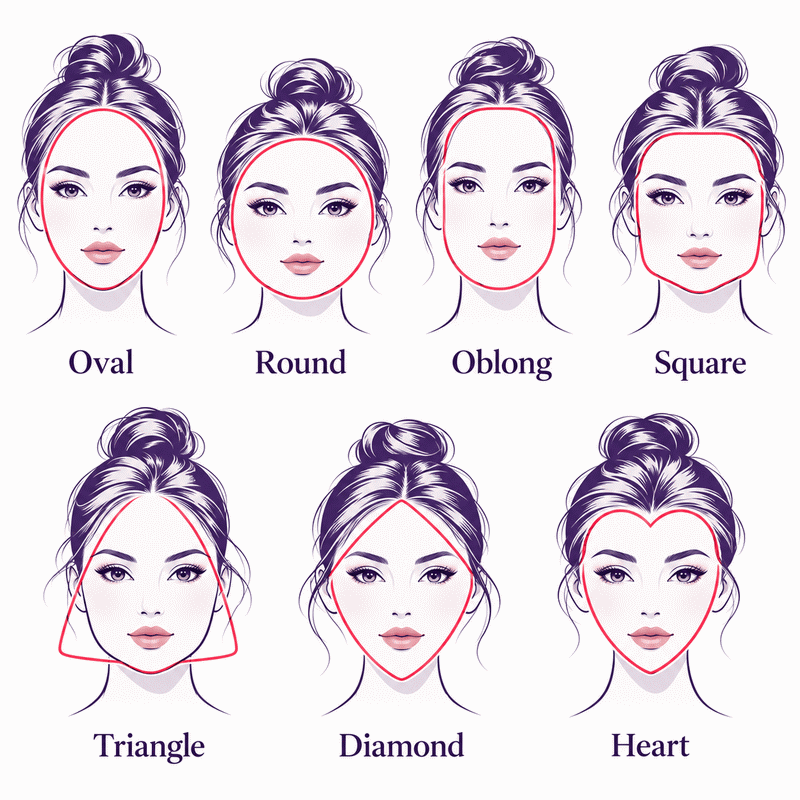
A label becomes useful when you know which pattern it describes. The calculator uses seven profiles. They are oval, round, oblong, square, triangle, diamond, and heart. Those names describe broad outlines, not exact templates. Each profile combines length, relative upper and lower dimensions, and softness. Real faces can sit between profiles. Read the result as the nearest guide for styling choices. It does not say that every feature of your face must match a drawing. Read these groups as useful visual summaries, not fixed identities.
Oval, round, and oblong: what separates them?
A soft jaw can appear in all three groups. Length changes the impression. Round tends to look closer to its width. Oval looks longer, with a gentle transition from cheeks to chin. Oblong looks longer still and can have straighter sides. The tool compares more than one ratio before choosing. That matters when your forehead and jaw are almost as broad as your cheeks. A single glance may call those faces oval or oblong on different days. Compare the full outline and the measured result together.
Square and triangle: what changes at the jaw?
A broad lower outline can pull attention away from the forehead. Square usually combines similar upper and lower presence with angular features. Triangle suggests more emphasis in the lower face than at the forehead. Your jawline entry is a one-side length. It describes contour rather than direct jaw width. Sharpness adds another clue. If the tool reports either shape, check the lower outline in a mirror. Do not infer that one label means a stronger or healthier jaw.
Heart and diamond: where is the widest point?
Both labels can involve a narrower lower contour. Heart often reads as broad across the upper face, with taper toward the chin. Diamond places more visual emphasis near the cheeks, with a narrower forehead. The difference can be subtle when forehead and cheek widths are close. Hair can hide the useful comparison, so pull it back before judging. If a small correction switches the result, keep both styling options. Try frames or hair shapes that work with your actual features.
Why do close shapes get different results?
A result can change while your face stays the same. Measurement points, softness judgments, and tool definitions all affect the label. AxiCalculator selects the profile with the closest weighted comparison. It does not claim a medical probability or universal boundary. A close second pattern can still describe you well. Treat a surprising answer as a prompt to check inputs, then consider the visible outline. The tape provides evidence for a styling choice. It does not tell you to change your face. Small boundaries deserve patient interpretation.
Why can two tools disagree?
One tool asks for jaw width across the face. Another asks for one-side jawline length. These are different inputs with different values. Tools can also use different shape lists, hairline points, photo landmarks, and decision rules. Some rely on a selfie; some rely on your tape. A result can vary without either tool malfunctioning. Before comparing labels, compare the instructions. Retake the same four measurements under the same conditions. A fair comparison begins with matching definitions, then checks how each tool explains its method.
What does a mixed face shape mean?
People often describe themselves as oval with a square jaw or heart with diamond cheeks. Such descriptions can be useful. A calculator must still show one closest category. That choice compresses several details into one word. It does not erase the features outside that word. A narrow lead between nearby patterns would make the label more sensitive to measurement changes. Explore styling advice for both outlines if both feel plausible. Fit, comfort, and personal taste remain the practical tests.
When should you measure again?
Measure again when a value looks out of place or the label changes unexpectedly. Check the jaw convention first, then the hairline and cheek endpoints. Repeat after changing hair placement or correcting a tilted tape. Facial fullness and styling can change how an outline appears over time. That does not make a previous result false. Keep the method consistent if you want to compare sessions. Do not keep measuring until you get a preferred label. Two careful passes usually teach more than repeated guesses.
How can the result guide style choices?
A shape label can narrow a crowded search for frames or a haircut. It cannot choose a product for you. Start with one option that echoes your outline and another that contrasts it. Then check comfort, size, hair texture, and the look you want. This simple comparison is more useful than a rigid rule. AxiCalculator gives a shared language for that experiment. The final choice should suit your face and your preferences in real life. Good fit is visible in motion. Compare it while you move.
Which glasses proportions should you test?
Frames can change the visible balance around your cheeks and jaw. A rounder outline may look different beside angular frames. An angular outline may look different beside softer curves. These are styling experiments, not laws. First check that the bridge sits well and the frame width fits. Then compare two shapes in steady light. Look at the whole face rather than the label alone. A well-fitting frame often matters more than a category match. Save your measurement notes if you want to explain the choice to an optician.
How do hairstyles change visible balance?
A fringe can hide the forehead point you measured. Volume near the cheeks can make that area seem wider. Hair pulled back exposes the full outline. Those effects explain why a face may look different across photographs. Bring your result to a stylist as a starting description. Discuss hair density, texture, maintenance, and your daily routine. Try a reference image on someone with similar hair behavior. The calculator identifies a pattern in measurements. It cannot predict how a particular cut will grow or sit.
When do personal taste and fit matter more?
You may like a style that conventional shape advice would reject. That preference is enough reason to test it. Size, comfort, color, texture, and purpose can outweigh outline contrast. Compare real products in real light where possible. The label should open choices, not close them. If advice feels narrow, use measured features instead. Describe a broad forehead, prominent cheeks, or a softer jaw. Those details can guide a more personal conversation than a single shape name.
How can you use the calculator responsibly?
A styling result should not become a health judgment. This tool estimates a common outline from user-entered measurements. It does not evaluate attractiveness, identity, symmetry, or a condition. The calculation happens in your browser. Export buttons load their file tools when you choose them. A shared link contains your entered measurements, so send it with care. Use the result to learn what the dimensions suggest. Seek a qualified professional for concerns about health or treatment. Keep the purpose of each tool clear. That distinction protects your decisions.
What stays private when you calculate or share?
You do not need to upload a selfie to use these fields. The shape calculation runs locally from the values you type. Sharing is a separate action. The share link includes entered values and units. Anyone with that link can read them. A browser history or copied message may keep the address. Prefer not to disclose measurements? Share only the shape name in your own words. PDF and spreadsheet exports create files when selected. Manage those files as you would any personal document.
What can a shape label not diagnose?
A face shape label cannot diagnose a medical condition or measure symmetry. It cannot tell you whether a face is healthy or attractive. It also cannot predict the fit of glasses without frame dimensions. Measurement error and natural variation make a closest match approximate. Considering medical or cosmetic treatment? Do not use this result to plan it. Describe the specific concern to a licensed professional. For style decisions, keep the category flexible and check what works on your own face.
The tool also cannot tell whether a new change is temporary. If an outline changes quickly, a style label cannot explain the cause. Avoid comparing your result with someone else’s as a score. Different measurement habits can create different numbers. Keep personal records only when they serve a practical purpose. If you share an export, remember that it carries the entries you chose to save. These boundaries keep the calculator useful. They do not give it clinical authority. It remains a tool for choices, not a diagnosis.
What should you do after seeing your result?
A result has little value if you cannot act on it. Check all four inputs, especially one-side jawline length. Read the closest shape beside your visible outline. Try a second sharpness choice only if your features sit between the options. Use the editable proportions when you know a ratio and one related measure is missing. Clear the other related field first. Save a PDF or spreadsheet when you need a record. Share the link only with someone you choose. Then test one practical style idea rather than chasing a perfect label.
A small decision works better than a long list of rules. For glasses, choose two frame shapes and check width, bridge comfort, and movement. For hair, choose a style that suits your texture and routine. Ask which feature you want to frame or soften. Use the shape label to explain your thinking, then test the look. Take notes on what worked. A result helps you make a clearer choice. Another category may still seem plausible.
You can also use the tool as a conversation aid. Share the broad category with a stylist or optician, then describe your actual features. Mention a prominent cheek area, a softer jaw, or an uneven hairline when relevant. This gives someone more useful context than a label alone. If you return later, repeat the same method before comparing. A changed reading may reflect the endpoints rather than a lasting change. Keep the process brief enough that it remains helpful.
If the result still feels wrong, repeat the measurements once. Compare the positions of the forehead, cheeks, and jaw in a mirror. A mixed outline is common enough to make two style directions useful. Bring the measurements to a stylist. Or try two frame shapes. You can also keep them for a later comparison. Use the AxiCalculator Face Shape Calculator to make that choice with clearer information. You can start again whenever you want a fresh comparison. Keep the tape, your landmark notes, and your preferences together. That record helps you see what changed and what stayed familiar. Choose a style because it fits your life.
Frequently Asked Questions
Can I measure with string when I have no soft tape?
What if glasses or facial hair hide part of my outline?
Should I keep a result from a day when my face looks swollen?
Can a child use the same result for future styling decisions?
How should I report uncertainty in a face-length-to-cheeks ratio?
Can one ratio identify two missing facial dimensions?
How can a study compare results across different face-shape tools?
Engineering Resources
Our engineers are here to help you get it right.