Body Frame Size
- Last formula update:
Decimal & Rounding Policy
- Height and wrist circumference are converted to the same length unit before division.
- Calculations and frame classification use unrounded numeric values.
- Calculated fields display up to 12 significant digits without forced trailing zeros.
- Changing units preserves the underlying measurement; its displayed value may be rounded.
- Values exactly on a category boundary belong to the medium frame range.
Valid range
- Sex: Select female or male to apply the corresponding frame category boundaries.
- Height: Enter 50 to 300 cm, or the equivalent in another supported height unit.
- Wrist circumference: Enter 3 to 50 cm, or the equivalent in another supported wrist unit.
- Body frame size index: Enter a unitless value greater than 1 and no higher than 100.
- Enter any two numeric values; the calculated third value must also meet its range, and wrist circumference must be less than height.

Brinelle Lumquell
Reviewers:
Cavarine Pexmont
Yeldric Vossbourne
Check our editorial policy
September 28, 2026
1.0.0
Initial calculator and formula release.
Our engineers are here to help you get it right.
Assumptions used in this calculator
- Height and wrist circumference describe the same person.
- Measurements are taken at the same point in time.
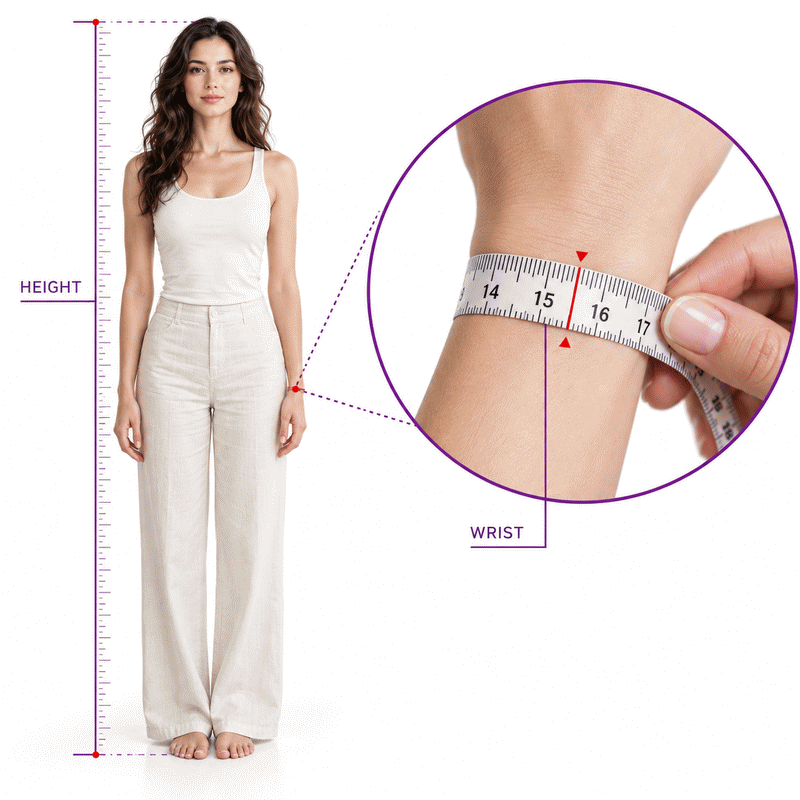
- Standing height is measured without footwear.
- Wrist circumference is measured around the narrowest part of the wrist.
- The tape lies flat without compressing soft tissue.
- Entered values represent adult measurements.
- Unit conversions use defined metric conversion factors.
- The index is dimensionless after both lengths share one unit.
- The selected sex determines the category boundaries.
- Boundary values belong to the medium frame category.
- The unrounded index determines the category.
- Reverse calculations assume the supplied index and measurement are accurate.
- Frame category does not diagnose body composition or health.
Results are rounded for display.
Internal calculations use full precision.
Formulas Used in Body Frame Size :
Convert Each Measurement to Centimeters
Lcm = Lu × fu
Calculate the Body Frame Size Index
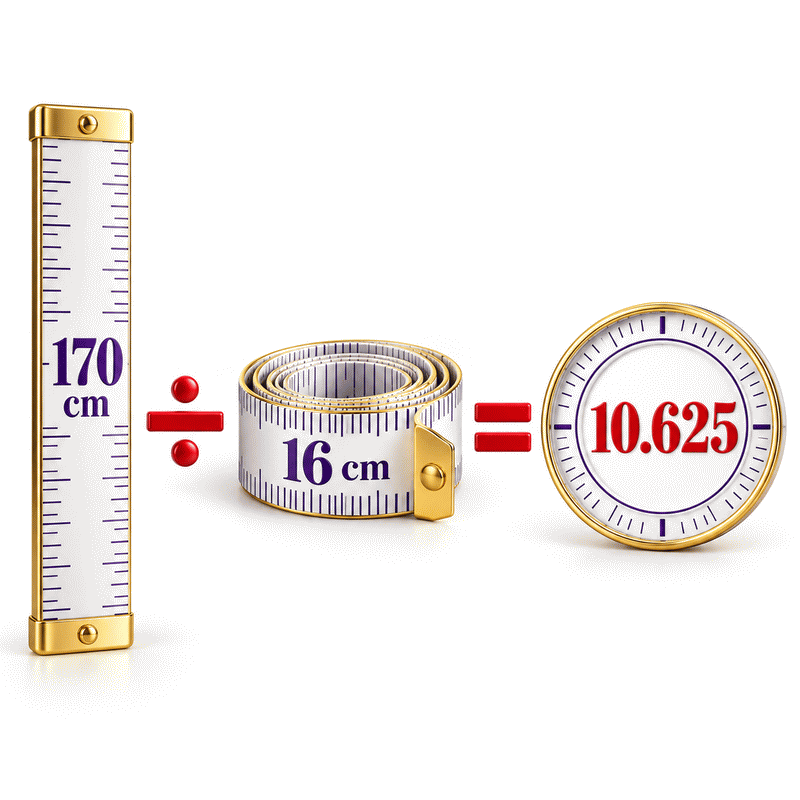
r = H/W
Classify the Frame
Lu: entered height or wrist length in its selected unit; fu: centimeters per selected unit; Lcm: the converted length; H: height in centimeters; W: wrist circumference in centimeters; r: unitless index; S: sex selection (F = female, M = male); C: frame category.
Variables & Definitions
View a complete list of all variables used in this calculator, including definitions and units
Body Frame Size Formula Variables
| Symbol | Meaning | Unit or Values | Role |
|---|---|---|---|
| Lu | Entered height or wrist length | Selected length unit | Input |
| fu | Conversion factor | cm per selected unit | Unit setting |
| Lcm | Converted height or wrist length | cm | Calculated |
| H | Height after conversion | cm | Input or calculated |
| W | Wrist circumference after conversion | cm | Input or calculated |
| r | Body frame size index | Unitless | Input or calculated |
| S | Selected sex | F = female; M = male | Category input |
| C | Body frame category | Small, medium, or large | Result |
Unit Conversion Table
Body Frame Size Unit Conversion Table
| Unit Group | Unit Name | Symbol | Equivalent in cm | Used For |
|---|---|---|---|---|
| Popular | Centimeter | cm | 1 cm = 1 cm | Height |
| Popular | Meter | m | 1 m = 100 cm | Height |
| Popular | Inch | in | 1 in = 2.54 cm | Height |
| Popular | Foot | ft | 1 ft = 30.48 cm | Height |
| Scientific | Millimeter | mm | 1 mm = 0.1 cm | Height |
| Popular | Centimeter | cm | 1 cm = 1 cm | Wrist circumference |
| Popular | Inch | in | 1 in = 2.54 cm | Wrist circumference |
| Scientific | Millimeter | mm | 1 mm = 0.1 cm | Wrist circumference |
Example Calculation
Male · Height: 178.2 cm · Wrist circumference: 16.5 cm
r = H / W = 178.2 cm / 16.5 cm = 10.8
Medium frame
Both measurements are expressed in centimeters before division.
The centimeters cancel, so the frame index is unitless.
For men, an index from 10.1 through 11 is medium.
The calculated index determines this category without display rounding.
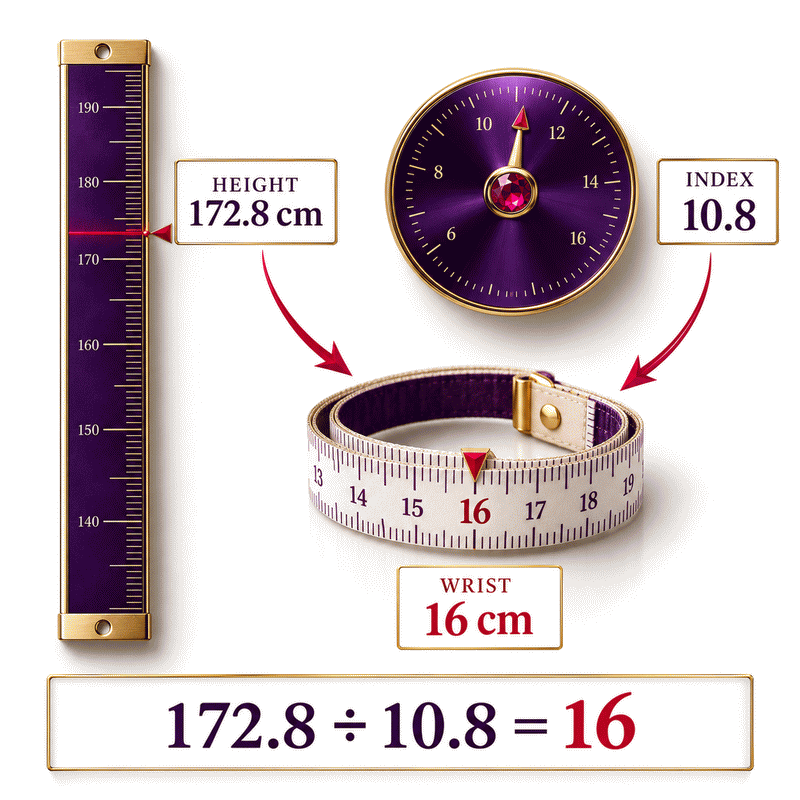
Female · Height: 172.8 cm · Frame index: 10.8
W = H / r = 172.8 cm / 10.8 = 16 cm
Wrist circumference: 16 cm · Small frame
Height and the unitless index are the two known values.
Dividing height by the index recovers wrist circumference.
The calculated wrist measurement falls within the supported range.
For women, an index above 10.4 indicates a small frame.
Results are rounded for display.
Internal calculations use full precision.
Calculations Disclaimer
What Your Body Frame Result Actually Means
A body frame size calculator answers a simple question. Its label can sound bigger than its evidence. A person sees “large frame” and may think it describes weight, fitness, or risk. This result does none of those jobs. AxiCalculator compares standing height with wrist circumference. A body frame size calculator is most useful when its method stays visible. That clarity helps you notice a surprising label before you act on it. A repeated wrist reading can then test whether the number holds steady. It then places that relationship in a small, medium, or large reference band. The label describes a measured proportion under this method. It cannot inspect your skeleton or explain why a wrist has its size. Read the index and category together. Then look at how the two measurements were taken. That context matters more than a label alone. Ask what you need the result for. A frame estimate can describe a proportion. It is weaker as a guide to personal goals. Keep that distinction in mind as you read the page.
A Label for Proportions, Not a Health Score
A category can feel like a grade when it appears beside a number. Here, the words only name reference bands. “Small” does not mean fragile, and “large” does not mean unhealthy. The calculation has no weight, age, medical history, symptoms, or body-fat input. It cannot assess those facts from height and wrist size. Two adults may share a category while having very different health needs. They may also have the same height yet different wrist readings. Use the result to describe the relationship you measured. If the question concerns health, use measures designed for that question. A frame label starts a discussion. It cannot answer every body question.
Why a Larger Index Can Point to a Smaller Frame
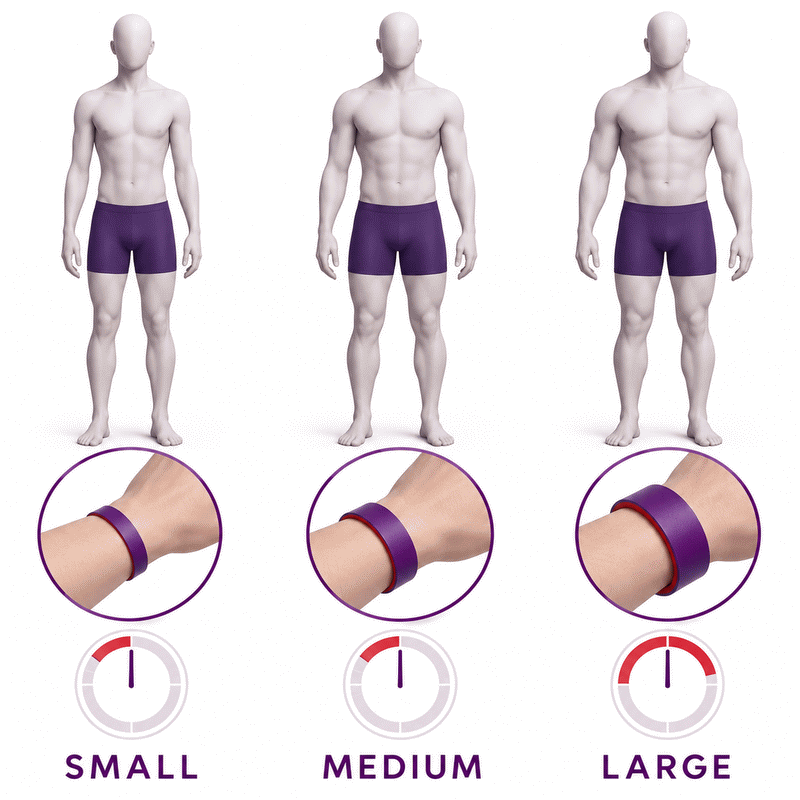
The direction of this index often surprises people. Imagine two adults of equal height with different wrist circumferences. The adult with the narrower wrist has the higher height-to-wrist index. Under this method, a higher index moves toward the small-frame side. A wider wrist makes the index lower and moves toward the large-frame side. Height matters too, so wrist size alone never tells the complete story. This is why two people with equal wrists may receive different labels. The calculator keeps both measurements in the same length unit before comparing them. That simple step makes the result a proportion, not a length.
Measure Height and Wrist Without Guesswork
A rushed wrist reading can move a borderline result. Prepare a flexible, non-stretch tape and a hard, level floor. Record height without shoes, then take the wrist reading at a consistent point. Do not pull the tape into the skin. Check the number at eye level where the ends meet. If the value sits near a category boundary, take another careful reading. A repeat measurement offers useful context when the two readings differ. Enter the actual values you observed instead of selecting the result you expect. The calculator can only work with the inputs it receives. Careful measuring improves the meaning of the estimate.
Find a Repeatable Wrist Landmark
People often place the tape at different spots on the same wrist. That can change circumference before the calculator does any work. Find the narrowest practical point near the wrist bone, and note that spot. Keep the wrist relaxed while measuring. Use the same wrist and location when repeating the check. A watch band position may be convenient, but it is not a fixed anatomical rule. If the two wrists differ, choose one and record which one you used. Do not average two locations without knowing why they differ. Consistent placement makes a second reading more useful than a random second number.
Keep Tape Tension Consistent
A loose tape adds length that is not part of the wrist. A tight tape compresses soft tissue and takes length away. Both errors change the index. Wrap the tape flat, level, and snug, without a gap or an indentation. If your tape twists, start again before reading it. A non-stretch tape helps keep the result steady across repeated checks. If only string is available, mark its overlap and lay it straight against a ruler. Avoid pulling the string after marking it. Small differences matter near a boundary. A changed wrist reading may change the category.
Check Height on a Hard Surface
Height is easy to guess and surprisingly easy to misread. Shoes, thick flooring, and a tilted head can all shift the number. Stand upright on a hard floor with heels settled and eyes forward. Use a level object against a wall to mark the top of the head. Then measure from the floor to that mark. Record the value in the unit shown on your ruler or tape. The calculator accepts compatible units. You need not estimate conversions by eye. An old height record may differ from today’s reading. Its date and conditions matter.
Read Small, Medium, and Large With Care
A single word can hide how close the number sits to a boundary. Look at the frame index as well as the label. A value deep inside a band is less sensitive to small tape changes. A value near its edge deserves a second measurement and a calmer interpretation. This calculator uses separate female and male reference groups. The selection changes the category rule, not the height-to-wrist calculation. It reports a category only after it has two usable numeric values. A pair may produce an unsupported third value. Correct inputs instead of forcing an answer.
Why the Selected Reference Group Matters
Two people can enter the same height and wrist size yet select different reference groups. Their numeric index will match, because the arithmetic is the same. Their category may differ, because the group boundaries differ. This selector chooses a comparison table used by the tool. It is not a claim about someone’s identity or a complete account of biological variation. If neither reference group fits a person’s situation, the category may be less meaningful. Share the chosen group whenever you discuss a result. Otherwise, someone comparing two screenshots may assume the arithmetic changed when only the interpretation changed.
What a Boundary Result Deserves
A number close to a cutoff can invite false certainty. Repeat the wrist measurement at the same landmark and note both values. Check the height and unit selections as well. A category can change across careful readings. Report that sensitivity instead of choosing a preferred label. A measurement can have real-world uncertainty even when a calculator displays many digits. The exact boundary itself belongs to the medium category in this tool. That rule is consistent and easy to test. It does not make someone just below or above a boundary fundamentally different. Treat nearby results as close observations.
When a New Measurement Changes the Label
A change in the label can be a change in measurement conditions. Tape tension, placement, and temporary swelling all affect circumference. Height records can differ by method or time of day. Recheck those inputs before drawing a conclusion about your body. For tracking, record the date, wrist side, landmark, unit, and raw values. Then compare like with like. A change in the ratio can also come from an edited reference selection. The category should be interpreted only with the method that produced it. One screenshot without context cannot explain why two results differ.
What This Calculator Can and Cannot Answer
People often arrive with a health question that this tool cannot settle. It can compare height and wrist circumference under a defined rule. It cannot measure fat, bone density, muscle, disease risk, or a weight target. Those questions require different information and sometimes clinical testing. The frame label may be useful as one description of body proportions. It is less useful when treated as proof of a diagnosis. AxiCalculator keeps the task narrow so the output is easier to understand. When the concern is medical, take the measurements and your question to a qualified professional.
Why Bone Density Needs Another Test
A large wrist does not prove strong bones. Circumference includes tissues around the bone and gives no mineral measurement. A small wrist does not diagnose low bone density either. If a person worries about fractures or osteoporosis, a wrist ratio cannot resolve that concern. A healthcare professional can assess history and decide whether a bone density test is appropriate. The test and the calculator answer different questions. Do not use a reassuring frame label to dismiss symptoms or a family history. Know what this number means. Another question may need other evidence.
Why Body Fat Cannot Be Inferred
A person may expect the calculator to describe body composition. It does not ask for weight, skinfolds, waist size, or a scan result. Wrist circumference includes soft tissue. It is not a pure bone measure. The category therefore cannot quantify fat or muscle. A changed wrist can alter the ratio. The ratio cannot reveal why. This matters when someone uses “large frame” to explain a weight concern. The label may describe a proportion, but it cannot settle that concern. Choose a suitable assessment for the question you actually need answered.
How This Differs From BMI
BMI and body frame answer different questions using different inputs. BMI uses height and weight. This frame estimate uses height and wrist circumference. Neither number reveals body fat percentage by itself, and neither tells a complete health story. A person can have the same BMI as someone else and a different frame index. That is not an error; the measures describe different relationships. Avoid adding a fixed weight allowance to a frame label without clinical context. If you are reviewing weight or health risks, consider the wider picture with a professional. The two tools can prompt better questions when their limits are understood.
Use the Result in a Real Decision
A frame result can organize a conversation. It cannot make a decision alone. Save the height, wrist circumference, units, index, category, and selected reference group together. Include the date and measurement method if the result will be reviewed later. This record makes it easier to find a unit mistake or a changed tape position. It also lets someone else repeat the calculation. Avoid turning the category into a diet rule or an exercise limit. For medical plans or weight goals, discuss the concern with a professional. The calculator provides context, not a prescription.
A Conversation Starter for a Clinician
A patient may wonder why their wrist-based label differs from a clinician’s assessment. Bring the raw measurements, not only the word on the screen. Explain where the wrist tape sat and whether swelling, injury, or recent change was present. Ask which method best answers the clinical question. A clinician may consider elbow breadth, body composition, history, or tests when relevant. The aim is not to defend one label. It is to identify what information matters for the decision at hand. A transparent calculator can make that discussion clearer because its inputs and method are visible.
Avoid Turning a Label Into a Target Weight
A “large frame” label may tempt someone to set a higher target weight. A “small frame” label may tempt the opposite. Neither move follows automatically from two measurements. Appropriate weight decisions depend on many factors that this calculator never receives. The result cannot evaluate eating patterns, activity, symptoms, medications, or clinical history. It is sensible to avoid a new target based only on the category. If you need a weight plan, seek advice suited to your circumstances. The frame result can inform that discussion. It cannot replace individual assessment.
Share a Result With Its Measurement Context
A shared number without units can create confusion. Include the original height and wrist entries, selected units, reference group, and category. A share link can preserve inputs. Review its address before sending it. A PDF or spreadsheet export can help keep a record of the calculation. Treat any saved or shared measurements as personal information. If a professional needs the result, tell them when and how you measured. That short note may be more useful than another decimal place. Clear context helps another reader understand or check the estimate.
Special Situations That Need More Care
A wrist measurement may be hard to interpret after an injury or with swelling. The number can include a temporary change that has little to do with skeletal proportions. Adult reference groups may fit growing bodies or unusual anatomy poorly. Valid numbers still produce arithmetic. They cannot establish that the context fits. Pause before treating an unexpected label as meaningful. Check the measurement and the purpose of your question. If the result would influence care, use professional assessment. The practical goal is a defensible interpretation, not a forced category.
Swelling, Injury, or Unusual Anatomy
A swollen wrist can make the index lower than it would otherwise be. A cast, scar, deformity, or painful area can also prevent a consistent measurement. Do not tighten the tape around an injured site to chase a more familiar result. If one wrist is affected, record it. Discuss a suitable measurement with a professional. A different wrist is not automatically interchangeable. The calculator cannot detect these conditions from the number entered. When readings are unstable, a professional can choose a better assessment.
Growing Bodies Need Different Assessment
An adult category can be misleading for a child or teenager. Growth changes height and body proportions over time. A fixed adult comparison does not account for age or stage of development. The tool may accept a numeric measurement, but acceptance does not validate that use. For a young person, seek age-appropriate guidance from a pediatric professional. Avoid using this label to judge appearance, fitness, or weight. A simple ratio cannot capture normal growth patterns. This protects users from reading too much into a convenient number.
When Two Methods Disagree
A wrist ratio and an elbow measurement can produce different categories. They observe different body dimensions and may use different reference tables. A height-band wrist chart may also disagree with a continuous ratio. First verify that both methods were measured and interpreted correctly. Then retain each method’s name with its result. Do not blend their cutoff rules into one answer. Disagreement calls for a clearer question. It does not prove that the body changed. If an important decision depends on frame assessment, a professional can choose the method.
A Clearer Way to Use AxiCalculator
Uncertainty is easier to manage when the calculation is easy to retrace. Enter two measurements into AxiCalculator. Read the index beside its category. Known index and one measurement can solve the third numeric field. Select units before checking results. Reset when starting a new case. Review the reference selection and repeat a borderline wrist reading. The tool can also produce a share link or an export for your own records. Start with the free calculator. Keep measurements with the result. Use the label narrowly. Use the body frame size calculator.
Frequently Asked Questions
Can I compare a result saved months ago with a new one?
What is the fastest way to catch a typing error?
Can a watch-size measurement replace the wrist reading?
Is it sensible to send a share link to someone else?
Why can a spreadsheet display a different last digit?
How should I discuss a result near a cutoff in a report?
Can I combine wrist-ratio and elbow-breadth categories?
Our engineers are here to help you get it right.