Milliliters to Grams Calculation
- Last formula update:

Decimal & Rounding Policy
- Calculations use full internal precision without intermediate rounding.
- Results display up to twelve significant digits when required.
- Trailing zeros are removed to keep results clear and readable.
- Unit conversions occur before the final result is formatted.
- Small and large valid values may use scientific notation.
- Ingredient density differences may affect practical conversion accuracy.
Valid range
- Volume must be a finite number greater than zero and no greater than 1e15.
- Mass must be a finite number greater than zero and no greater than 1e15.
- Custom density must be finite, positive, and no greater than 1e15.
- Only volume, mass, and density units supported by the calculator are accepted.
- Empty, negative, zero, nonnumeric, infinite, and unsupported values are rejected.

Nolissa Vantford
Reviewers:
Solavyn Marbourne
Orvick Bexquell
Check our editorial policy
September 8, 2026
1.0.0
Initial calculator and formula release.
Our engineers are here to help you get it right.
How Does the mL to Grams Calculator Produce a Reliable Result?
The mL to Grams Calculator converts volume and mass using the density of the selected ingredient. Choose water, milk, oil, flour, sugar, butter, honey, salt, cocoa powder, rice, or a custom density; then enter either known volume or known mass. The connected value updates automatically, so the same tool supports forward and reverse conversions.
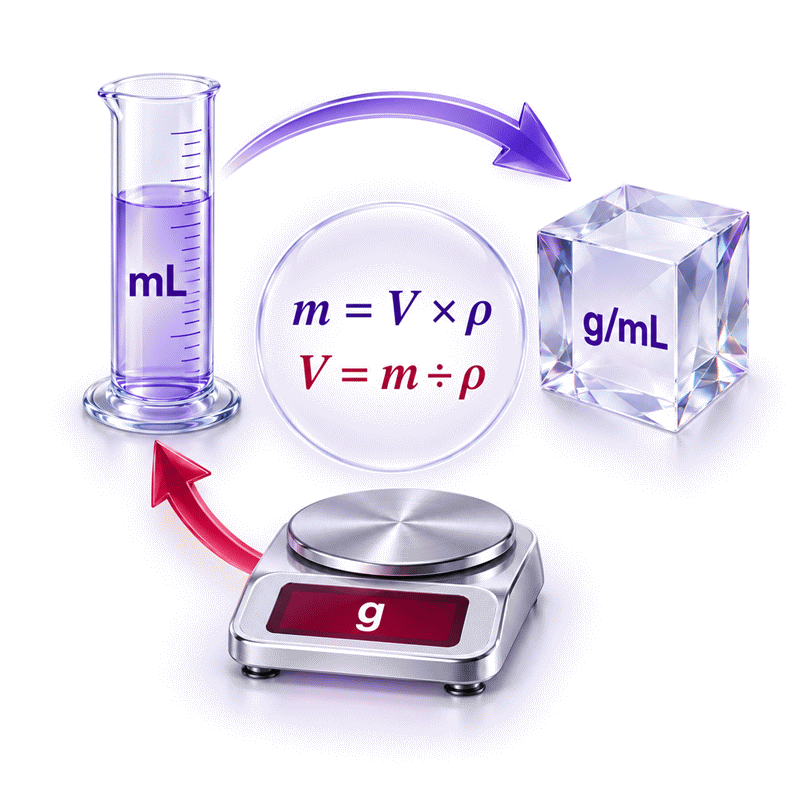
- Milliliters measure volume, while grams measure mass.
- Ingredient density connects these two different quantities.
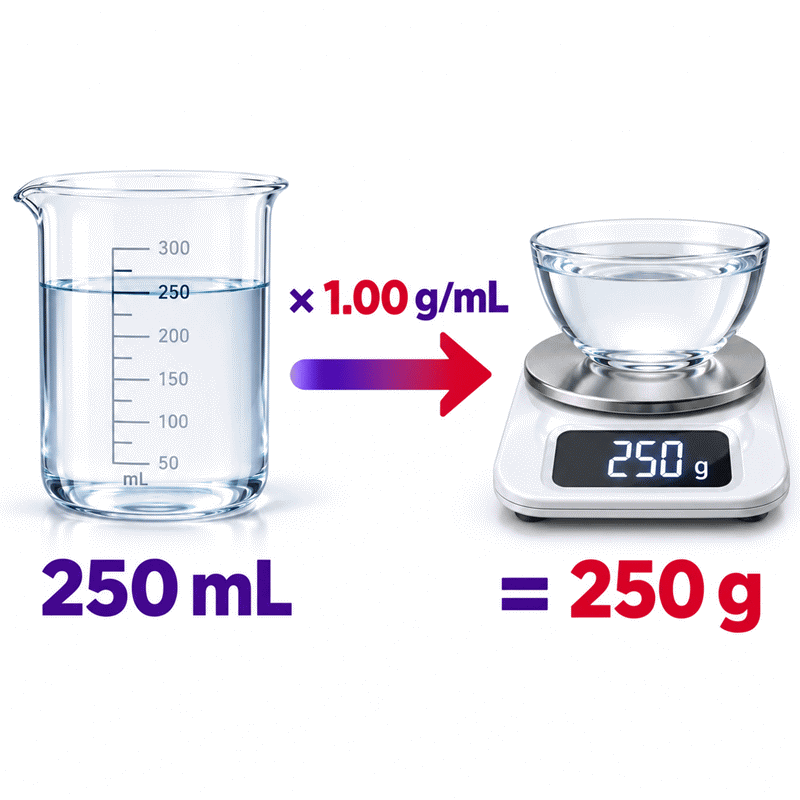
- A one-to-one conversion only applies near a density of 1 g/mL.
- Liquids, powders, granules, and pastes can produce different results.
- Temperature, moisture, packing, settling, and formulation affect practical accuracy.
- Custom density is best for branded, measured, or unlisted products.
- Changing units preserves the underlying physical amount.
- Dry ingredients are usually more repeatable when weighed directly.
Use the mL to Grams Calculator for cooking, baking, portion planning, and general educational work. Confirm the ingredient and unit before accepting the output. For regulated, medical, laboratory, or safety-critical applications, use verified material data and calibrated equipment. A kitchen scale remains the better final check whenever ingredient cost, texture, batch consistency, nutrition tracking, or professional quality depends on the measured mass.
Assumptions used in this calculator
- The selected ingredient is reasonably homogeneous throughout the measured portion.
- Preset ingredient densities represent typical reference values.
- Custom density values are entered in the selected density unit.
- Volume and mass values are finite and greater than zero.
- Temperature remains reasonably close to normal kitchen conditions.
- Pressure changes do not materially alter the ingredient density.
- Dry ingredients are not unusually compressed, aerated, or settled.
- Liquid ingredients contain no unexpected bubbles or suspended material.
- US customary cooking units use the defined calculator conversion factors.
- Unit conversions preserve the original physical quantity.
- Calculations retain full precision before formatting the displayed result.
- Results are estimates unless verified with calibrated measuring equipment.
- Regulated applications require independently verified density and measurement data.
Results are rounded for display.
Internal calculations use full precision.
Formulas Used in the Milliliters to Grams Calculation :
Unit Normalization
Bidirectional Mass, Volume, and Density Relationship
Variable Definitions
- Qbase is a quantity expressed in its calculation base unit.
- Qselected is the quantity entered or displayed in the selected unit.
- CQ is the conversion factor from the selected unit to the base unit.
- m is the ingredient mass expressed in grams.
- V is the ingredient volume expressed in milliliters.
- ρ is the ingredient density expressed in grams per milliliter.
Variables & Definitions
View a complete list of all variables used in this calculator, including definitions and units
Variables Used in the Milliliters to Grams Calculation
| Variable | Symbol | Meaning | Base Unit | Accepted Value |
|---|---|---|---|---|
| Mass | m | Mass of the selected ingredient | Gram | Finite value greater than zero |
| Volume | V | Volume occupied by the selected ingredient | Milliliter | Finite value greater than zero |
| Density | ρ | Ingredient mass per unit of volume | Gram per milliliter | Finite value greater than zero |
| Selected quantity | Qselected | Value entered or displayed in the chosen unit | Selected unit | Finite value greater than zero |
| Base quantity | Qbase | Value normalized for use in the calculation | mL, g, or g/mL | Calculated value |
| Conversion factor | CQ | Multiplier used to convert a selected unit into its base unit | Unit-specific factor | Positive defined factor |
Unit Conversion Table
Volume Unit Conversion Factors
| Unit Group | Unit Name | Symbol | Equivalent in mL | Used For |
|---|---|---|---|---|
| Popular Units | Milliliter | mL | 1 | Small liquid and ingredient volumes |
| Popular Units | Liter | L | 1000 | Large liquid quantities |
| Popular Units | US Teaspoon | tsp | 4.92892159375 | Small recipe measurements |
| Popular Units | US Tablespoon | tbsp | 14.78676478125 | Cooking ingredient measurements |
| Popular Units | US Legal Cup | cup | 236.5882365 | Recipe and serving quantities |
| Popular Units | US Fluid Ounce | fl oz | 29.5735295625 | Beverage and liquid measurements |
| Scientific Units | Cubic Centimeter | cm³ | 1 | Laboratory and scientific volumes |
| Scientific Units | Cubic Meter | m³ | 1000000 | Large scientific and industrial volumes |
Mass Unit Conversion Factors
| Unit Group | Unit Name | Symbol | Equivalent in g | Used For |
|---|---|---|---|---|
| Popular Units | Gram | g | 1 | Standard ingredient mass |
| Popular Units | Kilogram | kg | 1000 | Bulk ingredient quantities |
| Popular Units | Milligram | mg | 0.001 | Very small mass quantities |
| Popular Units | Avoirdupois Ounce | oz | 28.349523125 | US recipe measurements |
| Popular Units | Avoirdupois Pound | lb | 453.59237 | Large US ingredient quantities |
| Scientific Units | Microgram | µg | 0.000001 | Laboratory-scale mass measurements |
Density Unit Conversion Factors
| Unit Group | Unit Name | Symbol | Equivalent in g/mL | Used For |
|---|---|---|---|---|
| Popular Units | Gram per Milliliter | g/mL | 1 | Food and liquid density |
| Popular Units | Kilogram per Liter | kg/L | 1 | Bulk liquid density |
| Scientific Units | Kilogram per Cubic Meter | kg/m³ | 0.001 | Scientific and industrial density |
| Scientific Units | Gram per Cubic Centimeter | g/cm³ | 1 | Laboratory and material density |
Example Calculation
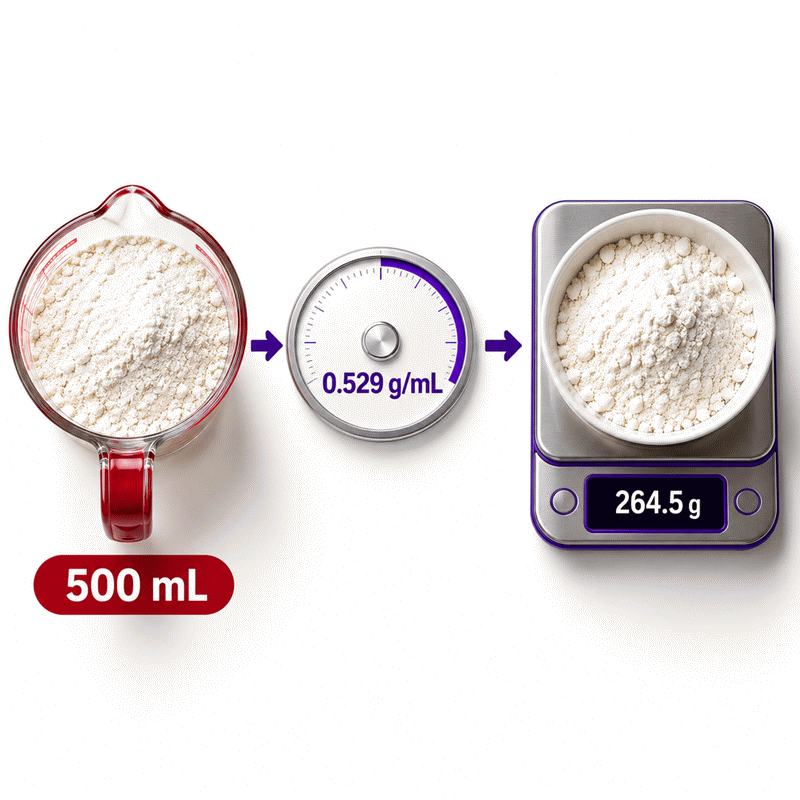
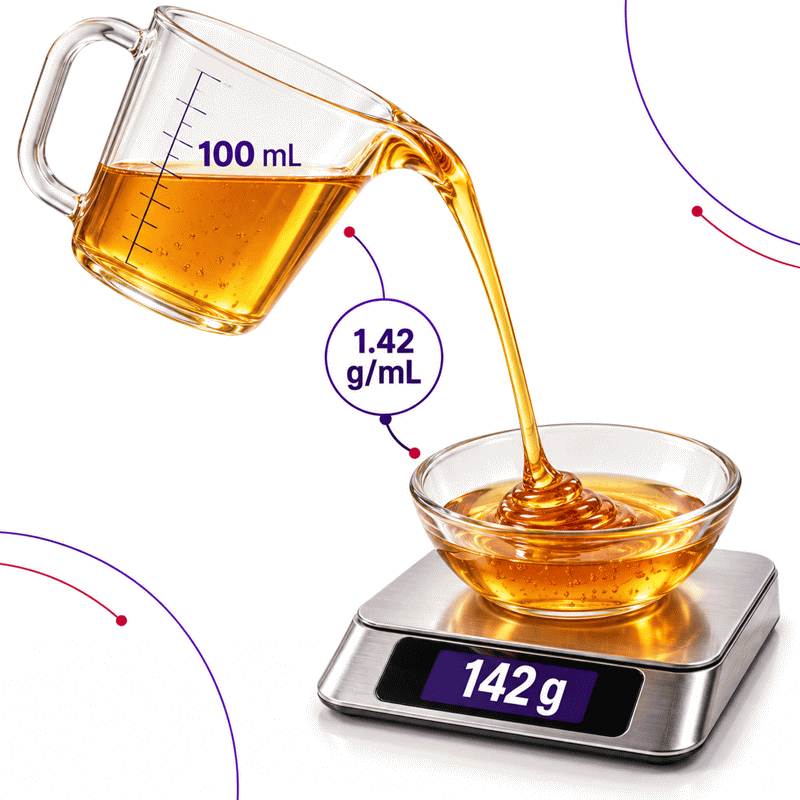
The calculator first expresses the volume in milliliters and density in grams per milliliter.
Multiplying these values cancels the milliliter units and produces grams.
The result retains full calculation precision before display formatting.
Actual honey density may vary with temperature, moisture content, and composition.
The reverse calculation begins with the entered mass and ingredient density.
Dividing mass by density returns the corresponding volume in milliliters.
The calculator can then convert that volume into another compatible unit.
Flour volume may vary substantially with sifting, settling, and packing technique.
Results are rounded for display.
Internal calculations use full precision.
Calculations Disclaimer
Why the Same Milliliters Can Produce Different Gram Results
A recipe lists milliliters, but your scale only displays grams. This gap causes many failed measurements. An mL to grams calculator resolves that problem through ingredient-specific data. It does not treat every substance like water. That difference protects texture, yield, and repeatability.
Milliliters describe occupied volume. Grams describe mass. These measurements answer different questions. A full cup of oil and honey can share equal volume. Their scale readings differ because their internal composition differs. Honey contains more mass within each milliliter. Oil contains less mass within the same space.
This distinction matters during baking, meal preparation, and recipe scaling. Small errors can change dough hydration. They can also change batter thickness or sauce consistency. A density-aware tool translates recipe volume into a useful scale target.
The mL to grams calculator on AxiCalculator supports both directions. You can begin with volume or mass. Enter the value you already know. The connected field updates without requiring another page. This design reduces repeated typing and direction mistakes.
Density Is the Missing Link Between Volume and Mass
A common problem begins with a false shortcut. Many people assume every milliliter equals one gram. That shortcut only works closely for substances resembling water. It fails quickly for flour, oil, honey, and many powders.
Density describes how much mass occupies a defined volume. Each ingredient has its own typical value. That value can change with condition. A preset ingredient gives a practical starting point. A custom value offers better control for known products.
The ingredient choice should always come before trusting the result. Selecting flour while measuring sugar creates a convincing but wrong answer. The calculator cannot detect what sits inside your bowl. It depends on your selection and measurement.
A reliable workflow begins by naming the material. Then identify its physical condition. Liquid, powder, granule, and paste behave differently. Finally, confirm whether the preset matches your actual product. This short check prevents most conversion errors.
When the Water Shortcut Works and When It Fails
Water creates the familiar one-to-one expectation. In ordinary kitchen work, one milliliter weighs about one gram. This convenient relationship makes water conversions feel universal. They are not universal.
Milk contains dissolved solids and fat. Its mass is usually slightly higher than water. Cooking oil is generally lighter. Honey is substantially heavier. Dry ingredients show larger differences because air occupies spaces between particles.
Use the water shortcut only for water and rough household estimates. Do not apply it automatically to every ingredient. Choose the correct preset whenever recipe balance matters. Select custom density when verified product information is available.
Temperature can also shift the relationship. Warm liquids expand, while cooled liquids often contract. Kitchen differences may be small. Controlled work needs tighter conditions. Measure products under consistent conditions when repeatability matters.
How to Use the mL to Grams Calculator Without Guessing
You have a recipe value and limited time. The safest path uses three decisions. Choose the ingredient. Enter the known measurement. Read the synchronized value. Avoid changing several fields before checking the first result.
The calculator accepts volume or mass. Editing volume calculates mass. Editing mass calculates volume. This reverse-solving behavior supports recipes written in either direction. It also checks a scale against a marked container.
Always inspect the unit beside each value. A correct number with the wrong unit remains incorrect. Milliliters and liters differ greatly. Grams and kilograms also differ greatly. Unit awareness prevents errors that density selection cannot repair.
The interface calculates locally within your browser. No calculation button delays the result. Changes appear after valid input. This supports quick comparisons while keeping the workflow simple.
Select the Ingredient Before Entering a Measurement
The most costly mistake is often the first selection. A user enters volume while the wrong ingredient remains active. The output looks precise, so the mistake feels trustworthy. Ingredient selection should become a deliberate first step.
Preset choices cover common kitchen materials. Water suits plain water measurements. Milk suits typical fluid milk. Cooking oil represents a practical oil estimate. Flour, sugar, butter, honey, salt, cocoa, and rice need separate selections.
Ingredient names do not guarantee identical products. Whole milk and skim milk differ slightly. Powdered sugar and granulated sugar behave differently. Melted butter and cold packed butter can also give different volume readings.
Match the preset to the closest real condition. Use custom density when no preset fits. Never choose a convenient ingredient because its answer seems plausible.
Enter Volume or Mass and Let the Other Value Update
A recipe may provide volume while your equipment provides mass. Enter the recipe volume first. The calculator supplies a scale target. This workflow replaces uncertain cup filling with controlled weighing.
The reverse direction solves another problem. A package may list grams per serving. Your container may display milliliters. Enter the gram amount to estimate matching volume. The selected ingredient relationship remains active.
Only one direction should guide each calculation. The latest edited field becomes the known value. Pause and decide which measurement you trust. Then change only that field.
Use Reset before starting an unrelated ingredient. Reset clears old values and restores initial units. This prevents accidental carryover between tasks. It also clears earlier validation messages.
Use Custom Density for Branded or Unlisted Products
A branded sauce may not match a generic preset. Sugar, oil, water, and solids alter its behavior. A supplement powder may differ even more. Custom density handles these cases when reliable product data exists.
Some labels show grams and milliliters for one serving. Ensure both values describe the same serving and condition. Do not combine mass from one portion with volume from another.
Commercial specifications may state density directly. Confirm the unit before entering it. A value using different units needs matching selector settings. Never copy an unlabeled number from an uncertain page.
Custom data improves relevance, but measurement error remains possible. Separation, settling, temperature, and batch variation may still matter. Mix products as directed before measuring. Use consistent tools and conditions.
Choosing the Right Measurement for Reliable Kitchen Results
Your measuring cup and scale may disagree with a chart. The disagreement does not always indicate a broken tool. Volume techniques vary between users. Scales usually provide more repeatable mass readings.
Liquid volume works well for water, milk, and oil. Dry volume is more sensitive. A flour cup can contain different amounts after scooping or sifting. Mass avoids much of that variation.
Choose the measurement that fits the task. A casual soup tolerates modest variation. Delicate baking often does not. Professional batches may demand tighter control. Required precision should guide equipment choice.
AxiCalculator provides a conversion target, not a physical observation. Your tools create the real measurement. A clear cup, level surface, and stable scale improve input quality. Better inputs create more useful outputs.
Liquids Behave Differently From Powders and Granules
Liquids usually fill a container continuously. Their volume can be read against a marked line. Powders contain particles and air spaces. Granules also settle when moved or vibrated.
A liquid may cling to its container. Thick syrups can leave significant residue. Pouring speed and waiting time affect transferred mass. Scrape viscous ingredients when complete transfer is expected.
Powders react to handling. Scooping can compress the lower portion. Pouring can leave a looser structure. Shaking encourages settling. Each action changes mass inside the same marked volume.
Granulated materials fall between these behaviors. Sugar and salt settle more predictably than flour. Crystal size and moisture still matter. Avoid assuming all granular products share one behavior.
Read a Liquid at Eye Level
A liquid surface can curve near the container wall. Looking from above changes the apparent level. Looking from below creates another error. Place the vessel on a flat surface. Bring your eyes level with the marking.
Use a container sized near the required amount. Tiny quantities are difficult inside large jugs. A narrow graduated vessel improves reading. For very small quantities, a suitable scale may work better.
Keep Dry-Ingredient Packing Consistent
Choose one filling method and repeat it. Spoon-and-level differs from direct scooping. Packed ingredients require controlled compression. Unpacked ingredients should not be pressed accidentally.
Break visible lumps only when the recipe expects that state. Large lumps trap uneven air spaces. Moist powders may clump again quickly. Record the method for repeated batches.
Why a Kitchen Scale Usually Improves Baking Repeatability
A baker repeats a successful recipe, but the second batch behaves differently. The written volume stayed unchanged. The flour mass probably changed. A scale exposes that hidden difference.
Mass remains stable when container shape changes. It avoids eye-level reading for dry materials. Taring removes bowl weight. Direct weighing reduces dishes and transfer losses.
Choose a scale with suitable capacity and resolution. A large platform may miss tiny additions. A precision scale may overload during large batches. Match the instrument to expected quantity.
Place the scale on a firm, level surface. Keep it away from vibration and airflow. Confirm zero before adding material. Allow the reading to stabilize.
What Changes Ingredient Density in Real Kitchens
Your calculator result appears consistent, yet the bowl behaves differently today. The ingredient may have changed condition. Density tables represent typical or defined states. Kitchens introduce temperature, moisture, and handling variation.
These changes do not make conversion useless. They define its practical limits. A household estimate supports everyday decisions. Controlled production requires product-specific data and repeatable methods.
Track the factors that matter most for your ingredient. Temperature matters for many liquids. Moisture and packing dominate many powders. Separation affects sauces and emulsions. Settling affects granules and mixed products.
Do not chase unnecessary decimal places while ignoring physical variation. Real variation can exceed display rounding. Focus first on ingredient condition and measuring technique.
Temperature Changes Liquid Volume
A warm ingredient often occupies slightly more space. Its mass does not rise through warming alone. Therefore, mass within each milliliter can change. The size of change depends on the substance.
Kitchen conversions rarely require laboratory temperature control. However, comparisons should use similar conditions. Melted butter should not be compared blindly with cold packed butter. Warm syrup can also flow and level differently.
Let ingredients reach the recipe’s intended condition. Stir separated liquids before measuring. Avoid using boiling or partially frozen products with room-temperature presets. Consistency matters more than false precision.
Moisture Changes Powders, Sugar, Salt, and Flour
A humid pantry can alter dry ingredients. Flour absorbs moisture from surrounding air. Sugar may form clumps. Salt can also attract moisture. Added water increases mass and changes flow.
Storage conditions influence volume-based measurements. Seal ingredients properly. Break clumps consistently when required. Avoid mixing freshly opened and moisture-exposed products within one batch.
For repeated production, weigh incoming ingredients. Record unusual texture or moisture. A conversion remains helpful, but observed mass provides stronger control.
Aeration, Settling, and Compression Change Bulk Density
A flour bag moves during transport. Vibration settles particles and reduces trapped air. The same flour may occupy less space afterward. Scooping from that bag can produce a heavier cup.
Sifting reverses part of this effect. It introduces air and separates particles. A sifted volume may weigh less. Compression then increases mass inside the measured space.
This behavior explains conflicting kitchen charts. Different preparation methods create different reference values. Select one method and state it clearly. Repeatability improves when everyone follows it.
Common Ingredient Decisions Before You Convert
A selector offers several ingredients, but your exact product is unclear. Start with physical similarity, not name similarity. Decide whether the product is liquid, granular, powdered, or paste-like.
Then consider preparation state. Melted, packed, sifted, chopped, and whole forms differ. A generic preset cannot represent every state. Custom density becomes valuable when variation affects the recipe.
Use presets for normal household estimates. Use label-derived data for repeated branded products. Prefer direct weighing when final mass truly determines success.
Water, Milk, Oil, and Honey
Water provides the simplest kitchen relationship. Milk stays close but contains additional components. Oil usually weighs less for equal volume. Honey weighs considerably more and transfers slowly.
Do not exchange these presets. Visual similarity does not imply equal mass. Transparent liquids can still have different composition. Choose the actual ingredient before entering volume.
Stir milk-based drinks and emulsions before measuring. Allow foam to settle. Check whether oil contains suspended herbs or solids. Warm honey consistently when easier flow is necessary.
Flour, Sugar, Cocoa, Rice, and Salt
Dry ingredients require careful naming. Flour type and handling affect volume. Sugar crystal form changes packing. Cocoa powder aerates easily. Rice variety and grain condition also matter.
Salt deserves special attention. Fine salt packs differently from coarse crystals. Equal spoon volumes may contain different masses. A generic salt selection remains an estimate.
Use a scale for sensitive baking. When volume is unavoidable, follow one filling method. Level the container without pressing unless packing is required.
Homemade Mixtures and Branded Products
A homemade dressing contains several components. Its behavior changes with ratio and separation. A single-ingredient preset cannot describe it accurately. The same issue affects sauces, syrups, and blended powders.
Branded products may provide serving information. Verify that mass and volume describe identical portions. Reformulation can change their relationship. Recheck labels after packaging updates.
For recurring work, weigh a known measured volume. Use clean and suitable equipment. Repeat the observation under consistent conditions. A stable average can support a custom value.
Troubleshooting Results That Look Wrong
The output seems impossible, but the calculation may still be sound. Most problems begin with selection, units, or direction. Check these items before rejecting the result.
Confirm the ingredient first. Then inspect every unit. Look for a misplaced decimal or extra zero. Finally, review the measuring method. These checks solve most surprising outputs.
A warning message provides useful guidance. Empty, zero, negative, or nonnumeric entries cannot create valid physical conversions. Correct the affected field and continue.
Check the Selected Ingredient and Direction
A previous ingredient may remain active. Reset between unrelated calculations. Confirm whether you entered volume or mass. The latest edited field controls the calculation direction.
If the calculated field was edited accidentally, re-enter the trusted measurement. Watch the connected field update. Do not treat two independently typed values as separate inputs.
Check Decimal Placement and Measurement Technique
A decimal shift creates a tenfold or hundredfold error. Compare your input with the container marking. Confirm whether the label uses milliliters, liters, grams, or kilograms.
Next, inspect technique. Was flour packed? Was foam included? Did thick liquid remain behind? The calculator cannot correct physical transfer loss automatically.
Compare the Preset With the Product Label
A generic preset may not fit a specialized product. Compare available serving data carefully. Use a custom value when trustworthy product information is available.
Do not force the output to match an expected answer. Investigate why the values differ. The expected answer may use another condition or reference.
Using Converted Measurements in Everyday Work
A successful conversion should improve a real task. It can support recipe scaling, portion preparation, or inventory planning. The number becomes useful only when applied consistently.
Save the chosen ingredient and measurement method beside important recipes. Shared results help collaborators reproduce decisions. Exported records can support kitchen documentation and later review.
AxiCalculator keeps the conversion quick. Good practice makes it dependable. Combine the tool with clear identification and careful measurement.
Recipe Scaling and Batch Consistency
Scaling multiplies small errors across an entire batch. Convert the original ingredient carefully before scaling. Keep one measurement system throughout production.
Mass-based targets simplify large batches. They reduce repeated cup filling. They also improve consistency across different workers and containers.
Record ingredient condition when repeating recipes. Note whether flour was sifted or packed. Note whether butter was melted. Small records prevent future uncertainty.
Nutrition Tracking and Portion Preparation
Nutrition labels may describe servings by mass, volume, or household measure. Match the exact product and serving basis. Never transfer one product’s relationship to another.
Use the conversion for planning, not diagnosis or treatment. Food labels may contain permitted rounding. Actual portions can also vary during serving.
When tracking intake, use the same method each time. Consistent measurement improves comparison across days. It cannot remove uncertainty from the label itself.
Laboratory and Professional Measurement Boundaries
Professional work needs documented methods. A kitchen preset may be unsuitable for controlled experiments. Use verified material data, calibrated instruments, and defined environmental conditions.
Medical, chemical, and regulated decisions require qualified review. Concentration is not automatically equal to material density. Read every specification carefully before converting.
Industrial materials may change under pressure or temperature. Mixtures can separate or react. A general food calculator should not replace approved procedures.
Build a Repeatable Measurement Workflow With AxiCalculator
A rushed conversion invites hidden mistakes. A repeatable workflow creates confidence. Identify the ingredient. Confirm its condition. Choose the unit. Enter one trusted measurement. Review the synchronized result.
Use presets for practical kitchen estimates. Use custom density for verified products. Prefer direct weighing when precision determines success. Record the chosen method for future batches.
The best calculator does more than return a number. It makes the decision understandable. AxiCalculator keeps both directions visible and reduces unnecessary steps. You remain responsible for input quality.
Open the mL to grams calculator when recipes and scales disagree. Check the ingredient before trusting the output. Then measure with consistent tools and technique. That habit turns a quick conversion into a repeatable result.
Frequently Asked Questions
Why does the calculator ask for an ingredient before converting?
Can I use a package serving size to create a custom density?
You can derive a practical product-specific density when the package provides both mass and volume for exactly the same serving, product state, and temperature. Confirm that the figures are not independently rounded, use matching units, mix separated products as directed, retain the package version, and remember that reformulation, settling, moisture, or serving-method changes can make later packages behave differently, while preserving the labeled serving basis so another user can reproduce the same calculation.
Why does my kitchen scale disagree with the calculated result?
Should I measure a dry ingredient in milliliters or grams?
How can a bakery validate one custom density for production use?
Can this calculator replace laboratory density measurement or regulated procedures?
How should uncertainty be handled when converting powders or mixed products?
Our engineers are here to help you get it right.