Decimeter to Meter Converter
- Last formula update:
Decimal & Rounding Policy
- Decimal values are supported for both decimeter-to-meter and meter-to-decimeter conversions.
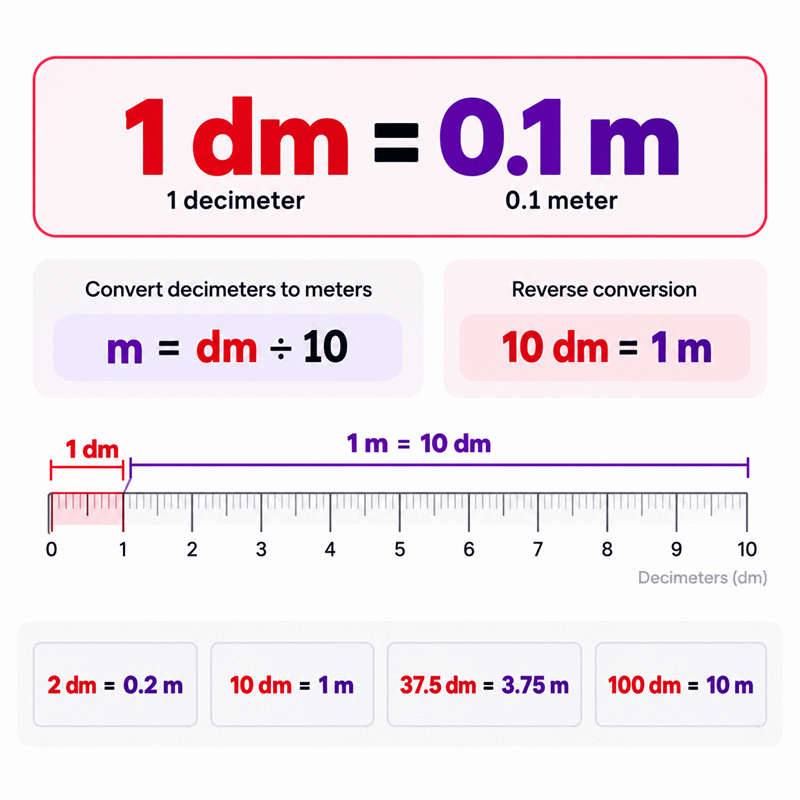
- The exact conversion relationships are 1 dm = 0.1 m and 1 m = 10 dm.
- Calculations use full available precision, with no rounding during intermediate conversion steps.
- Results are rounded only when necessary for clear display, while meaningful decimal precision is preserved.
- Trailing unnecessary zeros may be omitted without changing the numerical value of the result.
Valid range
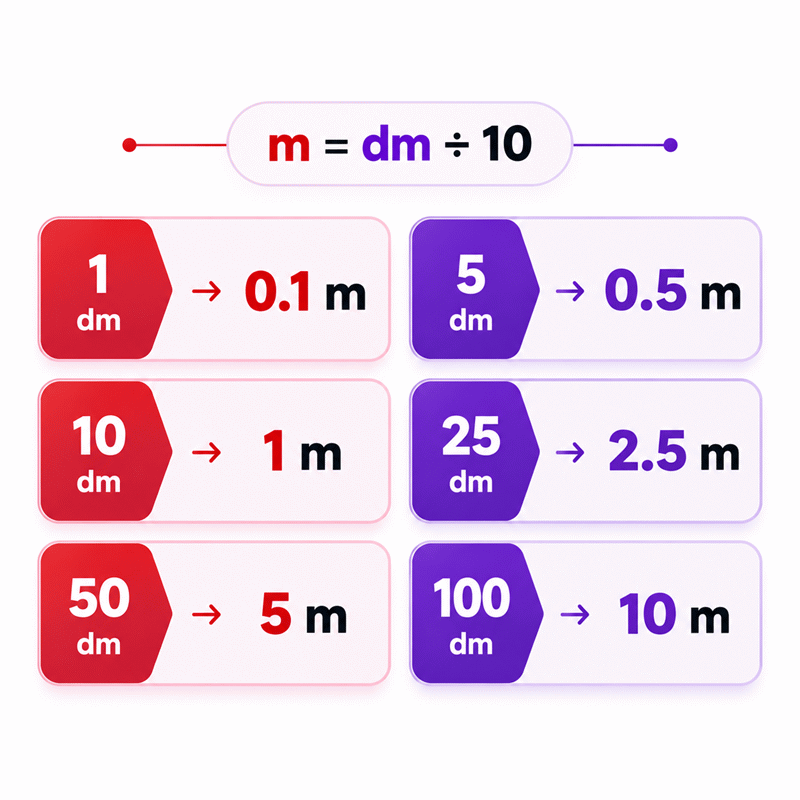
- Decimeters (dm): Enter any finite decimal length value within the calculator’s supported numeric range; meters are calculated as dm / 10.
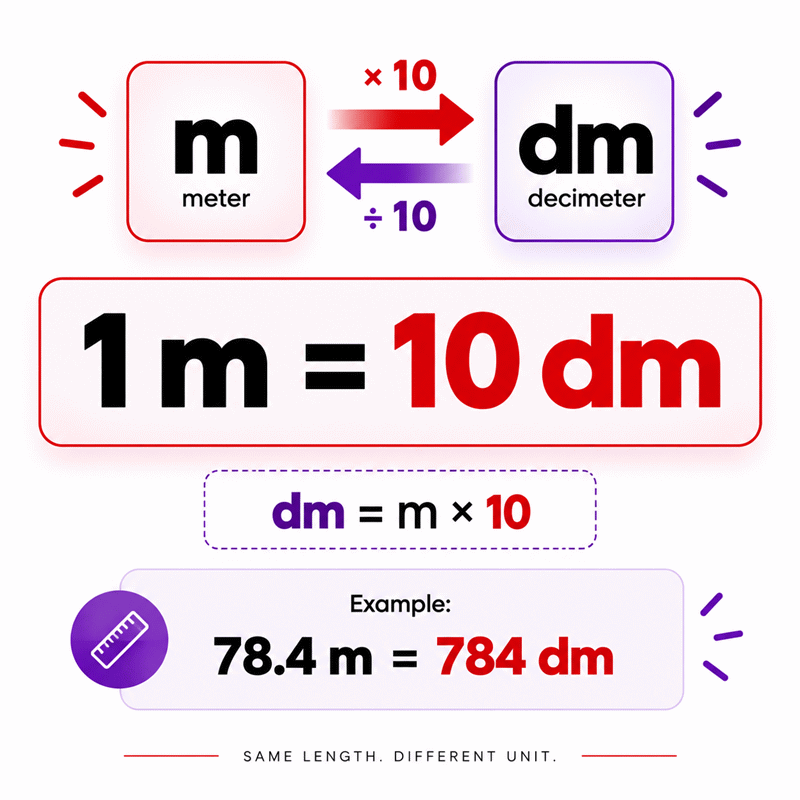
- Meters (m): Enter any finite decimal length value within the calculator’s supported numeric range; decimeters are calculated as m x 10.
- Zero is valid, while extremely large, extremely small, non-numeric, or non-finite values should be rejected to maintain reliable conversion results.
- For physical length measurements, zero or positive values are recommended; negative values can be converted mathematically but do not represent a physical length.

Felovyn Quarnwick
Reviewers:
Meravie Quellmont
Herixon Vosswick
Check our editorial policy
September 6, 2026
1.0.0
Initial calculator and formula release.
Our engineers are here to help you get it right.
How Does a Decimeter to Meter Converter Make Length Conversion Easier?
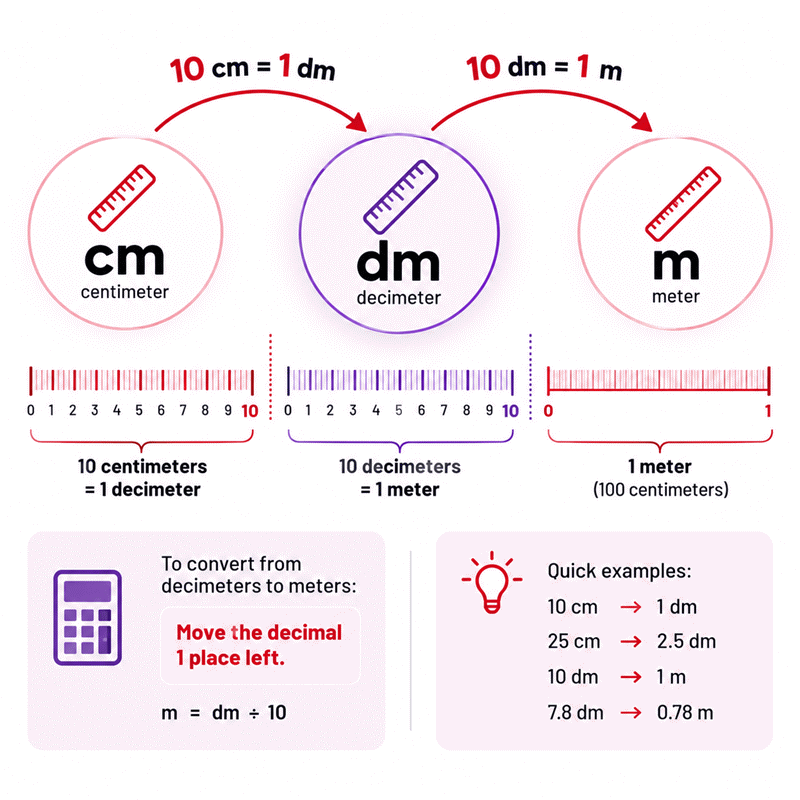
Decimeter to Meter Converter gives you a fast, clear way to convert metric length values without unnecessary steps. One decimeter equals exactly 0.1 meter, so decimeters convert to meters by dividing the value by 10. The reverse process converts meters to decimeters by multiplying the meter value by 10. This exact metric relationship makes the conversion simple, predictable, and easy to verify.
- Enter any known compatible length value and review the synchronized converted results instantly.
- Use reverse solving when the meter value is known and the decimeter value is unknown.
- Keep the number and its unit together to prevent measurement and reporting mistakes.
- Use meters for larger dimensions and decimeters when a smaller metric scale is clearer.
- Check the selected unit before copying, exporting, or sharing a converted measurement.
- Use dedicated area or volume converters for square and cubic measurements.
The Decimeter to Meter Converter also supports a practical bidirectional workflow, so the known value can become the active starting point. This is useful for education, engineering, design, manufacturing, technical documentation, and everyday measurement tasks. A quick visual check of the value and unit before final use helps reduce transcription errors and improves confidence in the converted measurement.
Assumptions used in this calculator
- Conversions use the exact relationship between decimeters and meters.
- One decimeter is assumed to equal exactly 0.1 meter.
- One meter is assumed to equal exactly 10 decimeters.
- All entered values are assumed to represent linear length measurements.
- Selected units are assumed to be dimensionally compatible length units.
- Input values are assumed to use valid finite numeric formats.
- Calculations retain available precision until final result display.
- No measurement uncertainty is added automatically to converted values.
- Instrument calibration errors are not included in conversion results.
- Environmental conditions do not alter the defined unit relationship.
- Negative values are mathematically convertible but may lack physical meaning.
- Industrial users should verify required tolerances before applying results.
- Safety-critical decisions should include independent engineering verification and validation.
Results are rounded for display.
Internal calculations use full precision.
Formulas Used in Decimeter to Meter Converter :
1. Normalize the Entered Length to Meters
The edited source value is first converted to the canonical meter value. For decimeters, the conversion factor is 0.1 meter per decimeter; for meters, the factor is 1.
2. Convert the Meter Value to the Selected Target Unit
The canonical meter value is divided by the target unit factor. The same calculation path works in reverse when the user edits another synchronized field, so no separate reverse formula is required.
Ls = length entered in the currently edited source unit.
Lm = canonical length expressed in meters.
Lt = converted length expressed in the selected target unit.
fs = number of meters represented by one source unit.
ft = number of meters represented by one target unit.
For decimeters, fdm = 0.1; for meters, fm = 1.
Variables & Definitions
View a complete list of all variables used in this calculator, including definitions and units
Decimeter to Meter Converter Variables and Units
| Symbol | Variable | Definition | Unit or Factor |
|---|---|---|---|
| Ls | Source Length | Length entered in the currently edited source field. | Selected source length unit |
| Lm | Canonical Length | Source length normalized to meters before conversion to another unit. | m |
| Lt | Target Length | Converted length expressed in the selected target unit. | Selected target length unit |
| fs | Source Unit Factor | Number of meters represented by one source unit. | m per source unit |
| ft | Target Unit Factor | Number of meters represented by one target unit. | m per target unit |
Unit Conversion Table
Complete Length Unit Conversion Table for the Decimeter to Meter Converter
| Unit Group | Unit Name | Symbol | Equivalent in Meters | Used For |
|---|---|---|---|---|
| Popular Units | Millimeter | mm | 0.001 m | Machining, manufacturing, small dimensions, and precision measurements |
| Popular Units | Centimeter | cm | 0.01 m | Everyday dimensions, product sizes, laboratory work, and construction |
| Popular Units | Decimeter | dm | 0.1 m | Metric length conversion, education, and intermediate-scale measurements |
| Popular Units | Meter | m | 1 m | Standard SI length measurement in science, engineering, and everyday use |
| Popular Units | Kilometer | km | 1,000 m | Road distances, geography, transportation, and large-scale surveying |
| Popular Units | Inch | in | 0.0254 m | Manufacturing, hardware, displays, and dimensional specifications |
| Popular Units | Foot | ft | 0.3048 m | Building dimensions, elevation, aviation, and general measurements |
| Popular Units | Yard | yd | 0.9144 m | Landscaping, textiles, sports fields, and general distances |
| Popular Units | Mile | mi | 1,609.344 m | Road travel, transportation, routes, and geographic distances |
| Popular Units | Nautical Mile | nmi | 1,852 m | Marine navigation, aviation navigation, and geographic positioning |
| Scientific Units | Micrometer | µm | 1 × 10⁻⁶ m | Microscopy, material thickness, biology, and precision engineering |
| Scientific Units | Nanometer | nm | 1 × 10⁻⁹ m | Nanotechnology, wavelengths, semiconductors, and molecular measurements |
| Scientific Units | Picometer | pm | 1 × 10-12 m | Atomic dimensions, bond lengths, spectroscopy, and molecular science |
| Scientific Units | Angstrom | Å | 1 × 10⁻¹⁰ m | Atomic structures, crystallography, wavelengths, and molecular dimensions |
| Scientific Units | Astronomical Unit | AU | 149,597,870,700 m | Distances within planetary systems and astronomical calculations |
| Scientific Units | Light-Year | ly | 9,460,730,472,580,800 m | Interstellar distances and large-scale astronomical measurements |
| Scientific Units | Parsec | pc | Approximately 3.0856775814913673 × 10¹⁶ m | Stellar distances, galactic measurements, and professional astronomy |
Example Calculation
Given: 347.6 dm
Formula:
Substitution:
A decimeter represents one tenth of a meter.
Converting decimeters to meters therefore requires division by 10.
The original decimal precision is preserved throughout the calculation.
The same relationship can be reversed by multiplying meters by 10.
Given editable result: 28.47 m
Unknown: Length in decimeters
Reverse formula:
Substitution:
Solution:
The meter field can be edited directly even when it normally displays a converted result.
Once 28.47 m is entered, that field becomes the source value for the calculation.
Because one meter contains exactly 10 decimeters, the value is multiplied by 10.
The unknown decimeter field is then updated automatically to 284.7 dm.
General reverse-solving relationships
Results are rounded for display.
Internal calculations use full precision.
Calculations Disclaimer
Why Decimeter-to-Meter Errors Still Happen in Real Work
A Decimeter to Meter Converter solves a simple task very quickly. Yet simple conversions still create expensive mistakes. The problem is rarely the metric relationship itself. The problem usually appears during reading, typing, copying, or reporting. A Decimeter to Meter Converter reduces that risk by making each value visible. It also keeps the workflow clear for everyday users.
One meter contains ten decimeters. That relationship never changes between normal measurement tasks. However, a user may read 36 dm as 36 m. Another user may copy only the number. The unit may disappear during a handoff. A decimal point may also move accidentally. Each mistake looks small at first. Its effect can become serious later.
This matters most when measurements pass between several people. A designer may prepare one dimension. A technician may copy it into another system. A supervisor may review only the final number. Clear conversion reduces uncertainty at every handoff.
The Simple Relationship People Still Misread
Decimeters and meters belong to the same metric length system. A decimeter represents one tenth of one meter. This makes the relationship easy to understand. It also makes mental conversion possible in many situations.
The danger appears when users work quickly. A value such as 48.6 dm looks similar to 48.6 m. The numbers match, but the physical lengths do not. Clear unit labels therefore matter as much as correct numbers.
The safest workflow keeps the number and unit together. Never copy a converted number without its unit. Never assume another person knows the original measurement scale. Clear notation saves more time than later correction.
Measure → Identify the unit → Enter the value → Review the result → Keep the unit attached
Why Reverse Input Changes the Workflow
A traditional converter often forces one fixed direction. That can slow real work. Users do not always begin with decimeters. Sometimes the known value already appears in meters.
A bidirectional tool removes that restriction. The user can edit the available value directly. The other fields then update from that known measurement. This feels more natural during fast technical work.
Reverse solving also reduces unnecessary mental steps. You do not need another calculator page. You do not need to remember which field is called input. The known value simply becomes the starting point.
This behavior is especially useful during reviews. A user can test a known meter value immediately. They can then inspect the corresponding decimeter value. That quick check can expose a copied unit mistake before publication.
How to Use a Decimeter to Meter Converter Without Slowing Your Work
A conversion tool should remove friction, not create another task. The fastest workflow begins with the value already available. Enter that measurement and keep its correct unit selected. The related values should appear immediately.
This approach matters when users repeat many conversions. Manual button clicks become annoying during long sessions. Real-time updates keep attention on the measurement. They also reduce repeated actions between each calculation.
The user should also avoid changing several fields simultaneously. Start with one known measurement. Confirm its unit. Then review the synchronized values. This keeps the relationship easy to follow.
For a quick check, focus on scale first. A meter value should be smaller numerically than its decimeter equivalent. That visual clue catches many obvious typing errors. It works before any deeper review begins.
A Three-Second Workflow for Fast Conversion
Start with one question: what value do you actually know? Enter that value first. Select the unit printed beside the original measurement. Then read the converted value with its unit.
This simple pattern avoids a common trap. Many users begin by choosing the desired output. They then forget which measurement was originally known. A source-first workflow is easier to verify later.
The Decimeter to Meter Converter should support this natural process. It should not force users into a rigid sequence. Editable synchronized fields make the interaction faster. They also make reverse checking easier.
Known measurement → Correct unit → Instant conversion → Visual check → Export or share
Before leaving the page, perform one quick sense check. Ask whether the converted size feels reasonable. A desk-sized object should not suddenly become building-sized. A small component should not become several meters long.
When Export and Share Features Become Useful
Conversion becomes more valuable when the result must leave the calculator. A shared result can support team communication. An exported file can support internal records. Both reduce manual retyping.
PDF export is useful for readable documentation. Excel export helps when results enter a larger worksheet. A shareable link helps another person review the same conversion state.
These features are most useful after verification. Exporting an unchecked value only preserves the mistake. Always confirm the original number first. Then confirm the selected unit. Finally, review the converted scale.
A short verification routine can prevent repeated corrections. It also creates a cleaner workflow between office and field teams. The goal is not more documentation. The goal is less ambiguity.
Decimeter vs Meter: Which Unit Makes the Work Clearer?
The best unit is not always the largest unit. It is the unit that communicates clearly. Decimeters can be convenient for medium-sized lengths. Meters often work better for larger dimensions and general reporting.
Imagine a length slightly larger than one meter. Writing it in meters may feel natural. A smaller object may be easier to understand in decimeters. The physical length stays unchanged. Only its written scale changes.
Good unit choice reduces unnecessary digits. It can also improve communication. A technician should understand the measurement quickly. A customer should not need another conversion before understanding it.
This is why conversion is not only mathematical. It is also a communication task. The clearest unit often depends on context, audience, and document type.
Choosing the Right Scale for the Task
Use meters when the measurement is naturally discussed at meter scale. Room dimensions are a familiar example. Long equipment distances may also be easier in meters. Larger layouts usually benefit from the same approach.
Use decimeters when the scale sits comfortably between centimeters and meters. This can make some medium dimensions easier to scan. It may also reduce long centimeter values.
Consistency inside one document is often more important than personal preference. A mixed drawing can slow every reader. Repeated switching also increases conversion risk. Choose a clear unit strategy before large data entry begins.
For public-facing content, familiar units usually improve readability. For technical teams, internal standards may matter more. The correct choice depends on the communication goal.
Mixed-Unit Documents and Technical Handoffs
Mixed-unit documents create hidden friction. One drawing may show meters. A parts list may use millimeters. A note may unexpectedly include decimeters. Each change forces the reader to stop.
A conversion tool can normalize these values before handoff. This is useful when teams use different templates. It is also helpful when imported data comes from several sources.
Keep the original measurement available when traceability matters. Then record the converted value beside it. This allows another person to verify the change quickly.
Do not treat unit labels as decoration. They are part of the measurement. Removing the label can turn correct data into ambiguous data.
Good handoff practice follows one simple rule. The next person should understand the value without guessing. Clear units support that goal immediately.
Common Decimeter-to-Meter Conversion Mistakes That Cause Rework
Most conversion mistakes begin before the calculation. A user may type the wrong value. They may select the wrong unit. They may also misread a handwritten measurement. The calculator cannot know the intended value.
The first defense is careful input. Read the original measurement once. Enter it once. Then compare both before moving forward. This takes seconds and catches many expensive errors.
Another common mistake involves copied results. A number may enter an email without its unit. Someone later assumes the wrong scale. That single omission can create major confusion.
Always copy the full measurement. Keep the number and unit together. This rule applies to chat messages, spreadsheets, drawings, and reports.
Input and Interpretation Errors Worth Checking
Watch for misplaced decimal points. They can change the scale dramatically. Also check duplicated digits. Fast typing often creates repeated numbers without obvious warnings.
Be careful when reading values from images. Small unit labels can be missed. Zoom before entering unclear measurements. Never guess when the original unit is uncertain.
Another mistake happens during reverse checking. Users sometimes compare two numbers without considering their units. The values should differ because the scales differ. A matching number does not mean matching measurement.
Use a simple visual test. The meter number should reflect a larger unit. The decimeter number should reflect a smaller unit. If that pattern looks reversed, inspect the input again.
Eye check: number + unit + expected scale. These three checks take very little time. Together, they catch many human errors.
Why Area and Volume Can Fool Length-Converter Users
A length converter handles linear measurements. That distinction is important. Square and cubic measurements behave differently. Their scale changes across more than one dimension.
Do not copy a linear conversion habit into area work. Do not copy it into volume work either. A length value, square value, and cubic value represent different quantities.
This mistake often appears when users see similar unit symbols. A linear decimeter is not a square decimeter. It is also not a cubic decimeter. The visual similarity can hide a major mathematical difference.
Use a dedicated area converter for area measurements. Use a dedicated volume converter for volume measurements. Matching the calculator to the quantity prevents avoidable errors.
This separation matters in engineering and manufacturing work. A wrong dimension type can affect material estimates. It can also damage documentation quality.
Where Decimeter-to-Meter Conversion Matters Most
Decimeter conversion appears in more places than many users expect. It can support classroom work, design tasks, manufacturing notes, and technical documentation. It can also help during international data exchange.
The real value comes from speed and clarity. A good converter removes repeated mental calculation. It also keeps related measurements visible at the same time.
This becomes useful when a task includes many values. Repeated manual conversion increases fatigue. Fatigue increases small errors. A real-time calculator reduces that burden.
The tool is especially helpful when the user needs reverse checking. One known value can be entered directly. The related values then become immediate references.
Engineering, Manufacturing, Design, and Education
Engineering teams often receive dimensions from several document types. A clear conversion step can normalize those measurements before analysis. This makes later review easier.
Manufacturing teams may also work across different unit conventions. Clear conversion helps when notes arrive from external partners. It reduces confusion before machining or assembly begins.
Designers can use the converter during quick layout checks. They can compare the same length at different metric scales. This supports faster visual reasoning.
Students benefit for another reason. They can see the relationship between metric scales immediately. This strengthens understanding beyond memorized rules.
Teachers can also use reverse editing during demonstrations. One value can be changed live. Students then see how the related measurements respond.
A Fast Workflow for Repeated Technical Tasks
Repeated work needs a repeatable process. Use the same short sequence every time. Identify the measurement. Confirm its unit. Enter the value. Review the related result.
Then perform a sense check. Ask whether the physical size still makes sense. This habit catches errors before they move into another document.
If the result must be shared, export it after review. Keep the unit visible in every file. Avoid copying bare numbers into project records.
This workflow is simple enough for everyday use. It is also structured enough for professional teams. That balance makes conversion easier to trust.
What Makes a Decimeter to Meter Converter Worth Trusting?
A trustworthy calculator should make its behavior easy to understand. Users should know what changed after every edit. Results should update clearly. Unit labels should remain visible at all times.
The interface should also work without unnecessary steps. A conversion task does not need a complicated workflow. The best experience keeps attention on the measurement itself.
Accessibility matters too. Keyboard users should reach every important control. Mobile users should read values without zooming. Error messages should explain the problem clearly.
These details may look separate from mathematics. They are not. A correct calculation can still fail the user through poor interaction.
Clear Behavior Builds More Trust Than Extra Claims
Trust grows when a tool behaves predictably. Enter a value and see the related measurements. Change a unit and understand what changed. Reset the tool and return to a clean state.
A good converter should also avoid hidden actions. It should not silently change unrelated settings. It should not force users through unnecessary screens.
Users also benefit from visible control. They can edit the known field directly. They can reverse the direction without opening another page. They can share the final state when needed.
Eye check: enter → convert → reverse → verify. If every step remains clear, confidence grows naturally.
When You Should Verify Beyond the Calculator
A calculator converts the value you provide. It cannot verify the original measurement. It cannot inspect a damaged measuring instrument. It also cannot confirm a mislabeled drawing.
Professional work still needs human review. Check source documents when consequences are important. Confirm the original unit before final approval. Review critical dimensions with the responsible technical team.
This is especially important when measurements affect fabrication or installation. One wrong source value can move through every later calculation. Early verification is faster than late correction.
The Decimeter to Meter Converter is most useful inside this disciplined workflow. It handles the conversion quickly. You remain responsible for the source measurement.
AxiCalculator is designed to make that workflow simple. Enter the known length and review the related values. Reverse the calculation when needed. Export or share only after your final check.
For routine conversion, this saves time immediately. For professional work, it adds a clear verification step. That combination supports faster decisions without making the process harder.
Use AxiCalculator when you need a fast, readable conversion workflow. Keep the original unit visible. Check the result once. Then continue your work with greater confidence.
Frequently Asked Questions
What should I do if my source measurement uses a comma as the decimal separator?
How should I compare two lengths when one is in decimeters and the other is in meters?
Should I replace the original measurement after converting it to another unit?
Can I use the converter when several measurements must appear in one assignment or report?
How should an engineer transfer converted dimensions into CAD or technical software?
What is the safest way to process a technical dataset containing mixed length units?
How can I verify a conversion before using it in an engineering calculation?
Our engineers are here to help you get it right.