Percentage Calculator: Choose the Right Question Before You Calculate
A percentage problem often looks simple until the wrong number becomes the reference. That single mistake can change every result. A Percentage Calculator should therefore do more than return a number. It should help you solve the exact question you have. The Percentage Calculator at AxiCalculator supports several common percentage relationships. You can also work backward when the missing value changes.
The fastest approach starts with one decision. Ask what you are trying to discover. Do you need a part of a known value? Do you need the percentage between two values? Do you know the part and percentage but not the whole? Or has an original value increased or decreased?
Four Percentage Problems That Look Similar but Behave Differently
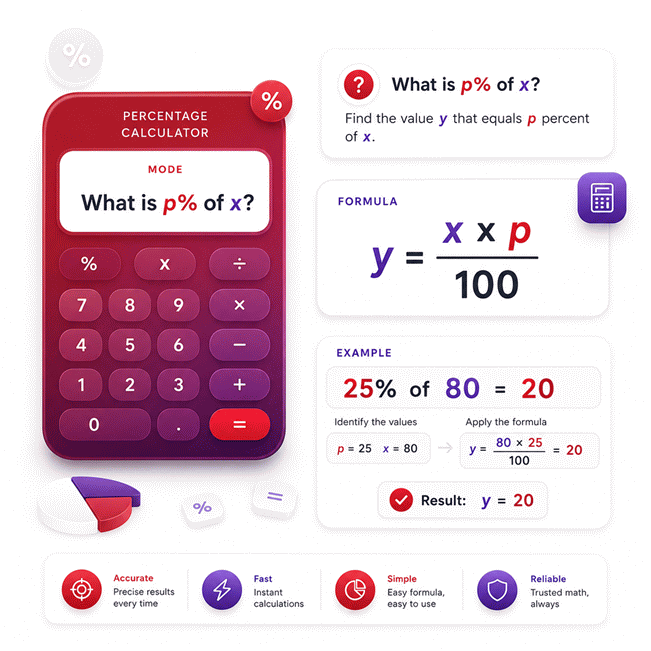
The first problem asks for a percentage of a known amount. This appears in discounts, commissions, taxes, targets, and allocation work. The reference value is already known. The percentage describes the share you want to find.
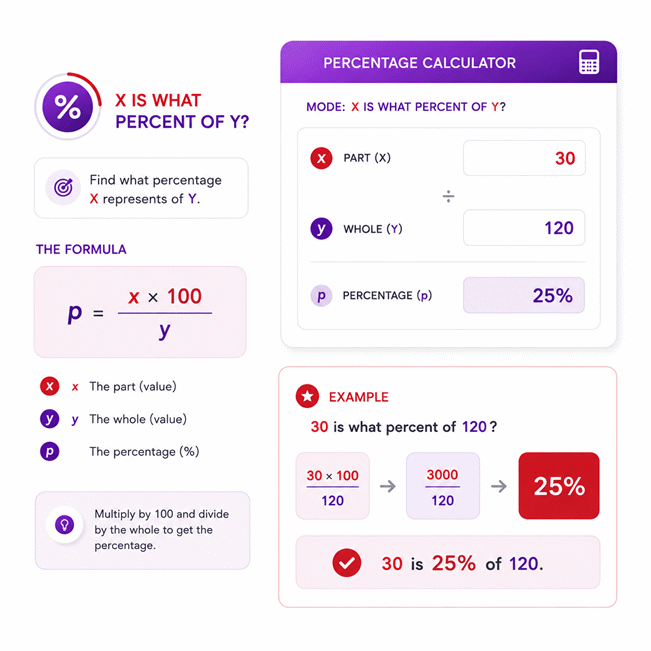
The second problem asks what percentage one value represents of another. Here, the reference value matters even more. Changing the reference changes the meaning of the result. This is common in reporting, budgets, production data, and performance reviews.
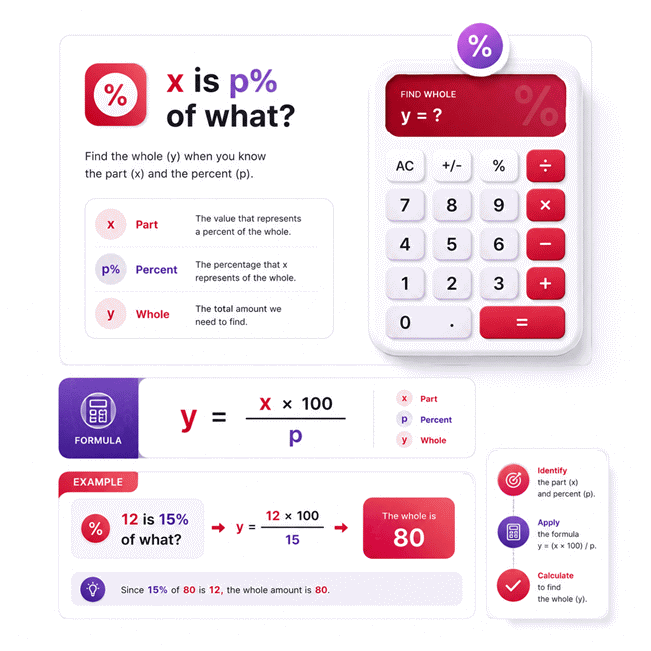
The third problem works backward. You know a part and its percentage. The missing value is the complete amount. This approach is useful when a report shows only a percentage share. It also helps when an original quantity is missing.
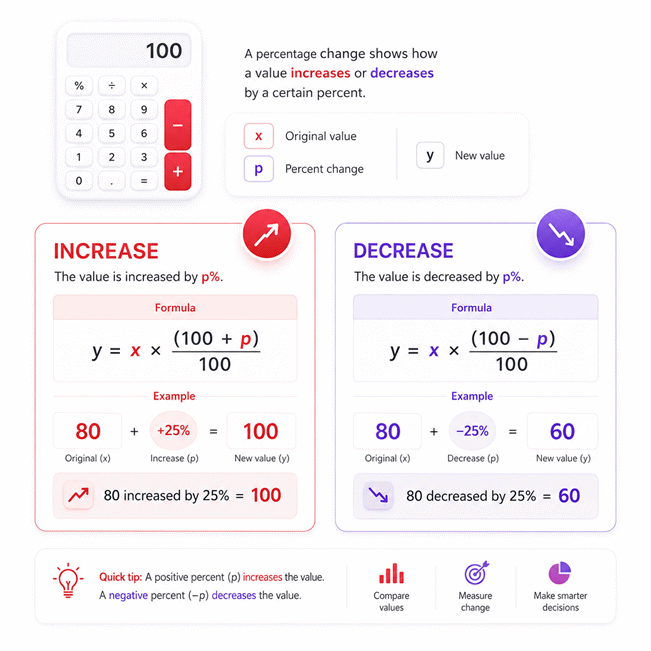
The fourth problem applies a percentage increase or decrease. This is common with prices, salaries, output, costs, inventory, and performance. The final amount depends on the original reference value.
Know the whole + know the percent → find the part
Know two values → find their percentage relationship
Know the part + know the percent → recover the whole
Know the starting value + know the change → find the new value
Why the Same Numbers Can Produce Different Answers
Numbers alone do not define a percentage problem. Their roles define it. A value can be the part in one question. The same value can become the reference in another question. That is why entering two numbers without understanding their roles can mislead you.
A useful habit is simple. Identify the reference before calculating anything. Then identify the value being compared with it. This small step prevents many percentage errors.
Quick check: if the reference changes, the percentage usually changes too.
AxiCalculator keeps these percentage questions separate. This helps you select the relationship that matches your actual problem. It also makes reverse solving easier when the unknown value changes.
How to Read a Percentage Result Without Misleading Yourself
A percentage can look precise while still answering the wrong question. This happens often in sales reports and price comparisons. A result such as 25% means little without a clear reference. Before acting on any percentage, ask what the 100% value represents.
The reference is the anchor of the calculation. It may represent total sales, an original price, a target, a starting measurement, or a complete population. The calculated percentage describes another value relative to that anchor.
The Reference Value Controls the Meaning
Suppose a team compares actual output with planned output. The planned amount is normally the reference. The result shows how much of the target was achieved. Reversing those values answers a different question.
This distinction matters in business dashboards. It also matters in engineering reports. A percentage of capacity differs from a percentage increase in capacity. The same two numbers can support both statements. Their interpretation is not the same.
Before using a result, state it in plain language. Say what value is being compared. Then say what value provides the reference. If the sentence sounds wrong, check the calculation setup again.
What a Result Above 100% Really Means
A result above 100% is not automatically an error. It can simply mean the compared value exceeds the reference. This often happens with targets, growth, production, and budgets.
If performance reaches 125% of a target, the achieved amount exceeds that target. It does not mean the calculation failed. The result describes the relationship between two values.
This becomes important when reading reports. A value can equal 120% of another value. That statement differs from saying it increased by 120%. The first describes a relative size. The second describes a change from a starting point.
Percentage of a Value and Percentage Change Are Different Questions
This distinction prevents expensive mistakes. A percentage of total describes composition. Percentage change describes movement between an earlier and later value.
For purchasing, this can separate a discount from a price comparison. For operations, it can separate current utilization from growth. For finance, it can separate contribution from performance change.
Do not trust the percentage alone. First ask what represents 100%.
A clear calculator interface reduces this confusion. Each percentage relationship should make the reference obvious. AxiCalculator separates these tasks so users can match the calculation to the decision.
Reverse Percentage Solving: Recover What Came Before
A final value is easy to see. The original value is often harder to recover. This happens after discounts, markups, increases, decreases, and performance changes. Reverse percentage solving answers that problem by working backward from known information.
The key idea is simple. A changed value represents a certain share of the original value. Instead of applying another percentage change, reverse solving removes the effect already applied.
Why Adding the Percentage Back Can Give the Wrong Original Value
A common mistake appears after a percentage decrease. Users often increase the reduced amount by the same percentage. They expect to recover the original amount. That usually fails.
The reason is the reference value. The decrease was calculated from the larger original amount. The later increase would be calculated from the smaller final amount. The percentage may match, but the bases do not.
The same issue appears after percentage increases. Subtracting the original increase percentage from the final value does not always restore the start. The final value now has a different base.
Reverse solving avoids this trap. It treats the final value as the result of the original change. Then it works backward to recover the missing starting amount.
Why Editable Fields Make Reverse Solving More Useful
Many real problems do not follow one fixed input-to-output direction. One day you know the original value. The next day only the final amount is available. In another case, the percentage itself may be missing.
A flexible calculator should reflect that reality. When two valid values are known, the remaining value can become the unknown. This is why editable fields matter.
AxiCalculator allows users to change calculated values and solve backward. The two values recently supplied by the user become the active information. The remaining value can then be recalculated.
Forward solving: known start → known percentage → final value
Reverse solving: known final value → known percentage → original value
Percentage solving: known start → known final value → percentage
When Reverse Solving Saves the Most Time
Reverse percentage work appears often in purchasing. A buyer may know only the sale price. The original price may be missing. A finance team may know the final budget after an increase. The previous budget must then be recovered.
The same idea helps with production records. A report may show final output after an improvement. Reverse solving can help identify the earlier baseline.
The value of reverse solving is not mathematical complexity. Its value is speed and flexibility. You do not need a separate calculator for every missing variable.
Percentage Increase and Decrease for Prices, Targets, and Performance
A price changes overnight, but the percentage shown beside it looks impressive. That percentage can influence a purchase immediately. The same problem appears with business targets and performance data. Understanding the direction of change protects the decision.
A percentage increase starts from an original value and moves upward. A percentage decrease starts from the same kind of reference but moves downward. In both cases, the starting value controls the meaning.
Using Percentage Changes for Buying and Pricing Decisions
Price decisions often involve several percentage statements. A seller may show a discount. Another offer may advertise a lower final price. Comparing only the displayed percentages can be misleading.
Start with the original price. Then identify the final price. A discount percentage describes the reduction relative to the original value. This helps you check whether the advertised saving matches the actual price change.
The same logic applies to price increases. A supplier may raise a price by a stated percentage. The new price should be reviewed against the previous reference value. This creates a clearer purchasing record.
For procurement work, percentages should support the decision rather than replace it. Shipping costs, taxes, service terms, and delivery conditions can still matter. The percentage only describes one relationship.
Using Percentages for Targets and Business Performance
Managers often see percentages before they see the raw numbers. That can create false confidence. A growth percentage looks strong when the starting base is small. A modest percentage can represent a large absolute change when the base is large.
Use both values when reviewing performance. Keep the original amount visible. Keep the new amount visible. Then use the percentage to describe their relationship.
This approach works for sales, revenue, output, cost, inventory, and completion targets. It also makes reports easier to audit. Another person can see what changed and what provided the reference.
Do Not Confuse Percentage Change With Target Achievement
These measurements answer different questions. Target achievement compares an actual result with a target. Percentage change compares a new result with an earlier result.
A department can exceed its target while showing weak growth. It can also show strong growth while still missing its target. Both statements can be true.
One percentage cannot answer every business question. Match the calculation to the decision.
AxiCalculator helps by separating common percentage tasks. Choose the relationship first. Then enter the values that match that relationship. This keeps the result tied to its real purpose.
Common Percentage Mistakes That Can Change Real Decisions
A small percentage error can become a large money error. The risk increases with large prices, budgets, production totals, or repeated calculations. Most mistakes begin before any arithmetic happens.
The safest approach is to identify the question first. Then identify the reference value. Only after that should you calculate the relationship.
Using the Wrong Reference Value
This is one of the most common percentage mistakes. A user knows two values but chooses the wrong denominator. The calculation may still return a clean number. The meaning, however, becomes wrong.
Ask which value represents the whole, original, target, or baseline. That value normally acts as the reference. If you swap the values, you create another percentage relationship.
This mistake matters during price analysis. It also matters when comparing production levels. In both cases, the answer can look reasonable while supporting the wrong conclusion.
Treating Equal Increases and Decreases as Opposites
An equal percentage increase and decrease do not normally cancel each other. The first change creates a new base. The second percentage acts on that new base.
This surprises many users because the percentages look symmetrical. The numbers are equal. Their reference values are not.
This effect matters in investments, pricing, production losses, and recovery rates. After a significant decrease, a larger percentage increase may be needed for full recovery.
Comparing Percentages Without Comparing Their Bases
Two percentages can look comparable while describing very different scales. A 10% gain on a large value can exceed a 50% gain on a small value.
Always review the underlying values when the decision matters. Percentages are excellent for comparison, but they remove scale from immediate view.
For industrial work, this point becomes especially important. A percentage change in scrap rate differs from the absolute quantity of wasted material. A percentage improvement in uptime differs from the actual hours gained.
Why Clear Context Matters More Than a Bigger Number
A larger percentage does not automatically mean a better outcome. Direction, reference, scale, and purpose all matter.
A 5% reduction in defects may be valuable. A 20% increase in cost may be harmful. A 110% target result may be excellent. The context defines the value of the number.
Use percentage results as decision tools, not isolated claims. Keep the starting and final values close to the result. This makes the information easier to verify.
Use AxiCalculator to Turn Percentage Questions Into Clear Decisions
Users rarely open a calculator because they want more mathematics. They open it because a decision is waiting. A buyer wants to check a discount. A student wants to verify an answer. A manager wants to understand performance. An analyst needs to recover a missing value.
A useful percentage tool should remove unnecessary steps. It should also make the direction of the calculation clear. That is the purpose of the Percentage Calculator at AxiCalculator.
Technical Use: Solve the Relationship That Matches Your Data
Start by identifying the values you already know. Then choose the percentage relationship that matches your question. Enter two known values when reverse solving is needed. The remaining value can then be determined.
If the question changes, you do not need to rebuild the calculation. Edit the relevant values and continue. This is useful when testing several scenarios quickly.
The separate calculation sections also reduce context switching. You can move from finding a percentage to recovering an original value. You can then review an increase or decrease without changing tools.
Decision Use: Check the Number Before You Act
Use the calculator before approving a discount, price change, target claim, or percentage comparison. A few seconds of checking can expose a wrong reference or misleading percentage.
For buying decisions, compare the actual original and final prices. For performance decisions, keep the baseline visible. For reporting, make the reference clear enough for another person to understand.
A reliable percentage result should answer a specific question. It should not force the user to guess what the number means.
A Faster Workflow for Everyday Percentage Problems
First, identify what you know. Second, identify what is missing. Third, choose the matching calculation. Finally, read the result in plain language.
This workflow keeps the calculation connected to the real decision. It also reduces common percentage mistakes.
AxiCalculator is designed for this kind of quick checking. Use it when you need a direct percentage result. Use reverse solving when the missing value changes. Then use the result with the original context still visible.