Slope Percentage Calculator
- Last formula update:

Decimal & Rounding Policy
- All slope calculations use full internal precision for rise, run, angle, and slope ratio values.
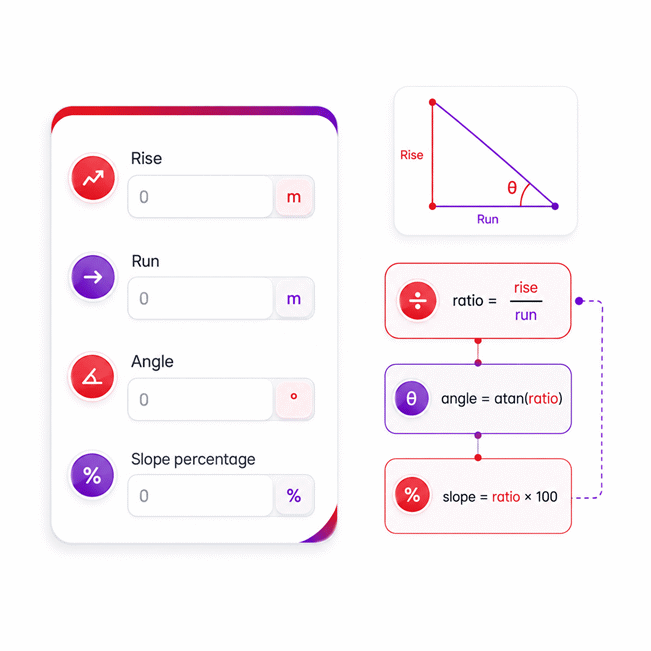
- Rise and run are converted to a common length unit before calculating the ratio: slope ratio = rise / run.
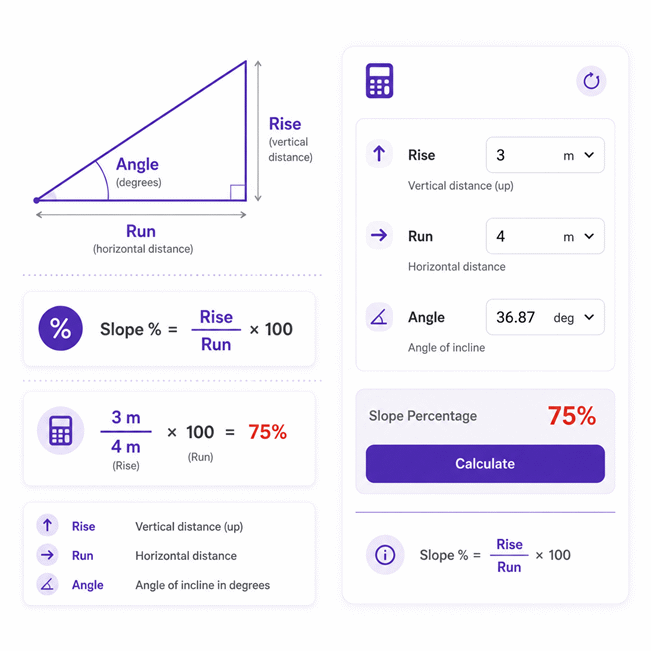
- Slope percentage is calculated as slope ratio × 100, while the angle is calculated using atan(slope ratio).
- Results are rounded only for display, typically showing about 2 to 3 decimal places when needed.
- Intermediate values are never rounded, helping prevent cumulative errors during reverse calculations and unit conversions.
- Trailing zeros are removed when they do not improve readability, so values such as 75.000% may appear as 75%.
- Changing units does not change the underlying physical value; calculations continue using the original full-precision value.
Valid range
- Rise: Accepts any finite real length value, including negative values for a descending slope and zero for a level slope.
- Run: Must be greater than 0; zero and negative run values are invalid because the slope ratio uses rise divided by run.
- Angle: Must remain strictly between -90° and 90°, equivalent to (-π/2, π/2) rad, (-100, 100) gon, or (-0.5, 0.5) × π rad.
- Slope percentage: Accepts negative, zero, 100%, and values greater than 100%; the value approaches positive or negative infinity as the angle approaches ±90°.
- Calculation method: The calculator uses slope ratio = rise / run, slope percentage = slope ratio × 100, angle = atan(slope ratio), and slope ratio = tan(angle) for reverse calculations.

Cerelia Daxbourne
Reviewers:
Melovia Pexford
Iskren Lumthorne
Check our editorial policy
August 29, 2026
1.0.0
Initial calculator and formula release.
Our engineers are here to help you get it right.
How Does the Slope Percentage Calculator Solve Rise, Run, Angle, and Grade?
Slope Percentage Calculator converts rise, run, angle, and grade into one consistent view of slope geometry. It supports direct and reverse solving, so you can enter the values you know and calculate the missing values automatically. The calculator is useful for roads, ramps, driveways, drainage, construction, surveying, terrain, and general slope analysis.
- Slope percentage compares vertical rise with horizontal run.
- A positive value represents an uphill slope, while a negative value represents downhill direction.
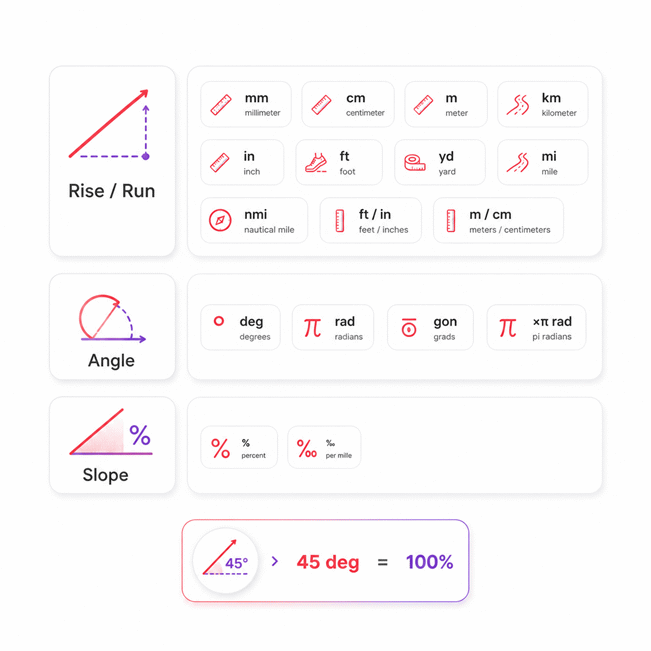
- A 100% slope corresponds to a 45-degree angle.
- Slope values above 100% are mathematically valid and represent angles above 45 degrees.
- Rise and run may use different compatible length units because values are normalized before calculation.
- Angle and slope percentage describe the same steepness and cannot define physical scale alone.
- One known length plus angle or grade can determine the missing length.
- Horizontal run must be distinguished from the distance measured along the sloped surface.
- Run must be greater than zero when entered directly.
- Valid slope angles remain strictly between -90 and 90 degrees.
The Slope Percentage Calculator also supports editable calculated values. When a result becomes a new input, the remaining compatible values can be solved again, making design changes and reverse slope checks faster and easier to understand.
Assumptions used in this calculator
- Rise represents vertical change and may be positive, zero, or negative.
- Run represents horizontal distance and must always be greater than zero.
- Rise and run are converted to compatible length units before calculation.
- Slope percentage is based on the ratio of rise to run.
- Angle is measured relative to a horizontal reference line.
- Valid angles remain strictly between minus 90 and 90 degrees.
- Negative slope values represent a descending direction relative to the reference.
- Slope values greater than 100 percent are mathematically valid.
- A 100 percent slope corresponds to an angle of 45 degrees.
- Entered dimensions are assumed to represent accurate physical measurements.
- Calculations assume a straight, constant slope between the measured endpoints.
- Displayed results may be rounded while internal calculations retain full precision.
- Engineering applications should be verified against applicable standards and site conditions.
Results are rounded for display.
Internal calculations use full precision.
Formulas Used in Slope Percentage Calculator :
1. Normalize Rise and Run to a Common Length Unit
Each single or compound length entry is converted to one exact base length before slope calculations begin.
2. Determine the Slope Ratio
3. Calculate a Missing Rise or Run
If both rise and slope ratio are zero, run remains indeterminate. If rise is nonzero while the slope ratio is zero, the calculated run tends to infinity.
4. Calculate the Angle
The angle must remain strictly inside the physical range from -90 degrees to 90 degrees.
5. Calculate the Slope Percentage or Permille
Use a slope scale factor of 100 for percent and 1000 for permille.
Variables and Conversion Factors
- L = normalized physical length.
- xi = each displayed length component.
- ki = exact conversion factor from the selected length unit to the base length unit.
- R = normalized rise.
- H = normalized run, which must be greater than zero when used as a direct input.
- r = dimensionless slope ratio.
- a = angle value in the currently selected angle unit.
- ca = angle-to-radian factor: π/180 for degrees, 1 for radians, π/200 for gradians, and π for × π radians.
- S = displayed slope value in percent or permille.
- cs = slope scale factor: 100 for percent and 1000 for permille.
All calculations retain full internal precision. Rounding is applied only to displayed values, so reverse calculations and unit changes do not accumulate rounding error.
Variables & Definitions
View a complete list of all variables used in this calculator, including definitions and units
Slope Percentage Calculator Variables, Units, and Calculation Parameters
| Symbol | Variable | Definition | Unit or Scale | Calculation Rule |
|---|---|---|---|---|
| L | Normalized length | Physical length after all entered length components are converted to one common base unit. | Base length unit | Used internally before comparing or combining rise and run. |
| xi | Length component | An entered component of a single or compound length value. | Selected length unit | Each component is multiplied by its corresponding conversion factor. |
| ki | Length conversion factor | Factor used to convert each displayed length component into the common base length unit. | Conversion factor | Preserves the same physical length when the selected unit changes. |
| R | Rise | Normalized vertical change of the slope; negative values represent a descending slope. | Length | May be calculated from R = H × r when run and slope ratio are known. |
| H | Run | Normalized horizontal distance associated with the rise. | Length | A direct run input must be greater than 0; when solvable, H = R / r. |
| r | Slope ratio | Dimensionless ratio describing vertical change relative to horizontal run. | Dimensionless | r = R / H, r = tan(a × ca), or r = S / cs, depending on the controlling inputs. |
| a | Angle | Slope angle expressed in the currently selected angular unit. | deg, rad, gon, or × π rad | Calculated from a = atan(r) / ca and restricted to the open interval equivalent to (-90°, 90°). |
| ca | Angle conversion factor | Factor that converts the selected angle representation to radians for trigonometric calculations. | π/180, 1, π/200, or π | Used for degrees, radians, gradians, and × π radians respectively. |
| S | Displayed slope | Slope ratio expressed as either percentage or permille according to the selected unit. | % or ‰ | Calculated from S = cs × r and may be negative, zero, 100%, or greater than 100%. |
| cs | Slope scale factor | Scale factor that converts the dimensionless slope ratio into the selected slope representation. | 100 or 1000 | Uses 100 for percent and 1000 for permille. |
Unit Conversion Table
Rise and Run Length Unit Conversion Table
| Unit Group | Unit Name | Symbol | Equivalent in Meters | Used For |
|---|---|---|---|---|
| Metric | Millimeter | mm | 1 mm = 0.001 m | Small rise and run measurements |
| Metric | Centimeter | cm | 1 cm = 0.01 m | Short dimensional measurements |
| Metric | Meter | m | 1 m = 1 m | General rise and run calculations |
| Metric | Kilometer | km | 1 km = 1000 m | Long-distance terrain measurements |
| Imperial and US | Inch | in | 1 in = 0.0254 m | Small imperial measurements |
| Imperial and US | Foot | ft | 1 ft = 0.3048 m | Construction and elevation measurements |
| Imperial and US | Yard | yd | 1 yd = 0.9144 m | Medium-distance site measurements |
| Imperial and US | Mile | mi | 1 mi = 1609.344 m | Long roadway and terrain distances |
| Navigation | Nautical Mile | nmi | 1 nmi = 1852 m | Marine and navigation distances |
| Compound | Feet and Inches | ft / in | m = ft × 0.3048 + in × 0.0254 | Compound imperial length input |
| Compound | Meters and Centimeters | m / cm | m = m + cm × 0.01 | Compound metric length input |
Angle Unit Conversion Table
| Unit Group | Unit Name | Symbol | Equivalent in Radians | Used For |
|---|---|---|---|---|
| Angular | Degree | deg | 1 deg = π / 180 rad | Common slope angle measurements |
| Angular | Radian | rad | 1 rad = 1 rad | Trigonometric calculations |
| Angular | Gradian | gon | 1 gon = π / 200 rad | Surveying and angular measurement |
| Angular | Pi Radian | × π rad | 1 × π rad = π rad | Angles expressed as multiples of π |
Slope Percentage and Permille Unit Conversion Table
| Unit Group | Unit Name | Symbol | Equivalent in Slope Ratio | Used For |
|---|---|---|---|---|
| Slope | Percent | % | 1% = 0.01 | Standard slope percentage representation |
| Slope | Permille | ‰ | 1‰ = 0.001 | Fine slope and gradient representation |
Example Calculation
A rise of 2.4 meters over a horizontal run of 7.5 meters produces a slope ratio of 0.32. Multiplying this ratio by 100 gives a slope of 32 percent. Applying the inverse tangent to the same ratio gives an angle of approximately 17.745 degrees. Rise and run may use different compatible length units when converted to a common unit first.
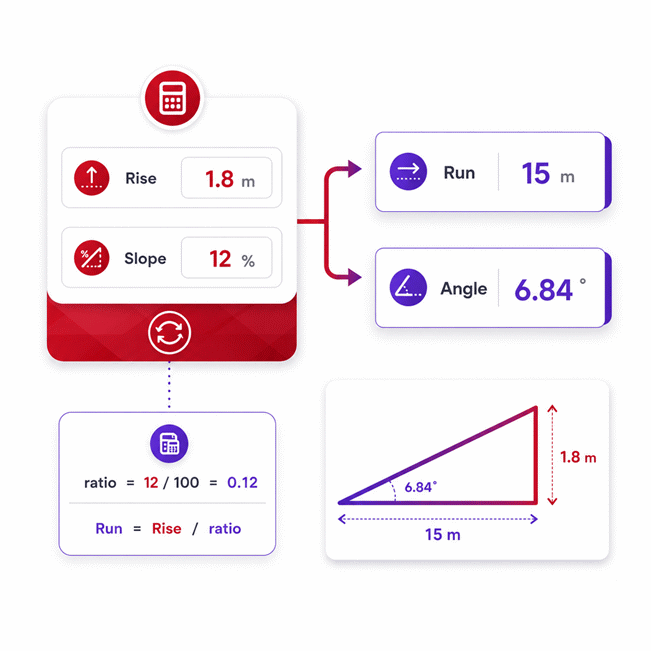
In reverse solving, the entered slope percentage first determines the dimensionless slope ratio. The known rise is then divided by this ratio to calculate the missing horizontal run. The same ratio also determines the corresponding angle through the inverse tangent function. Because rise and run are lengths, compatible units must be normalized before any ratio calculation.
Results are rounded for display.
Internal calculations use full precision.
Calculations Disclaimer
Slope Percentage Calculator for Real Measurements and Better Decisions
A site crew can measure two points and still misread the grade. The Slope Percentage Calculator turns those measurements into a clear slope view. It also works when one value is missing. That matters on ramps, roads, floors, and drainage paths. A Slope Percentage Calculator is most useful when every main value stays editable. The tool can then solve the remaining values without fixed input rules.
The main goal is simple. You want to describe how quickly elevation changes across horizontal distance. That description may appear as a percentage or an angle. Each form describes the same physical incline. However, each form answers a different practical question.
Field work becomes harder when measurements arrive in different forms. A surveyor may know elevation change and horizontal distance. A contractor may know the required grade and available space. A road planner may know the angle but need grade percentage. A flexible calculator must handle each case without forcing extra steps.
Quick check: the distance along a slope is not the horizontal run.
This distinction prevents many expensive layout mistakes. It also explains why two similar measurements can produce different grades.
What Slope Percentage Tells You Before Work Begins
A driveway may look gentle but still create access problems. Slope percentage gives that visual impression a measurable value. It describes vertical change relative to horizontal travel. A larger positive percentage means a steeper uphill direction. A negative value represents a downward direction.
This number becomes useful during early planning. It helps teams compare possible routes before excavation starts. It also helps users understand whether a grade changed after site work.
Slope percentage does not describe total distance by itself. It describes steepness. Two slopes may share the same percentage but have different lengths. One could span two meters. Another could continue for two kilometers. Their scale differs, but their incline relationship remains the same.
That idea is important during reverse solving. A known grade can describe shape without defining project size.
How Rise, Run, Angle, and Grade Relate
A technician may receive four different numbers from separate teams. One report may show rise. Another may show run. A drawing may show angle. A specification may show grade percentage.
These values are connected through one geometric relationship. Rise describes vertical movement. Run describes horizontal movement. Angle describes the incline relative to level ground. Grade describes the same incline as a percentage.
The calculator uses these relationships as one connected system. It does not treat every field as an isolated answer. That makes reverse solving possible.
When two independent measurements describe the geometry, more values become solvable. When only one length exists, scale is known but steepness is not. When only an angle exists, steepness becomes known but scale remains unknown.
Vertical change → horizontal reference → incline relationship → usable slope description
This sequence helps users understand what their measurements can actually reveal.
The Hidden Difference Between Horizontal Run and Surface Length
A worker may stretch a tape directly along a ramp. That measurement feels natural. However, it measures the inclined surface length. It does not measure horizontal run.
Horizontal run is measured across the level reference direction. This difference grows as the slope becomes steeper. Using surface distance as run usually produces a misleading result.
The error may look small on gentle grades. It becomes much larger on steep ramps or embankments. That can affect layout decisions before anyone notices the mistake.
Engineering insight: identify the geometric direction of every measurement before entering numbers.
This habit is more valuable than adding extra decimal places later.
How the Calculator Handles Known and Unknown Values
A project rarely starts with every value available. Sometimes only two measurements exist. Sometimes an output becomes the new design target. A practical calculator must adapt to that workflow.
The key idea is independence. Two values may look different but still describe the same information. Angle and grade percentage both describe steepness. They do not create two separate physical constraints.
Rise and run provide scale information. A steepness value adds the relationship between those lengths. This allows a missing length to become solvable.
The calculator should also react when the user edits a previous result. That result becomes a new design input. The system then updates values that no longer match the new condition.
This behavior feels natural during design changes. It also removes repeated manual rearrangement.
Direct Solving From Rise and Run
A contractor may know the vertical change and available horizontal distance. This is the most common direct measurement case.
These two lengths define both scale and steepness. The calculator can therefore determine the related grade and angle. No separate angle measurement is required.
The quality of the result still depends on measurement quality. Rise must reflect the intended vertical difference. Run must represent the correct horizontal span.
A small field error can matter on long drainage runs. It can also matter near a design limit. Users should therefore check both measurement points before accepting the final geometry.
Watch the reference points: correct numbers from wrong points still create a wrong slope.
Reverse Solving When One Length Is Missing
A designer may know the required grade but not the needed run. Another project may know run but need the required rise.
Reverse solving handles these situations directly. The known length provides scale. The grade or angle provides steepness. Together, they define the missing length.
This is useful during early layout work. It can answer practical space questions quickly. A team can test whether a target incline fits the available area. It can also estimate required elevation change before detailed drafting begins.
Reverse solving becomes especially useful during revisions. Change one design target, and the dependent value can change immediately.
Why Angle and Slope Percentage Cannot Set Physical Scale
A user may enter both angle and percentage and expect two lengths. That expectation seems reasonable. However, both values describe the same steepness.
They do not describe project size. A short ramp and a long road can share identical steepness. Their rise and run values remain very different.
At least one length is needed to establish scale. Without that length, countless geometric sizes remain possible.
This is an important reverse-solving rule. More filled fields do not always mean more independent information.
Why a 100% Slope Is 45 Degrees, Not Vertical
A common mistake appears when someone reads 100% as fully vertical. Percentage language makes that conclusion feel logical. Geometry works differently.
A 100% slope means vertical change matches horizontal run. Equal vertical and horizontal legs create a 45-degree incline.
A vertical face would have almost no horizontal run. Its grade percentage therefore grows without a normal finite limit.
This difference matters when reading road signs, site plans, and design notes. Percent and degrees use different scales. They should never be treated as interchangeable numbers.
Gentle incline → moderate grade → 45-degree incline → very steep grade → near vertical
Percent Grade and Degrees Describe the Same Incline Differently
A field team may prefer percentage. A drawing may show degrees. Both can describe the same physical slope.
Percentage focuses on vertical change across horizontal travel. Degrees focus on angular rotation from a level line. Neither format is universally better.
Percentage often feels clearer for roads and drainage. Degrees often feel clearer for geometric layouts and equipment positioning.
Confusion begins when users compare the numbers directly. A 20% grade is not a 20-degree angle. The values belong to different scales.
A useful calculator removes this mental conversion burden. The user can focus on the physical problem instead.
What Happens as a Slope Approaches Vertical
A retaining face can look almost vertical while still having measurable run. At that point, grade percentage becomes very large.
The increase is not linear. Small angle changes near vertical can cause huge percentage changes. This surprises many first-time users.
That behavior is mathematically normal. It reflects shrinking horizontal distance compared with vertical change.
Near-vertical work should therefore use a format suited to the task. Angle may communicate the geometry more clearly in that range.
Negative, Zero, and Very Steep Slopes in Practice
A route does not always climb. It may descend, remain level, or become extremely steep. Each case needs correct interpretation.
A negative slope describes direction. It does not mean the measurement failed. A zero slope describes no vertical change across the chosen run.
A value above 100% is also possible. It simply means vertical change exceeds horizontal run.
These cases are useful during troubleshooting. They help reveal whether the selected direction matches the intended project direction.
Reading a Negative Slope Without Reversing the Meaning
A drainage line may fall from the first point toward the second. That produces a negative direction when the first point defines the reference.
Reverse the measurement direction, and the sign changes. The physical line itself has not changed.
This makes sign convention important during team communication. Everyone should understand which point is considered the start.
Negative grades are common in downhill roads and drainage paths. They become confusing only when direction is left undefined.
Understanding Level Slopes and Zero Rise
A warehouse floor may be designed almost level. If both measured elevations match, vertical change becomes zero.
The slope is then level across the measured horizontal span. The run can still have any positive length.
This matters when reverse solving. Zero steepness does not automatically define one specific run. It only describes the relationship between elevation and horizontal travel.
That distinction prevents false certainty when too little information is available.
Why Slopes Above 100% Are Mathematically Valid
A steep embankment may rise more than it moves horizontally. Its percentage can therefore exceed 100%.
This does not indicate an error. It simply describes a steep incline. The percentage keeps growing as horizontal run becomes smaller.
Users often distrust these results because road grades are usually much lower. The mathematics still remains valid for steeper geometry.
Common Slope Measurement Errors That Change the Result
A calculator cannot repair a measurement taken in the wrong direction. Most serious slope errors begin before data entry.
The first risk is incorrect run. The second is inconsistent reference points. The third is unclear uphill or downhill direction.
Field conditions create more problems. Uneven surfaces may hide the intended straight reference. Soft ground may move measuring equipment. Long distances may introduce small alignment errors.
The best defense is a simple measurement plan. Define start point, end point, vertical direction, and horizontal reference first.
Engineering insight: measurement discipline usually improves results more than extra calculation complexity.
Measuring Surface Distance Instead of Horizontal Run
A tape placed on pavement measures the pavement path. That distance may be longer than horizontal run.
The difference may be minor on a shallow driveway. It can become important on steep terrain.
Before entering the distance, ask one question. Was this measurement taken horizontally or along the incline?
If the answer is unclear, verify the setup. This check takes seconds and may prevent major design changes later.
Choosing Different Start and End Reference Points
Two team members can measure the same area and report different grades. Their tools may both be accurate.
The problem may be their reference points. One person may measure curb to curb. Another may measure centerline elevations.
Those are different geometric segments. Different segments can have different grades.
Always record the exact start and end locations. This becomes vital when results move between field and office teams.
Sign Direction Errors on Downhill Measurements
A downhill road can become positive or negative depending on measurement direction. This often causes unnecessary confusion.
Choose a clear direction before recording rise. Keep that direction during later checks.
If the direction changes, the sign should change too. The steepness magnitude may remain the same.
Before approving a result, confirm direction first and magnitude second.
Real-World Uses for Slope Percentage
Slope calculations matter whenever elevation changes across distance. The same idea appears in many industries.
Road crews use grade to understand climbs and descents. Contractors use it during site layout. Survey teams compare elevation changes. Drainage work uses controlled fall to guide flow.
Facilities teams may also check floors, ramps, and access routes. Landscape work can use slope information before grading begins.
The calculation is simple. The decision around it may not be simple. Surface conditions, safety needs, and project rules can change the acceptable target.
A calculator supports the decision. It does not replace careful site judgment.
Roads, Driveways, and Site Access
A mountain access road can feel safe in dry weather. The same grade may feel very different during rain.
Slope percentage helps planners compare route options before construction. It also helps drivers understand why short sections feel unexpectedly steep.
Driveway planning has similar concerns. Available horizontal space can limit the achievable grade. Reverse solving can reveal that conflict early.
This makes the calculator useful before excavation begins. Early checks are usually cheaper than later corrections.
Ramps, Floors, Drainage Paths, and Construction Layout
A loading area may need controlled elevation change across limited space. Drainage paths face a similar planning problem.
Too little fall may reduce intended drainage performance. Excessive grade may create other site problems.
Construction teams can use slope information during rough layout. Survey teams can use it during field checks. Facility teams can compare planned and measured conditions.
The same calculator can support each workflow because the geometry stays consistent. The project purpose changes, but the relationship does not.
Choosing a Slope Calculator for Technical Work
A quick calculator is useful only when its behavior matches the real task. Fixed input forms can slow reverse design work.
A stronger tool lets users edit rise, run, angle, or grade directly. It should also make missing information obvious. Empty values can be more honest than invented outputs.
Clear validation also matters during field use. A user should know when a measurement creates an impossible setup.
For team workflows, sharing the same state can reduce transcription mistakes. Export features can also help with project records.
Technical value comes from predictable behavior. Decorative complexity should never hide the calculation workflow.
What to Check Before You Trust a Result
A polished interface does not guarantee a useful answer. Start by checking the entered measurements.
Confirm the start and end points. Confirm the horizontal reference. Confirm the intended travel direction. Then review whether the result matches physical expectations.
If a gentle driveway suddenly appears extremely steep, investigate the inputs. If downhill movement appears positive, review direction.
Good tools make these checks easier. Good users still perform them.
For professional workflows, support terms should also be clear. Teams should know how technical issues are handled before deployment.
Why Reverse Editing and Clear Inputs Save Time
A design often changes after the first calculation. The available run may shrink. The target grade may change. The required rise may become fixed.
Traditional calculators force users to restart with a different solving mode. A bidirectional tool can respond to the new value directly.
The latest independent design choice should guide the next solution. Older conflicting values can then become calculated results.
This workflow feels closer to real engineering discussion. People change targets, not just inputs.
AxiCalculator is designed around that flexible interaction. Enter what you know, change what matters, and review the updated geometry.
Frequently Asked Questions
Can I mix metric and imperial measurements in the same slope calculation?
How can I tell if my calculated slope is reasonable for the site?
Should I use percent, degrees, or permille when reporting a slope?
What should I do if the measured slope does not match the design value?
How should an engineer evaluate slope over a long road or drainage alignment?
Why can reverse solving produce an unexpectedly large rise or run?
How should a field engineer validate a slope result before using it professionally?
Our engineers are here to help you get it right.