Stone Weight Calculator
- Last formula update:
Cost of stone
Decimal & Rounding Policy
- Keep full calculation precision for area, volume, density, weight, and cost; do not round intermediate values.
- Round only displayed results, using up to 6 significant digits for practical measurement outputs.
- Display currency values to 2 decimal places while retaining full internal precision for cost calculations.
- Apply unit conversions before display rounding so changing units never changes the underlying physical value.
- Use consistent rounding for forward and reverse calculations to minimize accumulated error and preserve reliable stone weight estimates.
Valid range
- Stone shape: Use either Circular or Rectangular geometry with physically valid dimensions.
- Radius: Must be greater than 0 and represent the actual circular stone radius.
- Diameter: Must be greater than 0 and remain consistent with twice the radius.
- Length: Must be greater than 0 for rectangular stone calculations.
- Width: Must be greater than 0 for rectangular stone calculations.
- Area: Must be greater than 0 and geometrically consistent with the selected stone shape.
- Thickness: Must be greater than 0 for valid stone volume calculations.
- Volume: Must be greater than 0 and consistent with the known area and thickness.
- Density: Must be greater than 0 and represent a physically meaningful stone material density.
- Number of stones: Must be a positive whole number of 1 or greater.
- Total weight: Must be greater than 0 and consistent with volume, density, and stone quantity.
- Price per mass or volume: Must be greater than 0 when stone cost is calculated.
- Total cost: Must be greater than 0 when sufficient weight, volume, and pricing data are available.

Reviewers:
Elvarine Jexmont
Fenrick Zorquell
Check our editorial policy
August 16, 2026
1.0.0
Initial calculator and formula release.
Our engineers are here to help you get it right.
How Can a Stone Weight Calculator Improve Your Project Planning?
Stone Weight Calculator turns stone dimensions, material density, quantity, and pricing data into useful project estimates. It supports circular and rectangular stones, so users can work with radius, diameter, length, width, area, thickness, and volume without changing tools. The Stone Weight Calculator also supports reverse solving, which means known results can help recover missing dimensions or other connected values.
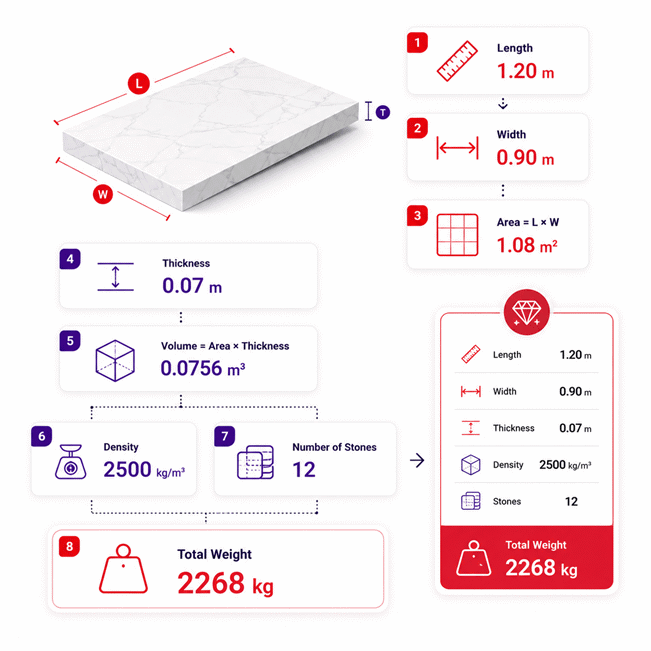
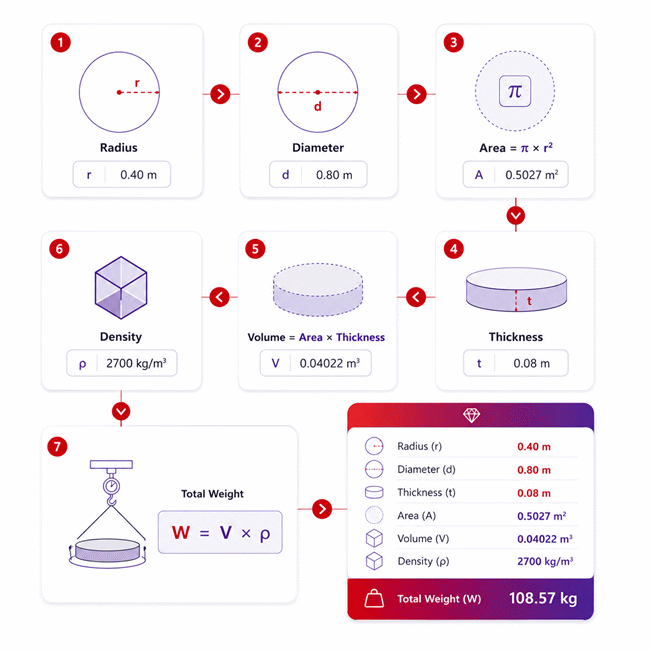
Stone geometry is the first step. Circular pieces use radius or diameter to determine area. Rectangular pieces use length and width. Thickness then connects area to volume. Once volume and material density are known, total stone weight can be estimated for one or many pieces.
- Choose Circular or Rectangular geometry to match the actual stone shape.
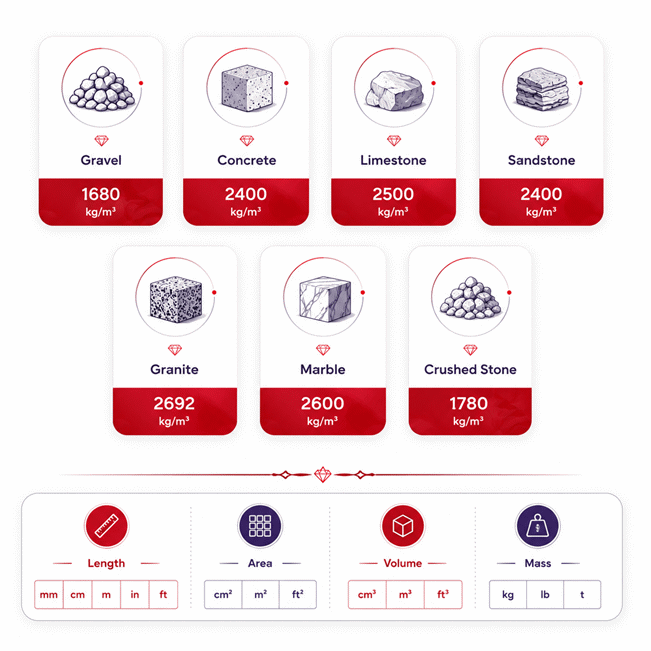
- Select Gravel, Concrete, Limestone, Sandstone, Granite, Marble, Crushed Stone, or custom density.
- Use partial calculations when only some measurements are available.
- Solve backward from volume, weight, area, or cost when enough values are known.
- Estimate stone cost by mass or by volume.
- Compare materials before transport, lifting, fabrication, or installation planning.
- Use project-specific density data when greater accuracy is needed.
- Treat natural stone density as material-dependent rather than perfectly fixed.
- Check dimensions carefully because thickness errors can affect the full calculated volume.
- Use the final result to support purchasing, handling, delivery, and project decisions.
Assumptions used in this calculator
- Stone dimensions are assumed accurate, positive, and measured using compatible units.
- Circular stones are approximated as flat cylinders with uniform thickness.
- Rectangular stones are approximated as rectangular prisms with uniform dimensions.
- Material density is treated as uniform throughout each stone.
- Preset densities represent typical values and may differ from actual stone.
- Natural porosity and mineral composition can cause real density variations.
- Custom density values are assumed to represent the actual material.
- Calculated weight excludes moisture, coatings, reinforcement, packaging, and attached components.
- Stone quantity assumes all pieces have identical dimensions and density.
- Unit conversions preserve the underlying physical quantity without changing measurement meaning.
- Cost calculations assume the entered price applies directly to calculated mass or volume.
- Taxes, delivery, installation, waste, and supplier surcharges are excluded unless entered.
- Results are estimates and should be verified for critical engineering decisions.
Results are rounded for display.
Internal calculations use full precision.
Formulas Used in Stone Weight Calculator :
1. Circular Diameter
This geometric relationship is solved in either direction whenever radius or diameter is known.
2. Circular Stone Area
The circular area relationship can also be solved backward when the area is known.
3. Rectangular Stone Area
Any one of the three quantities can be determined when the other two are known.
4. Stone Volume
This relationship supports forward and reverse solving between area, thickness, and volume.
5. Total Stone Weight
The same relationship allows mass, volume, density, or stone quantity to be solved when the remaining values are known.
6. Stone Cost by Mass
Use this equation when the stone price is specified per unit of mass.
7. Stone Cost by Volume
Use this equation when the stone price is specified per unit of volume.
8. Physical Unit Conversion
Values are converted to a canonical physical unit before solving, so changing the displayed unit does not change the physical quantity.
9. Price Rate Unit Conversion
Price rates use the inverse unit factor because currency is expressed per unit of mass or volume.
Variables
- D
- Stone diameter.
- r
- Stone radius.
- A
- Cross-sectional or plan area of one stone.
- L
- Rectangular stone length.
- W
- Rectangular stone width.
- t
- Stone thickness.
- V
- Volume of one stone.
- ρ
- Stone material density.
- n
- Number of stones.
- Mtotal
- Total stone mass displayed as stone weight.
- C
- Total stone cost.
- pm
- Price per unit mass.
- pv
- Price per unit volume.
- Xu
- Physical quantity expressed in the currently selected unit.
- XSI
- The same physical quantity expressed in its canonical SI unit.
- ku
- Conversion factor from the selected physical unit to its canonical SI unit.
- pu
- Price rate expressed per selected mass or volume unit.
- pSI
- Equivalent price rate expressed per canonical mass or volume unit.
Variables & Definitions
View a complete list of all variables used in this calculator, including definitions and units
Stone Weight Calculator Variables and Measurement Reference
| Variable | Meaning | Used For | Canonical Unit |
|---|---|---|---|
| D | Stone diameter | Circular stone geometry | m |
| r | Stone radius | Circular area and diameter | m |
| A | Stone plan area | Circular or rectangular geometry and volume | m² |
| L | Rectangular stone length | Rectangular area | m |
| W | Rectangular stone width | Rectangular area | m |
| t | Stone thickness | Stone volume | m |
| V | Volume of one stone | Stone weight and volume-based cost | m³ |
| ρ | Stone material density | Stone weight calculation | kg/m³ |
| n | Number of stones | Total weight and volume-based cost | Count |
| Mtotal | Total mass of all stone pieces | Total stone weight and mass-based cost | kg |
| C | Total stone cost | Final cost result | Selected currency |
| pm | Price per unit mass | Mass-based stone cost | Currency/kg |
| pv | Price per unit volume | Volume-based stone cost | Currency/m³ |
| Xu | Physical quantity in the selected unit | Unit conversion input and display | Selected unit |
| XSI | Physical quantity in its canonical SI unit | Internal calculations and unit-safe solving | Canonical SI unit |
| ku | Selected unit conversion factor | Conversion between displayed and canonical values | Dimension-dependent factor |
| pu | Price rate in the selected pricing unit | Displayed mass or volume pricing | Currency/selected unit |
| pSI | Price rate in the canonical pricing unit | Internal cost calculations | Currency/kg or currency/m³ |
Unit Conversion Table
Length Unit Conversion Table
| Unit Group | Unit Name | Symbol | Equivalent in Meters | Used For |
|---|---|---|---|---|
| Popular Units | Millimeter | mm | 0.001 m | Radius, diameter, length, width, thickness |
| Popular Units | Centimeter | cm | 0.01 m | Radius, diameter, length, width, thickness |
| Popular Units | Meter | m | 1 m | Radius, diameter, length, width, thickness |
| Popular Units | Inch | in | 0.0254 m | Radius, diameter, length, width, thickness |
| Popular Units | Foot | ft | 0.3048 m | Radius, diameter, length, width, thickness |
| Popular Units | Yard | yd | 0.9144 m | Radius, diameter, length, width, thickness |
| Scientific Units | Micrometer | µm | 0.000001 m | Small stone dimensions and thickness |
Area Unit Conversion Table
| Unit Group | Unit Name | Symbol | Equivalent in Square Meters | Used For |
|---|---|---|---|---|
| Popular Units | Square Millimeter | mm² | 0.000001 m² | Circular and rectangular stone area |
| Popular Units | Square Centimeter | cm² | 0.0001 m² | Circular and rectangular stone area |
| Popular Units | Square Meter | m² | 1 m² | Circular and rectangular stone area |
| Popular Units | Square Inch | in² | 0.00064516 m² | Circular and rectangular stone area |
| Popular Units | Square Foot | ft² | 0.09290304 m² | Circular and rectangular stone area |
| Popular Units | Square Yard | yd² | 0.83612736 m² | Circular and rectangular stone area |
| Scientific Units | Square Micrometer | µm² | 0.000000000001 m² | Very small calculated areas |
Volume Unit Conversion Table
| Unit Group | Unit Name | Symbol | Equivalent in Cubic Meters | Used For |
|---|---|---|---|---|
| Popular Units | Cubic Centimeter | cm³ | 0.000001 m³ | Stone volume and volume-based pricing |
| Popular Units | Liter | L | 0.001 m³ | Stone volume and volume-based pricing |
| Popular Units | Cubic Meter | m³ | 1 m³ | Stone volume and volume-based pricing |
| Popular Units | Cubic Inch | in³ | 0.000016387064 m³ | Stone volume and volume-based pricing |
| Popular Units | Cubic Foot | ft³ | 0.028316846592 m³ | Stone volume and volume-based pricing |
| Popular Units | Cubic Yard | yd³ | 0.764554857984 m³ | Stone volume and volume-based pricing |
| Scientific Units | Cubic Millimeter | mm³ | 0.000000001 m³ | Very small stone volumes |
Mass Unit Conversion Table
| Unit Group | Unit Name | Symbol | Equivalent in Kilograms | Used For |
|---|---|---|---|---|
| Popular Units | Gram | g | 0.001 kg | Total stone weight and mass-based pricing |
| Popular Units | Kilogram | kg | 1 kg | Total stone weight and mass-based pricing |
| Popular Units | Pound | lb | 0.45359237 kg | Total stone weight and mass-based pricing |
| Popular Units | Ounce | oz | 0.028349523125 kg | Total stone weight and mass-based pricing |
| Popular Units | Metric Ton | t | 1000 kg | Heavy stone loads and mass-based pricing |
| Popular Units | US Short Ton | US ton | 907.18474 kg | Heavy stone loads and mass-based pricing |
| Scientific Units | Milligram | mg | 0.000001 kg | Very small mass values |
Density Unit Conversion Table
| Unit Group | Unit Name | Symbol | Equivalent in kg/m³ | Used For |
|---|---|---|---|---|
| Popular Units | Kilogram per Cubic Meter | kg/m³ | 1 kg/m³ | Material density and stone weight |
| Popular Units | Gram per Cubic Centimeter | g/cm³ | 1000 kg/m³ | Material density and stone weight |
| Popular Units | Pound per Cubic Foot | lb/ft³ | 16.01846337396 kg/m³ | Material density and stone weight |
| Popular Units | Ounce per Cubic Inch | oz/in³ | 1729.994044 kg/m³ | Material density and stone weight |
| Scientific Units | Megagram per Cubic Meter | Mg/m³ | 1000 kg/m³ | Material density and stone weight |
| Scientific Units | Kilogram per Liter | kg/L | 1000 kg/m³ | Material density and stone weight |
Example Calculation
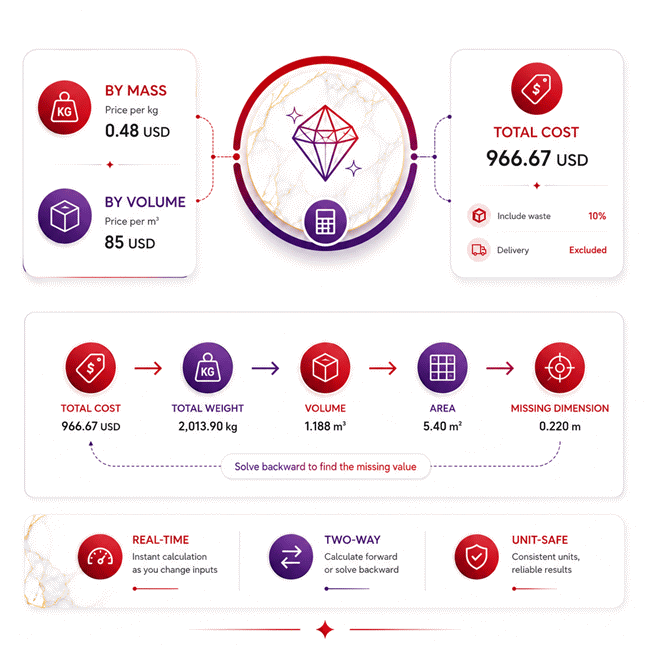
The circular stone area is calculated from its radius, and multiplying that area by thickness gives the volume of one stone.
The volume is multiplied by material density to determine the mass of each stone.
Multiplying by the number of identical stones gives the total stone weight for the project.
The final cost is calculated from the total mass and the selected price per unit mass.
Reverse solving begins with the known total cost and price per mass to recover the total stone weight.
The known density and quantity then determine the volume of one stone from that total weight.
Volume and thickness recover the rectangular area, even though the area was not originally entered.
Finally, the known length and solved area determine the missing stone width automatically.
Results are rounded for display.
Internal calculations use full precision.
Calculations Disclaimer
Why Stone Weight Estimates Fail Before Work Even Starts
A Stone Weight Calculator is most useful before a heavy piece moves. A small measurement error can change the whole plan. The Stone Weight Calculator reduces that risk by linking geometry, material, and quantity. It gives each known value a clear role. It also avoids forcing every field before showing useful results.
The first problem often appears during measurement. A slab may look simple, yet thickness varies across its surface. A round stone may also be measured across the wrong line. A rectangular block may have chipped edges. These small details affect the final volume. Volume then affects the estimated mass directly.
Many users focus only on size. That is not enough. Two stones can share the same dimensions yet weigh differently. Their internal structure may not be the same. Mineral content can change density. Pores can also reduce mass. Moisture may add extra weight in some materials.
Size Is Only Half of the Weight Story
A large stone does not always mean an extreme load. Its material matters just as much. A dense stone may outweigh a larger porous stone. This is why visual judgment can fail on site.
Length, width, radius, diameter, and thickness describe geometry. They do not describe material behavior. The calculator connects both parts before estimating the final load. That makes the result more useful for planning.
This matters during fabrication, transport, and installation. A team may need to choose lifting equipment early. A delivery vehicle may also have a strict load limit. A wrong estimate can delay work. It can also create extra handling costs.
Density Is Where Good Estimates Often Drift
Density presets are useful for fast planning. They should still represent the actual material closely. Granite, marble, limestone, sandstone, concrete, gravel, and crushed stone behave differently.
Even stones with the same commercial name may vary. Quarry source can change mineral content. Porosity may also change between batches. Surface moisture can affect real handling weight. This explains why a supplier value may differ from a general preset.
Solid Stone and Loose Aggregate Are Not the Same Material Condition
A solid block fills almost all its geometric space with material. Loose gravel does not. Empty spaces remain between particles. These voids change the relationship between bulk volume and material mass.
This distinction matters when ordering crushed stone. A solid-rock density should not be treated as bulk density. Doing so can create a large purchasing error. It can also distort transport planning.
Circular and Rectangular Stones Need Different Measurement Logic
A common site problem starts with the wrong shape assumption. A round stepping stone may be treated like a rectangle. A rectangular slab may be measured only along its longest side. Both approaches can create misleading results.
The calculator separates circular and rectangular geometry. This keeps each measurement meaningful. It also removes fields that do not belong to the selected shape.
Circular Stones Depend on the Correct Radius or Diameter
Circular pieces appear simple, but users often confuse radius and diameter. Diameter spans the full circle. Radius covers only half that distance. Mixing them can produce a large area error.
A responsive calculator should reduce this mistake. Entering one value can reveal the other. The area can also become available immediately. The user does not need thickness yet.
This partial result is valuable. A contractor may know only the stone diameter during early planning. That still provides useful geometric information. More results appear as new measurements become available.
Rectangular Slabs Depend on Length and Width First
A slab order often begins with length and width. These two measurements define the face area. Thickness then converts that face into a three-dimensional piece.
Rectangular geometry is common in countertops, wall panels, paving, steps, and cut stone. These products often arrive in repeated sizes. Small thickness changes can still create noticeable load changes.
A useful calculator should react as soon as length and width are entered. Waiting for density or quantity adds unnecessary friction. Early area feedback also helps users spot measurement mistakes.
Thickness Can Quietly Become the Largest Source of Error
Thickness may look less important than length or width. That assumption can be expensive. Thickness affects the full area of the stone.
A small thickness error across a large slab affects all calculated volume. That change then moves through the weight estimate. Large projects magnify the difference even further.
Measure thickness at more than one point when surfaces are uneven. Use the value that best represents the actual piece. Fabricated slabs may be more consistent than natural blocks.
Reverse Solving Changes How Stone Planning Works
A real project rarely gives every value in perfect order. Sometimes weight is known before size. Sometimes volume comes from a supplier. Sometimes only one dimension is missing.
A one-way form creates a problem here. It expects users to start at the beginning. A two-way solver works differently. It starts with whatever reliable information already exists.
Known Weight Can Lead Back to Missing Geometry
Imagine receiving a documented shipment weight. The stone dimensions may still be incomplete. If material density and quantity are known, the weight contains useful geometric information.
The solver can work backward through the same relationships. It can recover volume when enough supporting data exists. Known thickness can then reveal area. Other dimensions may become available afterward.
This is useful during receiving checks. It also helps when old project records are incomplete. A team may have weight tickets but no detailed stone schedule.
Partial Calculations Matter Before the Final Weight Exists
Users should not need every input before seeing anything useful. Early results help confirm measurements. They also show what information is still missing.
A radius can reveal diameter and area. Length and width can reveal rectangular area. Volume and thickness can reveal area in reverse. These intermediate results keep the workflow moving.
This behavior also reduces repeated manual calculations. The user can explore several possibilities without restarting. That makes design changes easier to compare.
Missing Dimensions Should Be Solved, Not Re-Entered
A missing width does not always require a new site visit. Existing volume, thickness, and length may already contain the answer. The same principle applies to circular dimensions.
This creates a better workflow for engineers and contractors. Known values stay useful. Derived values appear when the information becomes sufficient.
The key benefit is speed without hiding the logic. Users can see how one measurement affects another. That makes the calculator easier to trust.
Material Choice Can Change Weight More Than Users Expect
A purchasing mistake often begins with the phrase, “stone is stone.” It is not. Material density changes the load even when dimensions stay identical.
This difference matters for slabs, blocks, pavers, landscape stone, and decorative pieces. It also matters when comparing supplier quotes.
Granite, Marble, Limestone, and Sandstone Need Separate Treatment
Granite is often selected for strength and appearance. Marble is valued for finish and visual character. Limestone and sandstone serve many architectural uses. Their weight behavior is not identical.
Natural stone also varies within each category. Two granite products may not have exactly the same density. The same applies to marble and sedimentary stone.
For early estimates, a representative density is practical. For critical planning, use verified material data. Supplier documentation becomes more important as project risk increases.
This is especially important for large panels. Small density differences become large weight differences at high volume. The same effect appears across multiple pieces.
Gravel and Crushed Stone Need Bulk-Aware Thinking
Loose materials create a different planning problem. The container or truck measures bulk volume. That space includes gaps between particles.
Particle size can change those gaps. Grading also changes how tightly the material packs. Moisture can alter field weight as well.
This is why crushed stone should not be treated like a solid block. A bulk material estimate needs a density that reflects its loose condition. Compacted material may occupy less volume afterward.
Custom Density Is the Better Choice When Project Data Exists
A generic preset is useful when no better data exists. A verified project value is usually more relevant. It reflects the material actually being handled.
Custom density becomes important for unusual stone. It also helps with engineered products and quarry-specific materials. Large lifting plans benefit from this extra care.
Before a major purchase, ask for current material data. Check whether the figure describes solid density or bulk density. That simple question can prevent a costly mismatch.
Weight and Cost Planning Should Be Separated Before Buying
A low unit price can still create an expensive order. Buyers often compare price before checking the pricing basis. One supplier may price by mass. Another may price by volume.
The difference matters because density connects those two systems. A dense material may look affordable by volume yet expensive by weight. The opposite can also happen.
Pricing by Mass Works Best When Shipment Weight Drives the Sale
Mass-based pricing is easy to understand when material is sold by kilogram, pound, or ton. The calculated load becomes directly useful for cost planning.
Quantity still matters. A single stone may fit the budget easily. A full batch can change delivery and lifting requirements.
Separate material cost from project cost. Delivery, unloading, installation, cutting, and waste may follow different pricing rules. This prevents false comparisons between quotes.
Pricing by Volume Fits Many Bulk and Project-Based Orders
Volume pricing is common when material is ordered by cubic measure. It is useful for aggregates and some large material orders. Density still matters for transport.
A volume-based quote may look simple. The truck still carries weight. That means a purchasing estimate should also consider expected load.
This is where calculation becomes a decision tool. Price answers one question. Weight answers another. Good project planning needs both.
Compare Supplier Quotes Using the Same Basis
Two quotes can look different while representing similar value. Convert your planning data to one consistent basis before comparing them.
Check stone type, dimensions, quantity, delivery terms, and waste allowance. Ask whether packaging is included in shipment weight. Confirm unloading responsibilities before the vehicle arrives.
Warranty and support terms also vary between suppliers. Review them before ordering finished stone products. Check coverage for damage, fabrication, and delivery separately.
AxiCalculator can help organize the numerical side before requesting final quotations. Clear numbers make supplier conversations faster. They also reduce avoidable changes after ordering.
Accuracy Becomes Critical During Lifting, Transport, and Installation
A stone can be affordable and still create a handling problem. This happens when planning focuses on price alone. Heavy materials affect vehicles, cranes, forklifts, supports, and installers.
An estimate is most useful when its purpose is clear. Early design needs speed. Critical handling needs stronger verification.
Measurement Uncertainty Grows Across Large Pieces and Large Quantities
Every measurement contains some uncertainty. Small errors may be harmless on one small stone. The same errors can grow across many pieces.
Natural surfaces add another challenge. Thickness may vary. Corners may not be square. Edges may be broken or shaped.
For repeated manufactured pieces, consistency may be better. Natural blocks often need more careful measurement. Irregular pieces may require direct volume assessment.
Do not hide uncertainty behind extra decimal places. A highly detailed number is not automatically more accurate. Good planning depends on good input data.
Transport Decisions Need More Than the Stone Weight Alone
A calculated load is an important starting point. It does not describe the entire transport system. Packaging, pallets, frames, and securing equipment add weight.
Vehicle capacity is also only one limit. Load distribution matters. Axle limits may matter. Local transport rules may also apply.
The same principle applies to forklifts. A rated capacity does not mean every load is safe. Load center and attachment configuration affect usable capacity.
Lifting Plans Need Geometry as Well as Mass
A lifting device reacts to more than total weight. The load shape affects balance. Rigging points also change forces.
A wide slab may behave differently from a compact block. A tall stone can shift its center of mass. Fragile material may also need special support.
Use the calculated weight to support planning. Then compare it with verified project limits. Critical lifts need site-specific review.
Supplier Data Becomes Essential When the Consequence of Error Is High
The best input is the most relevant verified input. General density values are useful for early work. Project documents are better for final decisions.
Ask for stone dimensions and material identification. Request density information when it is available. Check shipment documents for large orders.
This creates a simple decision rule. Low-risk planning can use practical estimates. High-risk work should use verified data.
Use AxiCalculator as a Faster Stone Planning Workflow
A common planning delay comes from scattered calculations. One person checks dimensions. Another converts units. Someone else estimates weight. The buyer then starts again with cost.
AxiCalculator brings those connected decisions into one workflow. Users can begin with the values they already know. The calculator reacts as more information becomes available.
Start with the Measurement You Trust Most
You do not need to follow a rigid input order. Start with the best known measurement. Enter a radius, diameter, area, volume, or weight when available.
For rectangular stone, length and width provide an early area check. For circular pieces, radius or diameter can establish geometry. Thickness adds the third dimension later.
Material selection then connects geometry to weight. Quantity extends the result across repeated pieces. Cost information can be added when purchasing becomes relevant.
Use Reverse Solving to Test Project Decisions Faster
Reverse solving is useful when the desired result is already known. A project may have a maximum load. A slab may have a fixed volume. A known shipment weight may need investigation.
Instead of rebuilding the calculation manually, enter the known values. The calculator can reveal other values when enough information exists.
This also helps compare design options. Change one known value and watch related values update. The workflow stays quick because unnecessary calculate buttons are removed.
Turn the Result into a Better Purchase and Handling Decision
The final number should answer a real project question. Can the planned vehicle handle the expected load? Does the selected stone fit the weight target? Is the supplier quote based on mass or volume?
Use the result before ordering, transport, fabrication, and installation planning. Compare materials before committing to a design. Check custom density when project data is available.
Good stone planning is not about producing the largest number of calculations. It is about removing uncertainty early. A clear workflow helps teams make faster decisions with fewer surprises.
Frequently Asked Questions
Can I use the Stone Weight Calculator for steps, pavers, benches, and coping stones?
What should I do when one order contains stones with different dimensions?
Should I use a preset density or a custom density for my stone?
Can I share or export a stone calculation for project review?
Can calculated stone weight be used directly as a structural design load?
What should an engineer verify before using the result for a critical stone lift?
How can I judge whether uncertainty in density or thickness could affect the project?
Engineering Resources
Our engineers are here to help you get it right.