Steel Weight Calculator
- Last formula update:
Decimal & Rounding Policy
- Keep full numerical precision throughout all steel weight calculations and unit conversions.
- Do not round intermediate values for area, volume, density, weight, or total weight.
- Round only displayed results, using enough decimal places to preserve practical engineering accuracy.
- Retain additional significant digits for very small areas, volumes, and reverse-calculated dimensions.
- Apply unit conversion before display rounding so changing units does not alter the underlying physical value.
- Treat quantity as a whole-number count while preserving full precision in all dependent weight calculations.
Valid range
- Steel density: Use the predefined steel type values from 7,715 to 8,030 kg/m³.
- Diameter: Must be a finite value greater than 0 in the selected length unit.
- Side or across-flats dimension: Must be a finite value greater than 0.
- Width and height: Each dimension must be a finite value greater than 0.
- Length: Must be a finite value greater than 0 for bars, tubes, and plates.
- Wall thickness: Must be greater than 0 and less than half the relevant outside dimension.
- Cross-sectional area: Must be a finite value greater than 0 in the selected area unit.
- Volume: Must be a finite value greater than 0 and dimensionally consistent with the selected units.
- Weight: Must be a finite value greater than 0 when entered or solved from volume and steel density.
- Quantity: Must be a positive whole number representing the number of steel pieces.
- Total weight: Must remain greater than 0 and is calculated from piece weight multiplied by quantity.

Reviewers:
Elvarine Jexmont
Fenrick Zorquell
Check our editorial policy
August 16, 2026
1.0.0
Initial calculator and formula release.
Our engineers are here to help you get it right.
What Should You Know Before Using a Steel Weight Calculator?
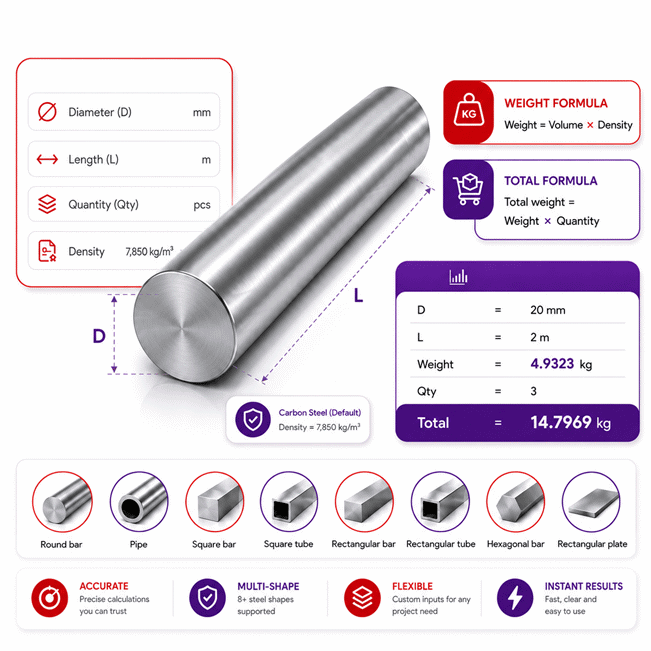
The Steel Weight Calculator gives you a fast way to estimate the weight of steel from shape, dimensions, material density, and quantity. It also supports reverse solving when enough known values define one unique result.
- Choose the correct steel type because density directly affects calculated weight.
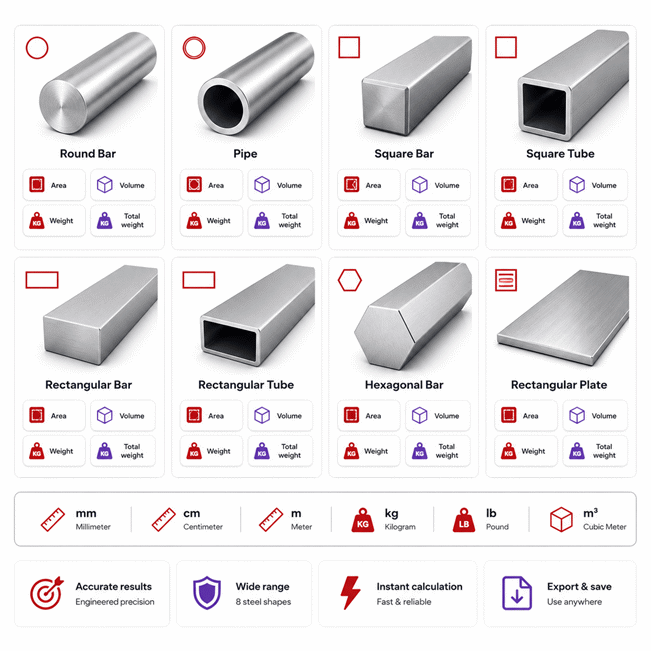
- Select the actual shape, such as round bar, pipe, tube, hexagonal bar, or plate.
- Enter only the values you know; missing values can be solved when the relationship is unique.
- Hollow sections require valid wall thickness and outside dimensions.
- Geometry determines cross-sectional area or volume before weight is resolved.
- Weight depends on material volume multiplied by the selected steel density.
- Quantity changes total weight without changing the weight of one piece.
- Changing compatible units should preserve the same physical value.
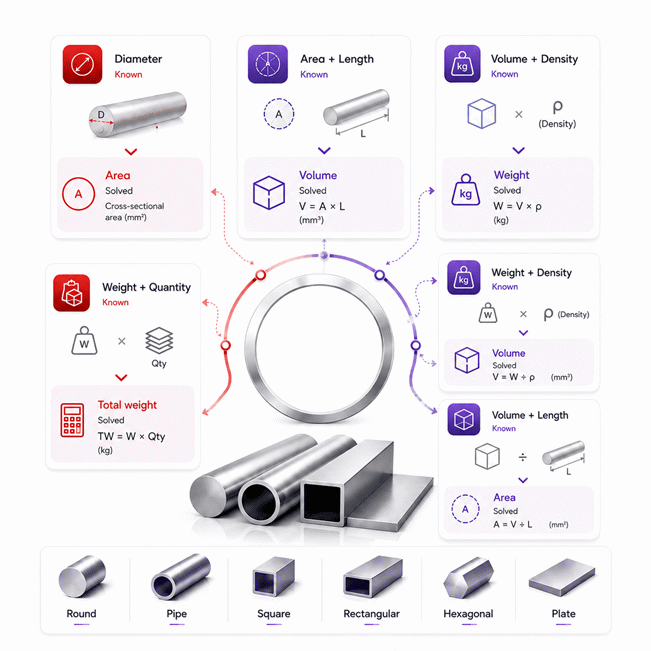
- Reverse solving can recover volume, area, diameter, side, width, or height when enough data exists.
- Calculated weight is theoretical and may differ from measured weight because of tolerances, coatings, cutouts, or added parts.
- The Steel Weight Calculator is useful for material planning, fabrication checks, purchasing, stock review, and early transport estimates.
For best results, use accurate dimensions, select the correct shape and steel type, and verify critical project loads with measured or certified data.
Assumptions used in this calculator
- Selected steel density is assumed representative of the specified steel type.
- Steel pieces are assumed homogeneous, solid, and geometrically uniform along their length.
- Dimensions are assumed measured accurately before calculation and unit conversion.
- Nominal dimensions are used without automatic manufacturing tolerance adjustments.
- Surface coatings, rust, scale, and attached hardware are excluded.
- Hollow sections assume constant wall thickness throughout the calculated length.
- Pipe dimensions assume wall thickness remains below half the outer diameter.
- Square tubes assume wall thickness remains below half the outside side.
- Rectangular tubes assume thickness remains below half the smaller outside dimension.
- Material volume is calculated from ideal geometric shape dimensions.
- Weight is calculated from volume multiplied by the selected steel density.
- Total weight assumes all pieces have identical geometry, material, and dimensions.
- Results are estimates and should be verified for safety-critical industrial applications.
Results are rounded for display.
Internal calculations use full precision.
Formulas Used in Steel Weight Calculator :
All dimensional values are converted to consistent SI units before calculation. The calculator preserves full numerical precision internally and rounds only displayed values.
Variables
- A
- Cross-sectional area.
- D
- Round bar diameter.
- Do
- Pipe outer diameter.
- Df
- Hexagonal bar across-flats dimension.
- S
- Square bar or square tube outside side length.
- W
- Rectangular section or plate width.
- H
- Rectangular section outside height.
- t
- Tube wall thickness or plate thickness.
- L
- Material length.
- V
- Volume of one steel piece.
- ρ
- Density of the selected steel type.
- Ws
- Weight of one steel piece.
- n
- Quantity of steel pieces.
- WT
- Total weight of all pieces.
- xu
- Numerical value expressed in the selected unit.
- Cu
- Conversion factor from the selected unit to its SI unit.
- xSI
- Equivalent physical value expressed in SI units.
1. Unit Normalization
The same physical value is preserved when a compatible unit is changed.
2. Round Bar Cross-Sectional Area
3. Pipe Cross-Sectional Area
4. Square Bar Cross-Sectional Area
5. Square Tube Cross-Sectional Area
6. Rectangular Bar Cross-Sectional Area
7. Rectangular Tube Cross-Sectional Area
8. Hexagonal Bar Cross-Sectional Area
9. Bar and Tube Volume
10. Rectangular Plate Volume
11. Weight of One Steel Piece
12. Total Steel Weight
Reverse calculations use algebraic rearrangement of these same equations, so no duplicate reverse formulas are required. A value is solved only when the known variables provide a unique physical solution. Intermediate calculations remain unrounded, while rounding is applied only to displayed results.
Variables & Definitions
View a complete list of all variables used in this calculator, including definitions and units
Steel Weight Calculator Variables and Symbols
| Symbol | Variable | Description | SI Unit | Used For |
|---|---|---|---|---|
| A | Cross-sectional area | Area of the solid steel section after accounting for its selected shape. | m² | Bar and tube volume |
| D | Round bar diameter | Outside diameter of a solid round steel bar. | m | Round bar area |
| Do | Pipe outer diameter | Outside diameter of the circular steel pipe section. | m | Pipe area |
| Df | Across-flats dimension | Distance between two opposite parallel faces of a hexagonal steel bar. | m | Hexagonal bar area |
| S | Side length | Outside side dimension of a square bar or square tube. | m | Square section area |
| W | Width | Outside width of a rectangular section or width of a rectangular plate. | m | Rectangular area and plate volume |
| H | Height | Outside height of a rectangular bar or rectangular tube. | m | Rectangular section area |
| t | Thickness | Tube wall thickness or rectangular plate thickness, depending on the selected shape. | m | Tube area and plate volume |
| L | Length | Longitudinal length of the steel bar, tube, or rectangular plate. | m | Volume calculation |
| V | Volume | Physical volume occupied by one steel piece. | m³ | Steel weight |
| ρ | Steel density | Density assigned to the selected steel type. | kg/m³ | Steel weight |
| Ws | Weight of one steel piece | Calculated weight of a single steel bar, tube, or plate. | kg | Total weight |
| n | Quantity | Number of identical steel pieces included in the calculation. | Dimensionless | Total weight |
| WT | Total weight | Combined weight of all steel pieces based on piece weight and quantity. | kg | Final output |
| xu | Value in selected unit | Numerical value entered or displayed in the unit selected by the user. | Selected unit | Unit conversion |
| Cu | Unit conversion factor | Factor used to convert a selected compatible unit to its corresponding SI unit. | Unit-dependent | SI normalization |
| xSI | Value in SI units | Normalized physical value used internally for consistent calculations. | Corresponding SI unit | Internal calculations |
Unit Conversion Table
Length Unit Conversion Table
| Unit Group | Unit Name | Symbol | Equivalent in Meters | Used For |
|---|---|---|---|---|
| Popular Units | Millimeter | mm | 0.001 m | Diameter, side, width, height, thickness, length |
| Popular Units | Centimeter | cm | 0.01 m | Diameter, side, width, height, thickness, length |
| Popular Units | Meter | m | 1 m | All linear dimensions and bar length |
| Popular Units | Inch | in | 0.0254 m | Imperial steel dimensions and thickness |
| Popular Units | Foot | ft | 0.3048 m | Imperial bar, tube, and plate length |
| Scientific Units | Micrometer | µm | 0.000001 m | Very small dimensional measurements |
Area Unit Conversion Table
| Unit Group | Unit Name | Symbol | Equivalent in Square Meters | Used For |
|---|---|---|---|---|
| Popular Units | Square Millimeter | mm² | 0.000001 m² | Steel cross-sectional area |
| Popular Units | Square Centimeter | cm² | 0.0001 m² | Steel cross-sectional area |
| Popular Units | Square Meter | m² | 1 m² | SI cross-sectional area |
| Popular Units | Square Inch | in² | 0.00064516 m² | Imperial steel cross-sectional area |
| Popular Units | Square Foot | ft² | 0.09290304 m² | Large imperial cross-sectional areas |
| Scientific Units | Square Micrometer | µm² | 0.000000000001 m² | Very small cross-sectional areas |
Volume Unit Conversion Table
| Unit Group | Unit Name | Symbol | Equivalent in Cubic Meters | Used For |
|---|---|---|---|---|
| Popular Units | Cubic Millimeter | mm³ | 0.000000001 m³ | Small steel piece volume |
| Popular Units | Cubic Centimeter | cm³ | 0.000001 m³ | Small bar, tube, and plate volume |
| Popular Units | Cubic Meter | m³ | 1 m³ | SI volume and density-based weight calculation |
| Popular Units | Cubic Inch | in³ | 0.000016387064 m³ | Imperial steel piece volume |
| Popular Units | Cubic Foot | ft³ | 0.028316846592 m³ | Large imperial steel volume |
| Scientific Units | Microliter | µL | 0.000000001 m³ | Very small volume representation |
Weight Unit Conversion Table
| Unit Group | Unit Name | Symbol | Equivalent in Kilograms | Used For |
|---|---|---|---|---|
| Popular Units | Kilogram | kg | 1 kg | Piece weight and total weight |
| Popular Units | Gram | g | 0.001 kg | Light steel piece weight |
| Popular Units | Pound | lb | 0.45359237 kg | Imperial piece and total weight |
| Popular Units | Ounce | oz | 0.028349523125 kg | Small imperial steel weights |
| Popular Units | Metric Tonne | t | 1000 kg | Heavy steel loads and total weight |
| Scientific Units | Milligram | mg | 0.000001 kg | Very small calculated weights |
Example Calculation
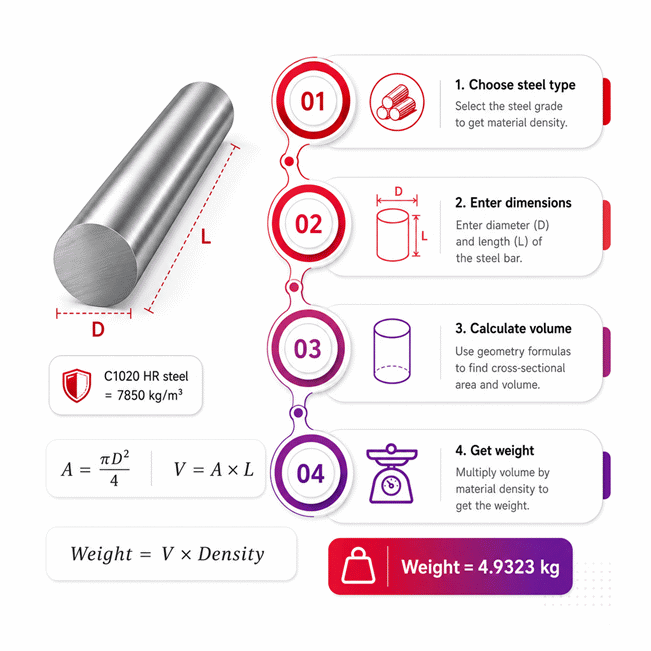
The 28 mm diameter is first converted to meters so all calculations use consistent SI units.
The circular cross-sectional area is multiplied by the 3.6 m length to obtain volume.
Volume is multiplied by the selected steel density to determine one bar's weight.
Finally, the single-bar weight is multiplied by eight pieces to obtain total weight.
The known steel weight is divided by the selected material density to recover volume.
The recovered volume is divided by the known bar length to determine cross-sectional area.
Because a round bar has one unique diameter for a given area, diameter can be solved directly.
Reverse solving uses the same physical equations without changing the known user-entered values.
Results are rounded for display.
Internal calculations use full precision.
Calculations Disclaimer
How a Steel Weight Calculator Turns Missing Data Into Useful Decisions
A steel order can stall because one useful value is missing. A Steel Weight Calculator should remove that delay, not create another form. The Steel Weight Calculator on AxiCalculator works as a multi-way problem solver. It can use the values you already know. It can then resolve other values when the relationship is unique.
This approach matters in workshops, purchasing teams, fabrication offices, and construction planning. Users rarely receive perfect data in one neat list. A drawing may provide dimensions but omit weight. A packing list may provide weight but omit volume. A stock record may show length and section data only. A flexible calculator can work from any valid combination.
The most useful benefit is speed with control. User-entered values remain separate from calculated values. This prevents the calculator from replacing information you intentionally entered. It also reduces confusing update loops when several values depend on each other.
Know what you have. Leave the missing value open. Let the relationship solve it.
This design also makes checking easier. You can start from geometry and reach weight. You can also move backward from weight toward missing geometry. That makes the tool useful beyond a simple material estimator.
AxiCalculator is designed for quick decisions without hiding the calculation logic. The result is useful when reviewing stock, planning fabrication, checking orders, or preparing transport data.
Choosing Steel Type Without Distorting the Geometry
A common problem starts when two identical pieces show different expected weights. The reason can be material density. Steel types do not all have the same density. Their dimensions may match while their calculated weights differ.
Changing the selected steel type should never alter the physical geometry. Diameter, width, height, thickness, length, area, and volume describe the piece itself. Material selection changes only values that depend on density.
This separation is important for fast comparison. A buyer can keep one geometry and review different steel choices. An engineer can also test material changes without rebuilding the entire input set.
Why Density Choice Matters More Than Many Buyers Expect
A small density change looks harmless on one short piece. The effect becomes more visible across large quantities. It also matters with long bars, thick plates, and repeated stock items.
The calculator therefore links each available steel type to its defined density. Selecting another type updates density-dependent results. Geometry remains untouched.
This helps prevent a common purchasing mistake. Users sometimes assume every steel product should use one universal density. That shortcut can create avoidable differences in larger material estimates.
When Material Grade Changes a Procurement Decision
Procurement teams often compare several material choices before ordering. Weight can affect freight, handling, storage, and lifting plans. Even a modest difference can become important across many pieces.
A density-aware estimate gives the buyer another useful comparison point. It does not replace material specifications. It helps expose the practical effect of material selection before an order moves forward.
Choosing the Right Steel Shape Before Entering Dimensions
A weight estimate can fail before the first number is entered. The wrong shape creates the wrong geometry. A solid bar cannot be treated like a hollow tube. A plate also needs different dimensional information than a pipe.
The shape selector solves this problem early. Each shape displays only the dimensions that belong to that geometry. This keeps the interface shorter and reduces irrelevant inputs.
Shape → Relevant dimensions → Section geometry → Material volume → Piece weight → Total requirement
The available shapes cover common steel stock forms. They include round and square sections. They also include rectangular, hollow, hexagonal, and plate forms.
Round Bars and Pipes Look Similar but Behave Differently
A round bar contains material across its entire circular section. A pipe contains an empty internal space. That difference changes the amount of steel present.
Pipe calculations therefore need the outside size and wall thickness. Treating the pipe as solid can overstate its weight significantly.
This distinction matters during purchasing and transport planning. It also matters when comparing solid stock against hollow alternatives.
Square and Rectangular Sections Need Solid-or-Hollow Context
A square bar and square tube can share the same outside size. Their weights can still differ sharply. The tube contains less material because its center is hollow.
The same principle applies to rectangular sections. Solid rectangular bars use the full section. Rectangular tubes subtract the empty internal region.
Choosing the correct section type protects the entire calculation chain.
Hexagonal Bars and Plates Need Their Own Geometry
Hexagonal stock often creates confusion because its size convention matters. The calculator uses the across-flats dimension for this shape. That keeps the geometric interpretation clear.
Rectangular plates follow another path. Their physical volume comes from three direct dimensions. No separate bar-style section workflow is needed.
Correct shape selection is therefore more important than entering extra numbers.
Reverse Solving When the Missing Value Is the One You Need
A workshop may know the finished weight but lack an original dimension. Traditional calculators become frustrating in that situation. They expect every input to arrive in one direction.
Reverse solving removes that limitation. Known values can work backward through the same physical relationships. The calculator only resolves a missing value when the result is unique.
This rule is important. Guessing a dimension can create a convincing but wrong result. AxiCalculator avoids solving cases where several geometric answers remain possible.
Reverse solving is useful only when the known data points to one physical answer.
Moving From Known Weight Back to Material Volume
A known piece weight can reveal its material volume when steel density is known. This is useful when paperwork lists weight but omits geometric volume.
Once volume becomes available, other valid relationships may also become solvable. The calculator continues only where enough information exists.
Moving From Volume Back to Cross-Sectional Area
Volume alone cannot identify a bar section. Add the known length, and the problem changes. Cross-sectional area can then be recovered.
This intermediate value is powerful. It can lead to a missing section dimension for certain shapes.
Recovering Diameter, Side, Width, or Height
Some cross-sections have one clear dimension for a known area. Round bars and square bars are good cases. Their missing primary size can be resolved uniquely.
Rectangular bars need more information. Area alone does not reveal both width and height. If width is known, height can be resolved. The reverse also works.
This prevents the calculator from inventing geometry that the data does not support.
Theoretical Steel Weight and Actual Steel Weight Are Not Always Identical
A calculated value can look precise while the real piece weighs slightly differently. That does not automatically mean the calculation failed. Real steel products are manufactured within physical tolerances.
Theoretical weight is based on geometric dimensions and selected material density. Actual weight reflects the manufactured item that arrives on site.
For planning, the theoretical value is often very useful. For final load confirmation, measured information can become more important.
Manufacturing Tolerances Can Shift Real Material Weight
Steel products are not produced with infinitely exact dimensions. Small thickness or diameter variations change material volume. Those differences also change weight.
The effect may look tiny on one piece. A large order can amplify the difference.
This is why buyers should separate estimating accuracy from manufacturing variation. A correct calculation can still differ from a scale reading.
Coatings, Corrosion, Cutouts, and Added Parts Change the Real Piece
Geometry alone describes only the modeled steel section. Real fabricated parts may include more details. Coatings can add material. Holes and cutouts remove material. Welded components add weight.
Corrosion can also reduce material after long service. Attachments can increase the final assembly weight.
When a fabrication becomes complex, use the calculator for its defined steel geometry. Then account for additional physical features separately.
Common Steel Weight Calculation Mistakes That Waste Time and Material
The most expensive error is often simple. A user enters correct numbers for the wrong shape. Every result after that point may look reasonable but remain incorrect.
Good steel estimation begins with geometry. Material selection comes next. Quantity should only be applied after one-piece weight is clear.
Keeping that sequence in mind prevents many everyday mistakes.
Choosing the Wrong Shape Creates a Hidden Error
A pipe should not be entered as a round bar. A square tube should not be treated as a square bar. These mistakes ignore the hollow internal space.
The result can overstate material demand. That can affect buying, freight, and stock planning.
Treating Hollow Steel Sections as Solid Material
Hollow profiles contain less steel than solid profiles with matching outside dimensions. Wall thickness defines how much material remains.
Ignoring that detail can create a large weight difference. The problem becomes more serious with long sections and large quantities.
Confusing Piece Weight With Total Weight
A single piece and an entire order answer different questions. Piece weight helps with handling and stock checks. Total weight helps with purchasing and logistics.
Quantity should change the total requirement, not the geometry of each piece.
One piece → Check handling | Many pieces → Check ordering | Full batch → Check transport
How Accurate Is Steel Weight Estimation for Industrial Work?
Industrial users need more than a number that looks precise. They need to understand what the number represents. A geometry-based result estimates theoretical material weight from known inputs.
That is highly useful for early planning. It supports material takeoffs, stock checks, fabrication planning, and purchasing reviews.
Accuracy improves when the entered dimensions describe the real product closely. Material selection also needs to match the intended steel type.
When Theoretical Weight Is Enough for a Practical Decision
Theoretical weight works well for many estimating tasks. Buyers can compare quantities before requesting material. Fabricators can review stock needs before cutting begins.
Logistics teams can also use estimated weight during early planning. It helps identify whether a load deserves closer transport review.
The key is understanding the purpose of the estimate.
When Measured Data Becomes the Better Choice
Some decisions require the actual manufactured load. Final lifting plans are a clear case. Finished assemblies can include welds, fittings, coatings, and other parts.
Measured dimensions can also improve estimates when nominal dimensions are too broad.
For critical operations, actual project data should guide the final operational decision.
Using Steel Weight Data for Better Buying and Procurement Decisions
A material order can become expensive before fabrication even starts. Too little stock causes delays. Too much stock ties up cash and storage space.
Weight information gives buyers another way to review an order. It connects dimensions, material selection, and quantity with a practical purchasing value.
AxiCalculator can support that review before an order reaches the supplier.
Quantity, Transport, and Stock Ordering Should Be Reviewed Together
Quantity changes more than the purchase count. It changes total handling weight and transport demand. Large orders can also affect storage and unloading plans.
Reviewing total weight early can expose problems before delivery day. That can reduce last-minute transport changes.
It also helps procurement teams compare delivery options with clearer material data.
Compare Material Options Before You Commit to the Purchase
Two materials can fit the same geometry yet produce different estimated weights. That difference can influence handling and shipment planning.
Price should never be the only comparison point. Buyers should also review grade, dimensions, traceability, tolerances, and documentation.
Warranty and support terms depend on the supplier. They should be checked before purchase. Ask for clear commercial terms, product documentation, and traceability details.
A cheaper order can become expensive when weight, delivery, or material details are misunderstood.
A Practical Workflow for Fabricators, Buyers, and Engineers
The fastest workflow starts with the information already available. Do not waste time searching for every possible value. Select the correct steel type and shape first.
Next, enter the dimensions or physical values you already know. Leave unknown values open. The calculator can resolve supported relationships without forcing unnecessary entries.
Review calculated values before applying quantity. Check whether the selected shape matches the actual product. Pay special attention to hollow profiles and wall thickness.
Fabricators can use the result to review stock before cutting. Buyers can use it to check order quantities. Engineers can use it as a quick independent estimate. Logistics teams can use total weight during early load planning.
The most valuable feature is not simply producing another number. It is making incomplete project data easier to use.
AxiCalculator keeps geometry and material behavior connected. It also supports reverse solving when the missing value appears earlier in the calculation path.
This creates a faster decision process. Users can move from known project data toward the information they actually need.
Before placing a material order, review the geometry once more. Confirm the steel type and quantity. Compare the result with purchasing documents and project requirements.
A clear estimate makes supplier conversations easier. It also reduces uncertainty before fabrication begins.
Use AxiCalculator when you need a fast steel weight check without rebuilding the problem manually.
Frequently Asked Questions
Can I use the calculator to estimate steel stock before cutting and machining?
How should I calculate several steel pieces with different sizes in one project?
Can calculated steel weight help me check whether delivered material is correct?
Can I use the calculator for leftover steel pieces in workshop inventory?
What should an engineer do when tube wall thickness varies along the section?
How should coatings, liners, weld buildup, or machining be handled in assembly weight?
What should I check when calculated weight disagrees with a drawing or material certificate?
Our engineers are here to help you get it right.