Password Combination Calculator
- Last formula update:

Decimal & Rounding Policy
- Password lengths, symbol counts, and password combination totals are discrete whole numbers.
- No intermediate calculation is rounded; exact integer arithmetic is preserved throughout.
- Final combination counts are displayed as integers with digit grouping for readability.
- Decimal approximations and scientific notation are avoided when an exact integer is available.
- Reverse solving requires an exact integer match and never uses rounding tolerances.
Valid range
- Exact password length: any positive integer mathematically; this calculator supports 1 to 256 characters.
- Minimum and maximum lengths: 1 to 256 characters, with minimum not exceeding maximum.
- Length ranges may contain up to 128 individual lengths in the current implementation.
- Specified allowed symbols: 1 to 32; selecting all symbols makes the effective count 32.
- Specified excluded symbols: 1 to 31; excluding every symbol should use the no-symbols option.
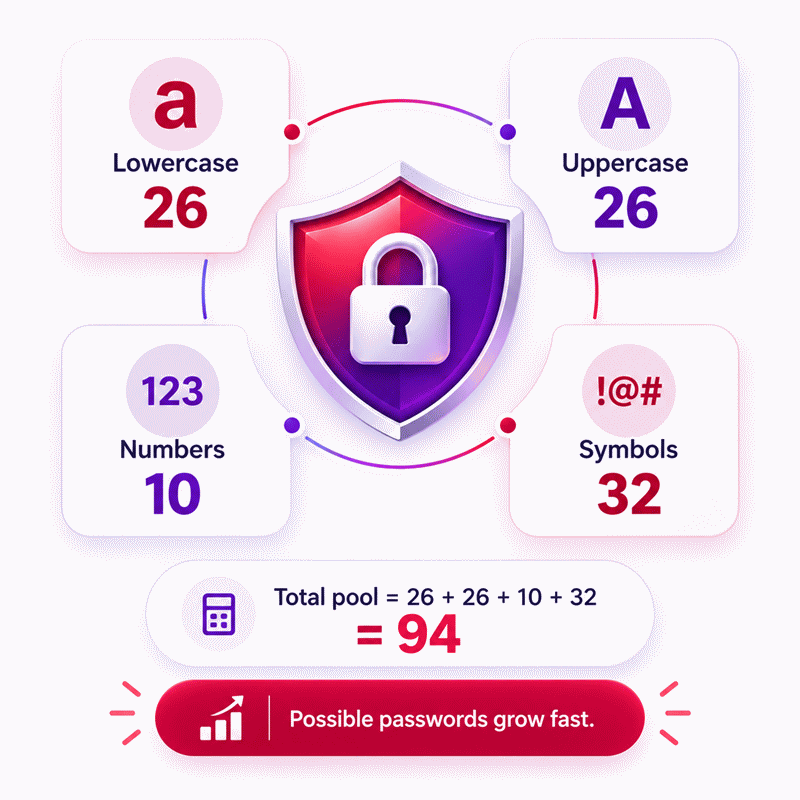
- Effective character pool: 26 to 94 distinct characters, depending on selected options.
- Reverse target: a positive whole-number password count that exactly matches a feasible result.
- A valid short length may return zero combinations when mandatory categories cannot all appear.
- Uppercase requirements apply only when uppercase letters are available as distinct characters.
- Number requirements apply only when digits are enabled, and symbol requirements need available symbols.

Wylena Brantford
Reviewers:
Valdren Clyforde
Zenara Dentwick
Check our editorial policy
September 14, 2026
1.0.0
Initial calculator and formula release.
Our engineers are here to help you get it right.
How Does a Password Combination Calculator Count Possible Passwords?
Password Combination Calculator results show how many valid password sequences can exist under a defined length and character policy. The calculation considers available lowercase letters, distinct uppercase letters, numbers, symbols, case sensitivity, mandatory character categories, and either an exact length or an inclusive length range. Unlike a basic character-pool estimate, constrained counting also excludes sequences that fail required-category rules.
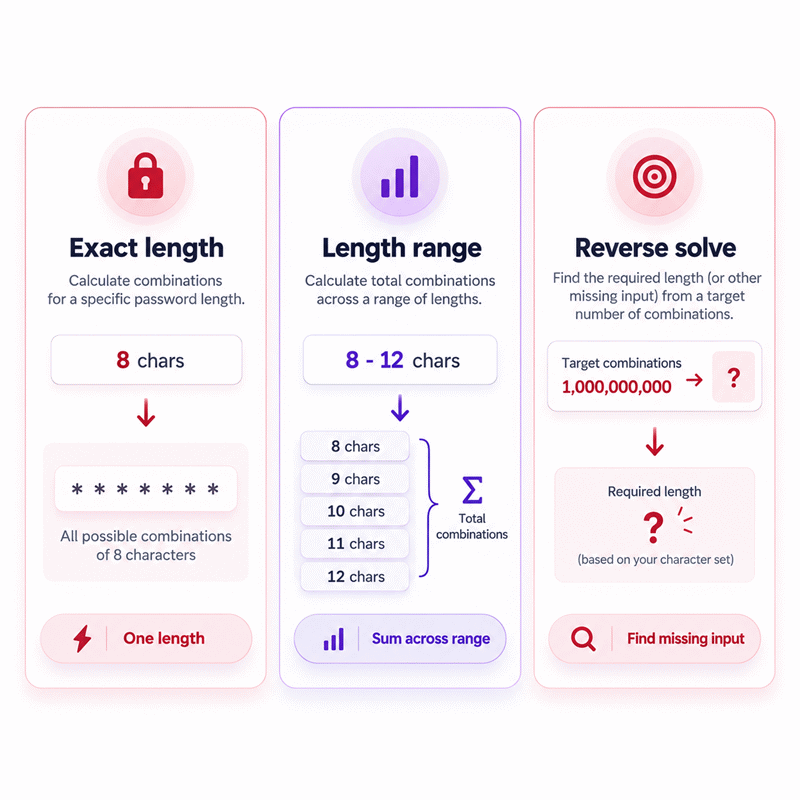
- Use exact length when every valid password has the same length.
- Use range mode when several password lengths are accepted.
- Available categories and required categories produce different search spaces.
- Character order matters and repeated characters may remain valid.
- Case sensitivity changes the number of distinct available characters.
- Reverse solving can recover a supported length from an exact target count.
- No real password needs to be entered to model a password policy.
- Theoretical combinations are not identical to entropy or real-world cracking time.
The Password Combination Calculator is most useful for policy comparison, combinatorics education, generator configuration checks, and mathematical validation. Read the result as a theoretical search-space count, then consider randomness, credential uniqueness, storage, rate limiting, and authentication design separately when evaluating real security.
Assumptions used in this calculator
- Characters may repeat at any password position.
- Character order matters, so different sequences count as different passwords.
- Lowercase letters use the 26-letter Latin alphabet.
- Uppercase letters add 26 distinct characters when case sensitivity is enabled.
- Digits include the ten characters from 0 through 9.
- The complete supported symbol set contains 32 printable symbols.
- Selected symbol exclusions reduce only the available symbol pool.
- Required categories mean at least one character from each category.
- Optional categories may appear zero or more times.
- Each allowed character is treated as equally available mathematically.
- Password counts use exact integer combinatorics without intermediate rounding.
- Range results sum valid counts for every included password length.
- Reverse solving requires an exact feasible integer match.
Results are rounded for display.
Internal calculations use full precision.
Formulas Used in Password Combination Calculator :
1. Effective Symbol Pool
2. Available Character Pool
3. Permutations With Repetition
4. Valid Passwords With Required Categories
5. Total Passwords Across a Length Range
6. Reverse Solving Conditions
- as
- Number of specifically allowed symbols, from 1 to 32.
- es
- Number of specifically excluded symbols, from 1 to 31.
- ns
- Effective number of available symbols.
- nl
- Available lowercase letters; normally 26.
- nu
- Distinct uppercase letters; 26 when enabled and 0 otherwise.
- nn
- Available digits; 10 when enabled and 0 otherwise.
- n
- Total number of available distinct characters.
- k
- Password length in characters.
- R
- Set of character categories that must appear at least once.
- S
- Any subset of the required-category set R.
- ni
- Number of characters belonging to required category i.
- Pr(n,k)
- Unrestricted permutations with repetition.
- N(k)
- Valid password count for one exact length.
- Nrange
- Total valid password count across an inclusive length range.
- kmin
- Minimum password length in an inclusive range.
- kmax
- Maximum password length in an inclusive range.
- T
- Known target password count used for reverse solving.
- x
- Unknown positive integer length solved from the target count.
Lowercase letters form the baseline required category. Additional enabled requirements add their corresponding categories to R, and inclusion-exclusion removes every password that omits one or more mandatory categories.
Variables & Definitions
View a complete list of all variables used in this calculator, including definitions and units
Password Combination Calculator Variables and Mathematical Symbols
| Variable | Meaning | Valid Domain or Rule | Unit |
|---|---|---|---|
| as | Number of specifically allowed symbols | Integer from 1 to 32 | symbols |
| es | Number of specifically excluded symbols | Integer from 1 to 31 | symbols |
| ns | Effective available symbol count | 0 to 32 | symbols |
| nl | Available lowercase letters | 26 in the standard Latin alphabet model | characters |
| nu | Distinct available uppercase letters | 26 when enabled; otherwise 0 | characters |
| nn | Available numerical digits | 10 when enabled; otherwise 0 | characters |
| n | Total available character pool | nl + nu + nn + ns | characters |
| k | Exact password length | Positive integer | characters |
| R | Set of mandatory character categories | Contains every category required at least once | set |
| S | Subset used by inclusion-exclusion | S is a subset of R | set |
| ni | Size of required category i | Positive integer category size | characters |
| Pr(n,k) | Unrestricted repeated permutations | n raised to the power k | passwords |
| N(k) | Valid password count for exact length k | Nonnegative integer | passwords |
| kmin | Minimum password length | Positive integer not exceeding kmax | characters |
| kmax | Maximum password length | Positive integer not below kmin | characters |
| Nrange | Total valid combinations across an inclusive length range | Sum of N(k) from kmin through kmax | passwords |
| T | Known target combination count for reverse solving | Positive exact integer | passwords |
| x | Unknown length solved from the target | Positive integer satisfying the selected reverse equation | characters |
Unit Conversion Table
Character Count Reference
| Unit Group | Unit Name | Symbol | Equivalent in Base Count | Used For |
|---|---|---|---|---|
| Discrete Count | Character | characters | 1 character = 1 character | Password length and total character pool size |
Symbol Count Reference
| Unit Group | Unit Name | Symbol | Equivalent in Base Count | Used For |
|---|---|---|---|---|
| Discrete Count | Symbol | symbols | 1 symbol = 1 available symbol character | Allowed, excluded, and effective special-character counts |
Password Combination Count Reference
| Unit Group | Unit Name | Symbol | Equivalent in Base Count | Used For |
|---|---|---|---|---|
| Discrete Count | Password Combination | passwords | 1 password combination = 1 distinct password sequence | Exact-length, range-total, and reverse-solve results |
Example Calculation
The full pool contains 68 possible characters at every password position.
Lowercase letters, uppercase letters, and digits must each appear at least once.
The six selected symbols remain optional, so passwords may contain zero or more symbols.
Inclusion-exclusion removes every sequence missing one or more required character categories.
The target represents the total number of valid passwords from the known minimum length upward.
The calculator evaluates candidate integer maximum lengths without rounding intermediate password counts.
A maximum length of 6 produces fewer combinations than the specified target.
Including length 7 produces the target exactly, so the reverse solution is 7.
Results are rounded for display.
Internal calculations use full precision.
Calculations Disclaimer
How Many Password Combinations Are Possible?
A password policy can look strong on paper yet leave one basic question unanswered: how many valid passwords can it actually create? A Password Combination Calculator turns that policy into a clear count. You choose the password length, case behavior, numbers, symbols, and required character groups. The calculator then counts only the sequences that satisfy those settings.
This matters because the answer can change by many orders of magnitude after a small policy change. Adding one character position can be far more important than adding a few symbols. Requiring a category can also change the valid total differently from simply allowing that category. Those distinctions are easy to miss when a policy is reviewed by intuition alone.
AxiCalculator is designed to make those differences visible without asking for an actual password. You describe the rule set rather than enter a secret credential. That makes the tool useful for mathematics, education, development work, security-policy comparison, and password-generator planning.
What Changes the Size of a Password Search Space?
The practical problem usually starts with several switches. Is the password case-sensitive? Are numbers allowed? Are symbols available? Must at least one uppercase letter or digit appear? Does the policy accept one fixed length or several lengths? Each answer changes which sequences belong to the valid search space.
The largest changes normally come from password length and the number of distinct choices available at each position. Restrictions then remove sequences that fail the policy. This is why two systems can appear to support the same characters but still have different numbers of valid passwords.
Why Password Length Changes the Result So Quickly
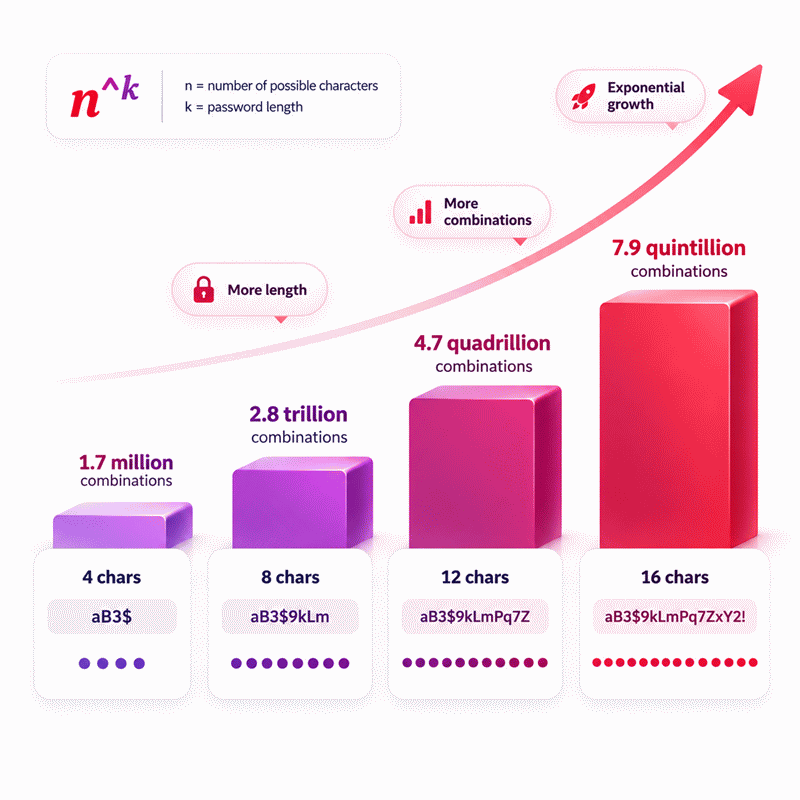
A new password position is not merely one more possible password. It creates another position that can use the available character pool. The search space therefore expands very quickly as length increases. This effect is one reason short passwords can have surprisingly small theoretical spaces even when several character types are permitted.
The same principle works in reverse. Removing a character position can collapse the search space dramatically. When comparing two policies, length should therefore be treated as a primary variable rather than a cosmetic setting.
How Character Pool Size Changes the Search Space
Suppose a policy begins with lowercase letters. Enabling distinct uppercase letters adds more choices. Enabling digits adds another group. Symbols can expand the pool again. A larger pool gives every password position more alternatives.
However, an available category and a required category are not the same thing. If digits are available but optional, passwords without digits remain valid. If a digit is mandatory, those digit-free passwords must be removed. A good calculator must understand that difference instead of treating every enabled category as automatically required.
Why Character Order and Repetition Matter
A common counting mistake is to treat passwords like selections where order is irrelevant. Passwords do not work that way. Changing the order of characters creates a different sequence. Repeated characters may also be valid when the policy permits them.
That means a password containing repeated letters is not automatically excluded, and two strings using the same collection of characters may still represent different passwords because their positions differ. Correct counting must preserve both facts.
When Password Rules Change the Simple Combination Count
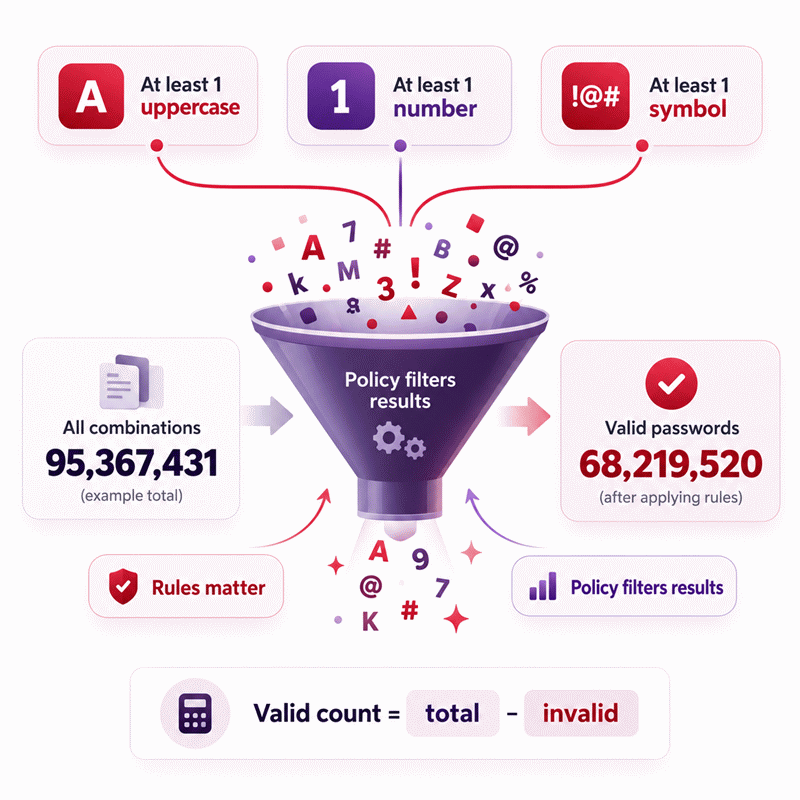
Simple character-pool counting works only when every sequence of the selected length is acceptable. Real password policies often add conditions. They may demand at least one uppercase letter, require a number, require a symbol, or disable particular character groups.
Those conditions turn the problem into constrained counting. Invalid strings must be removed without accidentally removing the same string more than once. This is where simplistic calculators can produce a misleading total.
Required Uppercase Letters, Numbers and Symbols
Imagine that uppercase letters and numbers are both available. If neither is required, a password made only from lowercase characters can still be valid. Once both categories become mandatory, that same password fails the policy.
The difference matters most when several requirements operate together. Some invalid passwords may miss one category, while others may miss two or more. The calculator must evaluate the complete rule set as one connected problem.
Why Overlapping Password Requirements Need Careful Counting
The difficult part is overlap. A password with no uppercase letters may also contain no digits. If a calculation subtracts every no-uppercase sequence and every no-digit sequence independently, that password can be removed twice.
Correct constrained counting compensates for those overlaps. The user does not need to perform that bookkeeping manually. The value of an advanced calculator is that the policy can be described in familiar language while the counting logic handles the overlapping restrictions consistently.
How Case Sensitivity Changes Available Passwords
Case sensitivity can change the meaning of the alphabet. In a case-sensitive policy, an uppercase character and its lowercase counterpart are distinct choices. In a case-insensitive model, that distinction disappears.
This is more than a visual difference. It changes the number of distinct sequences that can be created. When comparing two systems, make sure the calculator’s case setting matches the actual policy. Otherwise, the reported search space can be substantially different from the one the system truly accepts.
Exact Password Length or Length Range: Which Should You Use?
Many systems require one exact length, but others accept anything between a minimum and maximum. Treating these situations as identical can produce the wrong total. A fixed-length count describes only one layer of the search space. A range combines several layers.
AxiCalculator separates those modes so the user can model the real policy rather than force every scenario into one input format.
When an Exact-Length Calculation Gives the Right Answer
Use exact length when every valid password must contain the same number of characters. This is common in classroom exercises, fixed-format credentials, generated codes, and controlled test cases.
Exact-length mode is also useful when you want to compare how a policy changes between two specific lengths. Calculate each length independently and observe how rapidly the valid space changes.
How Minimum and Maximum Lengths Change the Total
A range is different because every accepted length contributes valid passwords. If a system accepts several lengths, the complete search space contains all valid strings at every included length.
This feature is particularly useful when reviewing authentication policies. A stated minimum tells only part of the story. The maximum accepted length also determines which additional password spaces are available to users.
Can You Reverse Calculate a Password Length?
Sometimes the unknown is not the number of passwords. You may already know a target count and need to identify which length produces it. That is a reverse-solving problem.
Reverse solving is useful in teaching, policy reconstruction, testing and validation. It also gives the calculator a bidirectional workflow instead of forcing every calculation to move only from inputs toward one fixed output.
Finding an Exact Length From a Known Combination Count
For an exact-length policy, the calculator can compare the known target against valid counts produced by candidate integer lengths. A solution exists when one of those lengths produces the target exactly under the selected character rules.
This exact-match requirement matters. A nearby number is not automatically a valid answer. Password length is a discrete quantity, so reverse solving should return a supported integer solution rather than an approximate fractional length.
Finding a Missing Minimum or Maximum Password Length
A range can also be solved backward. If the total valid count and one endpoint are known, the missing endpoint can sometimes be identified by evaluating candidate ranges.
This is useful for checking whether a published search-space total is consistent with a claimed minimum or maximum. It also turns a conventional counting calculator into a verification tool for more complex exercises.
What Does the Password Combination Result Really Tell You?
A large number is easy to interpret as “strong,” but that conclusion can be too simple. The calculator reports a theoretical count defined by the selected rules. It does not observe how people actually create passwords, whether credentials are reused, or how an authentication system stores and verifies them.
The result is best understood as the size of a mathematical space. That is valuable information, but it is one part of a wider security picture.
Password Combinations Versus Password Entropy
Combination count and entropy are related ideas, but they answer different questions. A combination count tells you how many valid sequences exist under a model. Entropy expresses uncertainty in a logarithmic way and depends on assumptions about how secrets are generated.
A randomly generated password can closely follow a defined character-selection process. Human-selected passwords often do not. People favor words, dates, keyboard patterns, familiar substitutions and memorable structures. That behavior changes how an attacker is likely to search.
Why Theoretical Search Space Is Not the Same as Crack Time
Search-space size does not contain enough information to predict a universal cracking time. Guessing speed varies with the authentication environment. Online systems may restrict repeated attempts. Offline attacks depend heavily on how password verifiers are stored and processed.
For that reason, AxiCalculator’s combination result should first be read as a combinatorial quantity. Any time-based security estimate would require additional assumptions that are separate from the password-space calculation itself.
Why Human-Chosen Passwords Behave Differently
A theoretical model often treats valid sequences as available choices. Humans do not explore those choices evenly. Many people select meaningful words, predictable number endings, repeated passwords, names, dates or familiar keyboard patterns.
This creates a gap between the mathematical size of a policy and the difficulty of guessing a particular human-created password. The calculator is therefore especially powerful when evaluating a random generation policy, where the generation process can be defined more precisely.
Where Is a Password Combination Calculator Most Useful?
The tool is useful far beyond a single “is my password strong?” question. Developers can compare policy configurations. Students can study discrete mathematics. Security teams can review theoretical search spaces. Technical writers can validate published examples. Generator designers can check how configuration changes affect the number of possible outputs.
Because the calculation can be performed from policy settings alone, none of these tasks requires exposing a real credential.
Comparing Password Policy Designs
Policy comparison is one of the clearest use cases. Configure one rule set, record its valid search space, then change a single variable. Increase the length. Remove case sensitivity. Enable numbers. Make a category mandatory. Adjust the permitted symbol set.
Changing one variable at a time reveals which decision actually caused the difference. This is more useful than describing one policy as “complex” and another as “simple” without quantifying the effect.
Learning Combinatorics With Real Password Rules
Password problems are practical examples of ordered counting. They demonstrate repetition, overlapping constraints, exact-length spaces and sums across several lengths. That makes them useful teaching cases for students who find abstract combinatorics difficult to visualize.
The interactive tool lets a learner change one condition and immediately see how the answer moves. That feedback can make a mathematical rule easier to understand than a static exercise alone.
Checking Random Password Generator Configurations
A password generator is defined partly by its choices. The length, alphabet, digits and allowed symbols determine the theoretical output space. If the generator guarantees certain categories, those guarantees also influence the valid total.
Before deploying or documenting a generator configuration, its search space can be checked independently with AxiCalculator. This does not certify the generator’s randomness, but it confirms the combinatorial size implied by the stated configuration.
How Can You Make Better Password Decisions?
A combination count is most useful when it changes a decision. If two policies are being compared, focus on the variables that meaningfully expand the space without creating unnecessary user friction. If a generator is being reviewed, confirm that its actual generation behavior matches its advertised character pool.
For personal accounts, the goal extends beyond maximizing a theoretical number. A credential should also be unique, difficult to predict and managed safely. Security controls work together, so password design should not be treated as an isolated checkbox.
Prioritize Length, Randomness and Unique Credentials
Longer random credentials create a very different challenge from short human-patterned passwords. Uniqueness also matters because reusing the same secret across services allows one compromise to affect another account.
A useful workflow is therefore simple: use the calculator to understand the theoretical space, use a trustworthy generation process when randomness is required, and avoid interpreting a large number as permission to reuse predictable credentials.
Use Password Managers and Strong Authentication Together
A password manager can reduce the need to memorize many unique random credentials. Strong authentication adds another layer so account protection does not depend on one secret alone.
AxiCalculator helps with one precise part of this process: understanding the mathematics of possible password sequences. Use that number as a decision aid, compare configurations carefully, and keep the wider authentication design in view. The result becomes more useful when it informs a better policy rather than simply producing an impressive integer.
Frequently Asked Questions
Why can two password policies with the same length produce different combination counts?
Should I enter my real password into a Password Combination Calculator?
Why does increasing password length change the result more than expected?
Can a large number of password combinations prove that my password is secure?
How should a security engineer model a policy requiring several character categories?
How can I validate a published password-space figure without knowing the original password?
Why can theoretical search-space calculations differ from observed password-cracking results?
Our engineers are here to help you get it right.