Ligation Calculator
- Last formula update:
Decimal & Rounding Policy
- All ligation calculations use full internal precision for vector mass, insert length, vector length, and insert-to-vector molar ratio.
- Intermediate values are not rounded, helping preserve accuracy when calculating the required insert mass.
- Final numerical results are displayed with up to 12 significant digits, while unnecessary trailing zeros are removed for readability.
- Unit conversions such as 1 kb = 1000 bp and 1 µg = 1000 ng are applied before calculation without intermediate rounding.
- For laboratory use, the displayed insert mass may be rounded to a practical precision that matches the accuracy of the available measuring equipment.
Valid range
- Insert length: Enter a finite value greater than 0 bp or kb.
- Vector length: Enter a finite value greater than 0 bp or kb.
- Vector mass: Enter a finite value greater than 0 ng or µg.
- Insert / vector ratio: Use a positive molar ratio appropriate for the ligation setup; 3:1 is a common reference ratio.
- Insert mass: The calculated or reverse-solved mass must be greater than 0 ng or µg; at least 50 ng may be used as practical ligation guidance rather than a mathematical minimum.
- All valid values must remain finite and physically meaningful because zero or negative DNA length, mass, or molar ratio cannot be used in the ligation formula.

Olivara Dremmont
Reviewers:
Urellyn Vexmere
Ralven Pexthorne
Check our editorial policy
August 29, 2026
1.0.0
Initial calculator and formula release.
Our engineers are here to help you get it right.
How Does a Ligation Calculator Help You Plan a DNA Ligation Reaction?
Ligation Calculator results help you estimate the required DNA insert mass from vector mass, insert length, vector length, and the selected insert-to-vector molar ratio. The calculation focuses on molecular balance rather than equal DNA weights, because fragments with different lengths contain different numbers of molecules at the same mass. This makes the calculator useful for planning cloning reactions before laboratory preparation begins.
- The required insert mass increases when vector mass increases.
- A longer insert requires more DNA mass at the same molar ratio.
- A longer vector reduces the required insert mass under identical conditions.
- The insert-to-vector molar ratio directly changes the required insert amount.
- A 3:1 ratio is a practical starting point, not a universal optimum.
- DNA mass ratio and molar ratio describe different relationships.
- Reverse solving can determine a missing vector mass, insert length, or vector length.
- Correct mathematics cannot compensate for poor DNA quality or incompatible ends.
- Enzyme condition, phosphorylation, DNA purity, and reaction setup can affect success.
The Ligation Calculator is most useful as a planning and verification tool. Use the calculated DNA relationship to prepare a controlled reaction, compare different molar ratios, identify unusual values, and reduce avoidable calculation errors before working with valuable DNA samples.
Assumptions used in this calculator
- DNA lengths and masses are assumed to be accurate and correctly measured.
- Insert and vector DNA are assumed to be compatible for ligation.
- Selected molar ratio is assumed appropriate for the intended ligation protocol.
- All entered values must be positive, finite, and physically meaningful.
- Length units are assumed correctly converted between base pairs and kilobases.
- Mass units are assumed correctly converted between nanograms and micrograms.
- The calculation assumes DNA mass is proportional to fragment length.
- Reaction chemistry is assumed suitable for standard DNA ligation conditions.
- DNA purity, phosphorylation, and end compatibility may affect experimental success.
- Enzyme activity and buffer quality are assumed within manufacturer specifications.
- Calculated insert mass is an estimate, not a guaranteed experimental outcome.
- Users should verify final conditions against their validated laboratory protocol.
- Industrial or regulated workflows require independent review before operational use.
Results are rounded for display.
Internal calculations use full precision.
Formulas Used in Ligation Calculator :
1. DNA Length Unit Conversion
Insert length and vector length must use compatible length units before their ratio is evaluated.
2. DNA Mass Unit Conversion
DNA mass is normalized to a compatible mass unit before the ligation calculation is performed.
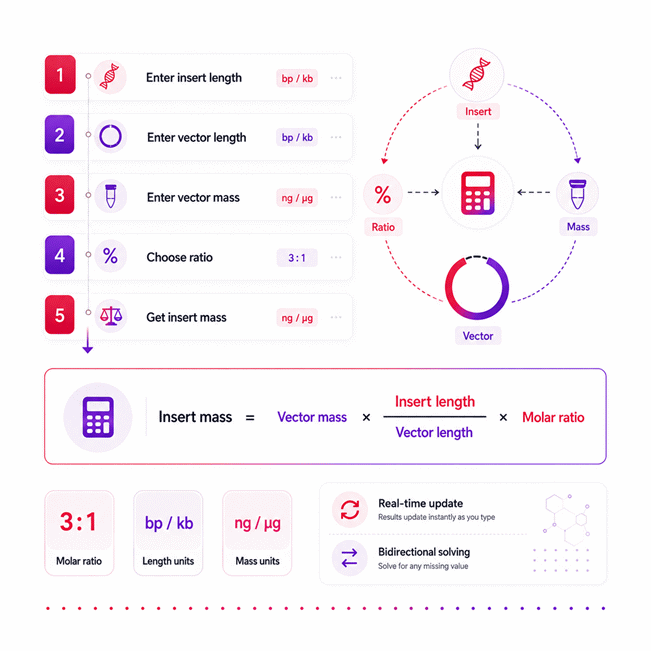
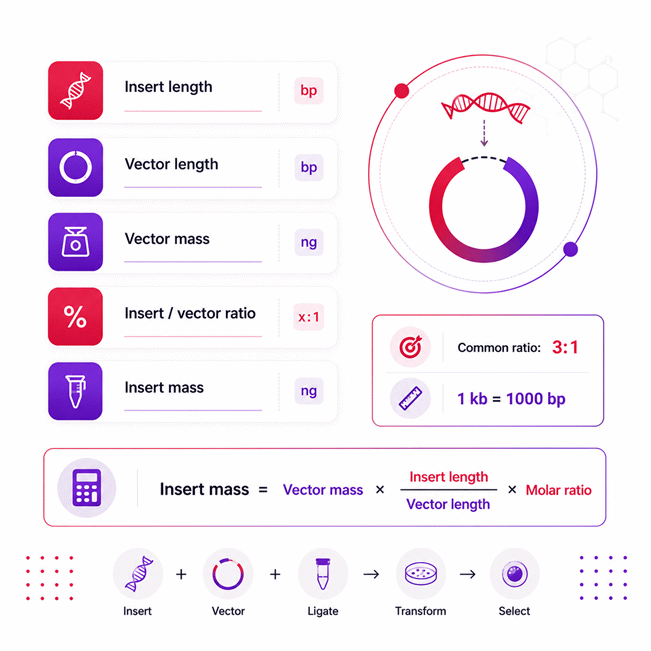
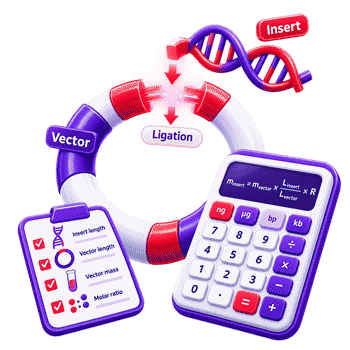
3. Required Insert Mass
The same equation is algebraically solved for a missing insert length, vector length, or vector mass during reverse calculation, so no additional independent reverse formula is required.
Variable Definitions
- minsert = required DNA insert mass, typically expressed in ng.
- mvector = DNA vector mass, expressed in a compatible mass unit.
- Linsert = DNA insert length, expressed in bp or kb.
- Lvector = DNA vector length, expressed in bp or kb.
- R = dimensionless insert-to-vector molar ratio, such as 1:1, 2:1, 3:1, 5:1, or 7:1.
Intermediate calculations retain full precision. Rounding is applied only to the displayed result. This calculator contains no price or cost calculation.
Variables & Definitions
View a complete list of all variables used in this calculator, including definitions and units
Ligation Calculator Variables and Units
| Symbol | Variable | Description | Supported Units | Calculation Role |
|---|---|---|---|---|
| minsert | Insert mass | Required mass of the DNA insert used in the ligation reaction. | ng, µg | Calculated result or editable value for reverse calculation |
| mvector | Vector mass | Mass of the DNA vector used as the backbone in the ligation reaction. | ng, µg | Input or reverse-solved variable |
| Linsert | Insert length | Length of the DNA fragment that will be inserted into the vector. | bp, kb | Input or reverse-solved variable |
| Lvector | Vector length | Length of the DNA vector receiving the insert fragment. | bp, kb | Input or reverse-solved variable |
| R | Insert-to-vector molar ratio | Dimensionless molar proportion of DNA insert relative to vector DNA. | Ratio | Selected calculation parameter |
Unit Conversion Table
Ligation Calculator Unit Conversion Table
| Unit Group | Unit Name | Symbol | Equivalent in Other Supported Unit | Conversion Relationship | Used For |
|---|---|---|---|---|---|
| DNA Length | Base Pair | bp | 0.001 kb | 1 bp = 0.001 kb | Insert length and vector length |
| DNA Length | Kilobase | kb | 1000 bp | 1 kb = 1000 bp | Insert length and vector length |
| DNA Mass | Nanogram | ng | 0.001 µg | 1 ng = 0.001 µg | Vector mass and insert mass |
| DNA Mass | Microgram | µg | 1000 ng | 1 µg = 1000 ng | Vector mass and insert mass |
Example Calculation
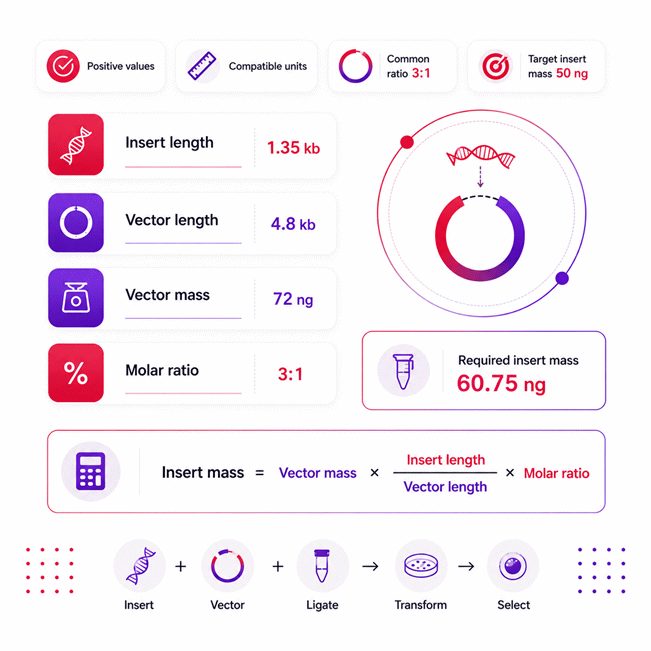
The insert and vector lengths already use the same unit, so no length conversion is required.
The vector mass is multiplied by the insert-to-vector length ratio and the selected molar ratio.
For these values, the calculated DNA insert mass required for the ligation setup is 60.75 ng.
Changing any known value automatically updates the result while preserving full calculation precision.
Required Insert Mass
Reverse Insert Length
Reverse Vector Length
Reverse Vector Mass
Length Conversion
Mass Conversion
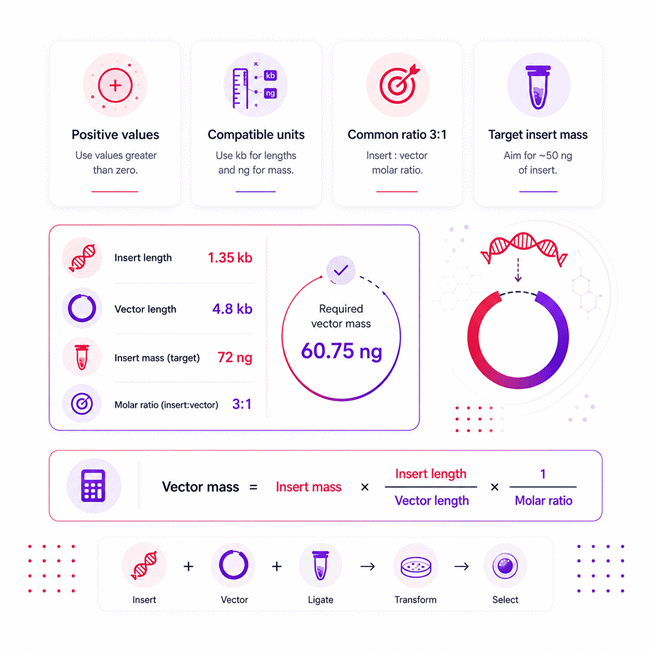
The required insert mass is known, while the vector mass is treated as the unknown variable.
The original ligation relationship is rearranged algebraically without changing its calculation method.
Because both DNA lengths use kilobases, their units cancel directly in the length ratio.
Using a 3:1 insert-to-vector molar ratio gives a reverse-calculated vector mass of 90 ng.
Required Insert Mass
Solve for Vector Mass
Solve for Insert Length
Solve for Vector Length
Solve for Molar Ratio
DNA Length Conversion
DNA Mass Conversion
Results are rounded for display.
Internal calculations use full precision.
Calculations Disclaimer
How Does a DNA Ligation Calculator Work?
A common problem starts before the ligation reaction even reaches the bench. You know your vector mass, but the required insert amount remains unclear. A ligation calculator turns those known values into a useful DNA mass. This ligation calculator also reduces repetitive manual calculations during cloning work. It connects DNA length, vector mass, and the selected molar relationship. The result helps you prepare a more deliberate ligation setup.
The calculation focuses on molecular balance rather than equal DNA weights. That distinction matters because DNA fragments can have very different lengths. Short fragments contain more molecules within the same DNA mass. Longer fragments contain fewer molecules at that same mass. This relationship explains many unexpected cloning calculations. It also explains why equal nanogram amounts may not provide equal molecule counts.
What Decision Does the Calculator Help You Make?
The immediate question is usually simple: how much insert DNA should you prepare? Guessing can waste DNA, reagents, and valuable bench time. The calculator gives a mass based on your intended molecular relationship. That result becomes a practical starting point for reaction preparation.
The tool is especially useful when fragment sizes differ greatly. Mental estimates become less reliable under those conditions. A small insert may need surprisingly little DNA mass. A large insert may require much more mass. The calculator makes that relationship visible before pipetting begins.
Quick check: equal DNA mass does not mean equal DNA molecule count.
How DNA Length Changes the Required Mass
Fragment length changes how much DNA mass represents a chosen molecule count. This effect is easy to miss during fast laboratory preparation. A shorter insert needs less mass for the same molecular proportion. A longer insert needs more mass under otherwise identical conditions.
Vector size matters for the same reason. A larger vector contains fewer molecules per nanogram. That changes the insert mass needed for the selected relationship. The calculation therefore treats DNA length as a central factor. It does not treat length as optional background information.
Why DNA Mass and Molar Ratio Are Different
A frequent mistake is treating a mass ratio like a molar ratio. They describe different things. Mass compares DNA weight. Molar ratio compares the relative number of DNA molecules.
This difference becomes important when insert and vector lengths are unequal. Equal masses can produce very unequal molecule counts. A short insert may greatly outnumber a long vector. The opposite can also happen with different fragment sizes. Correct planning therefore requires both DNA length and DNA mass.
What Changes When One Input Changes?
One small input change can shift the required insert mass quickly. Increasing vector mass increases the required insert amount. Increasing insert length also increases the required insert amount. Increasing vector length moves the result in the opposite direction.
The selected molecular relationship has a direct effect too. A larger ratio requests more insert molecules relative to vector molecules. That usually increases the required insert mass. This predictable behavior makes the calculator useful for rapid scenario testing.
Vector mass rises → required insert mass rises
Insert length rises → required insert mass rises
Vector length rises → required insert mass falls
Molar ratio rises → required insert mass rises
What Does the Insert-to-Vector Molar Ratio Mean?
A common concern appears when several ratio choices seem equally plausible. The ratio describes insert molecules relative to vector molecules. It does not directly describe their weights. A 3:1 relationship means three insert molecules per vector molecule.
That concept becomes more useful when DNA sizes differ greatly. The required masses will rarely follow the same numerical ratio. A 3:1 molecular relationship does not usually mean three times the DNA weight. Fragment length changes the mass needed to create that molecule count.
Why Is a 3:1 Insert-to-Vector Ratio a Common Starting Point?
Many cloning workflows begin around a moderate insert excess. A 3:1 relationship offers a practical starting point for many reactions. It increases insert availability without assuming extreme DNA excess.
However, 3:1 should not become an automatic rule. Reaction chemistry can behave differently across cloning systems. Fragment length can also influence practical performance. DNA quality and end structure matter as well. The calculated ratio supports planning, not blind protocol replacement.
Do not confuse a common starting ratio with a universal optimum.
When Lower Ratios Can Make Sense
More insert is not always the better choice. Some reactions perform well with a smaller insert excess. Similar fragment sizes may reduce the need for aggressive ratios. Clean DNA can also support efficient encounters between compatible ends.
A lower ratio may also help when unwanted multi-insert products matter. Less insert can reduce excessive insert availability. However, the best choice depends on the specific cloning workflow. The calculator lets you compare planned ratios without rebuilding calculations manually.
When Higher Ratios Need More Caution
A difficult ligation can tempt users to keep increasing insert DNA. That approach can create new problems. Excess insert may favor unwanted structures or multiple insert events. It can also complicate interpretation after transformation.
Higher ratios should therefore have a clear reason. Small inserts sometimes need larger molecular excess. Difficult reaction conditions may also justify testing several ratios. The useful strategy is controlled comparison, not uncontrolled DNA addition.
Why More Insert Is Not Always Better
A successful cloning workflow depends on more than molecule abundance. DNA ends must still meet under workable reaction conditions. Excess DNA cannot repair poor compatibility. It cannot restore damaged DNA. It cannot replace active enzyme or suitable buffer.
This is why calculation and laboratory judgment must work together. The calculator answers a stoichiometric question. The experiment answers whether the chosen setup actually performs well. Keeping those roles separate prevents false confidence.
How Does Reverse Solving Work in a Ligation Calculator?
A real laboratory problem often begins with the result already known. You may know the desired insert mass but lack another value. Traditional calculators force you to rearrange the relationship manually. Reverse solving removes that extra step.
A bidirectional calculator can treat one missing parameter as the unknown. The remaining known values then determine that missing value. This creates a faster workflow during planning and troubleshooting. It also reduces transcription mistakes during manual rearrangement.
When Vector Mass Is Missing
Sometimes the required insert amount is already fixed by a workflow. The vector mass may still need adjustment. Reverse solving can determine the compatible vector mass from the known information.
This is useful when available DNA stocks create practical limits. You can start from the mass you can realistically prepare. The calculator then works backward through the same mathematical relationship. No separate calculation model is needed.
When Insert Length Is Missing
A planning sheet may contain masses but omit a fragment length. Reverse solving can expose that missing information mathematically. The result can then be compared with the expected construct design.
This feature is also useful for checking recorded data. A surprising solved length may reveal a copied value error. It may also expose an incorrect mass entry. Reverse solving therefore becomes both a calculator feature and a checking tool.
When Vector Length Is Missing
Vector length can also become the unknown value. Known mass information can help reconstruct the missing length relationship. This approach can support data review before reaction preparation.
The result should still match the actual construct map. A mathematically consistent number is not automatically a biological identity. Use reverse solving to test consistency. Then compare the result with the real plasmid information.
How to Check a Reverse-Solved Result
A reverse result should never feel like a mysterious number. A simple consistency check can increase confidence. Place the solved value back into the original relationship. The known result should return again.
If it does not return, inspect the entered values first. Check for a misplaced decimal point. Check the selected ratio. Check the DNA lengths and masses. Most unexpected results come from input interpretation, not advanced mathematics.
Known values → choose one unknown → reverse solve → verify result
Unexpected result → inspect inputs → confirm construct data → calculate again
Why Can a Correct Ligation Calculation Still Fail?
This situation causes understandable frustration in molecular cloning work. The calculation looks correct, yet the reaction gives poor results. The reason is simple. Stoichiometry controls only one part of ligation success.
DNA quality, DNA ends, enzyme condition, and reaction handling still matter. A calculator cannot measure those laboratory factors. It can only organize the mathematical relationship between the entered DNA values. Understanding that boundary helps users troubleshoot more intelligently.
DNA Quality and End Compatibility
Clean calculations cannot compensate for damaged or contaminated DNA. Poor DNA preparation can reduce ligation performance. Residual contaminants may also affect later workflow stages.
End compatibility matters just as much. DNA fragments must have ends that support the intended joining process. Matching numbers cannot make incompatible ends become compatible. Before changing the ratio, verify the DNA design itself.
Phosphorylation and Ligase Activity
A perfectly balanced DNA setup may still fail enzymatically. Ligation depends on suitable DNA end chemistry. It also depends on active ligase and usable reaction components.
Enzyme handling deserves attention during troubleshooting. Repeated temperature abuse can reduce expected performance. Buffer condition can also affect the reaction. These problems may look like calculation errors, but their causes are experimental.
If the mathematics looks right, inspect chemistry before changing every DNA value.
Sticky-End and Blunt-End Ligation Behave Differently
Not every ligation has the same practical difficulty. Compatible overhangs can help DNA ends meet productively. Blunt ends lack that pairing advantage. Their reactions can therefore require more careful optimization.
The calculator still provides useful molecular planning in both situations. However, identical ratios do not guarantee identical experimental performance. Users should separate mathematical correctness from reaction efficiency. This distinction prevents repeated changes to already correct calculations.
Common Setup Mistakes That Hide Behind the Numbers
Small preparation mistakes can create large experimental consequences. An incorrect fragment size can distort the calculated mass. A copied concentration value can mislead later pipetting. Selecting the wrong ratio can change the intended molecule balance.
Another common problem is solving the wrong unknown. Reverse calculation requires a clear missing parameter. Trying to infer several unknown values creates ambiguity. Good records make this process much safer. Clear sample labels also reduce errors during bench preparation.
How Should You Use a Ligation Calculator in a Real Laboratory Workflow?
Bench time becomes stressful when calculations happen during active pipetting. A better workflow separates calculation from reaction assembly. Complete the numerical planning first. Then prepare the physical reaction from a checked plan.
AxiCalculator supports that process with direct and reverse solving. It lets users test changes before touching precious DNA. Results can also be reviewed before the reaction begins. This creates a clearer path from planning to bench work.
Before Reaction Setup
Start by confirming the identity of every DNA fragment. Check the insert size against the expected construct. Check the vector size against its current plasmid map. Confirm the DNA mass chosen for the vector.
Then decide which molecular relationship you want to test. Avoid selecting a ratio without understanding its purpose. A moderate starting point may be suitable for many workflows. Difficult reactions may require planned comparison across several conditions.
During Bench Preparation
Once the calculation is complete, avoid changing values casually. Every changed mass can alter the intended molecular relationship. Keep the calculated result beside the physical reaction plan.
If stock concentration affects pipetting volume, handle that as a separate preparation step. Concentration describes mass per volume. The ligation calculation determines the target mass relationship. Mixing those concepts can create avoidable mistakes.
After the Calculation
A useful result should answer more than one immediate question. It should also support review and communication. Save the values used for the reaction. Record the chosen ratio with the final construct notes.
Shared calculation data can help team members verify the setup. Exported records can also improve repeatability between experiments. These steps become especially useful when several reactions run together. Clear records reduce uncertainty during later troubleshooting.
When Should You Recheck the Result?
Recheck whenever the DNA preparation changes. A different vector mass changes the required insert amount. A redesigned insert length changes it too. A different molecular ratio also changes the planned mass.
Recheck after replacing a construct with another plasmid version. Recheck after discovering a sequence-length correction. Recheck when a previous calculation looks unusually large or small. Unexpected numbers deserve investigation before pipetting begins.
AxiCalculator is most useful before those mistakes reach the bench. Use it to test the DNA relationship first. Use reverse solving when one value is missing. Then verify the result against the actual construct information.
Good ligation planning does not remove every experimental risk. It removes one important source of uncertainty. That makes troubleshooting faster when the biology becomes unpredictable.
Frequently Asked Questions
Can I use the calculator when my vector and insert come from different DNA preparation methods?
Should I recalculate the ligation setup after changing only the vector concentration?
Can I compare several candidate inserts with the same vector using one calculation method?
What should I do if the calculator gives an unexpectedly large or small insert mass?
How can I detect a hidden unit mistake when reverse solving gives a mathematically valid result?
When should a professional lab test multiple insert-to-vector ratios instead of relying on one calculated setup?
How should I document a ligation calculation so another researcher can reproduce it later?
Engineering Resources
Our engineers are here to help you get it right.