Metal Weight Calculator
- Last formula update:

Decimal & Rounding Policy
- Use full internal precision for all metal weight calculations; never round intermediate volume, density, unit conversion, or quantity values.
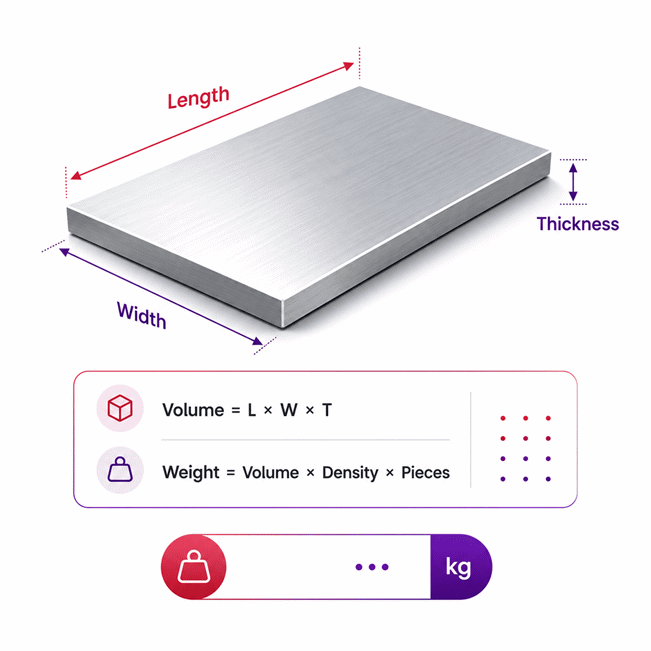
- Calculate total weight using: Total Weight = Volume × Density × Number of Pieces.
- Round only the displayed result, using up to 6 significant digits and removing unnecessary trailing zeros.
- Perform all unit conversions before rounding so equivalent units return consistent metal weight results.
- Use the unrounded internal value for reverse calculations, even when the displayed value has been rounded.
- Use scientific notation only for extremely small or large values where standard decimal formatting reduces readability.
Valid range
- Dimensions: Enter finite values greater than 0; all required dimensions must match the selected metal shape.
- Inner and outer dimensions: For hollow shapes, each inner dimension must remain smaller than its corresponding outer dimension.
- Volume: Use a finite value greater than 0 when volume is entered directly for a custom or unsupported shape.
- Material density: Density must be a finite positive value; selected materials use their predefined density, while custom materials require a user-entered density.
- Number of metal pieces: Use a positive quantity of at least 1 piece for the total metal weight calculation.
- Total weight: The valid result must be greater than 0 and is calculated using Total Weight = Volume × Density × Number of Pieces.
- Reverse calculations: Keep the same calculation method and solve only one unknown parameter at a time from the known total weight, density, quantity, and required geometry.

Reviewers:
Elvarine Jexmont
Fenrick Zorquell
Check our editorial policy
August 18, 2026
1.0.0
Initial calculator and formula release.
Our engineers are here to help you get it right.
How Does a Metal Weight Calculator Help You Estimate Total Metal Weight?
Metal Weight Calculator estimates total metal weight from the selected material, shape, dimensions, and piece quantity. It first identifies the physical volume represented by the chosen geometry. Material density then converts that volume into mass, while quantity scales the result for multiple identical pieces. The Metal Weight Calculator also supports different metal forms, unit systems, custom material data, and reverse solving when one required value is unknown.
- Choose the correct metal or alloy before entering dimensions.
- Match the selected shape to the real physical metal part.
- Use accurate dimensions for better planning and purchasing estimates.
- Hollow shapes must account for the material removed from their interior.
- Quantity converts a single-piece result into the complete project weight.
- Reverse solving can recover one missing dimension, quantity, or custom density.
- Theoretical weight may differ from measured weight because real parts have tolerances.
- Coatings, holes, machining, welds, and cutouts can change finished-part weight.
- Use calculated weight for planning, comparison, ordering, fabrication, and logistics checks.
Assumptions used in this calculator
- Selected material density is assumed uniform throughout each metal piece.
- Predefined density values represent typical material properties, not certified batch measurements.
- All entered dimensions are assumed accurate and measured in compatible units.
- Each piece is assumed to match the selected ideal geometric shape.
- Surface coatings, plating, paint, rust, and contamination are excluded.
- Holes, cutouts, welds, threads, and machining losses require separate consideration.
- Hollow shapes assume valid inner dimensions smaller than corresponding outer dimensions.
- Custom density values are assumed accurate and applicable to the entire piece.
- All pieces in one calculation are assumed geometrically identical.
- Total weight equals single-piece volume times density times piece quantity.
- Unit conversions are performed before calculation using consistent dimensional relationships.
- Intermediate calculations remain unrounded; rounding applies only to displayed results.
- Results are estimates and should be verified for safety-critical industrial decisions.
Results are rounded for display.
Internal calculations use full precision.
Formulas Used in Metal Weight Calculator :
1. Unit Normalization
Convert every entered dimension, volume, density, and known weight to a compatible base unit before calculation.
2. Radius From Diameter
Use this relation whenever diameter entry is selected instead of radius entry.
3. Rectangular Prism Volume
4. Circular Prism Volume
5. Hexagonal Prism Volume
6. Octagonal Prism Volume
7. Ring-Based Prism Volume
8. Wire Volume
9. Tube Volume
10. Sphere Volume
11. Ring Volume
12. Can Volume
This geometry represents a closed hollow cylindrical can with uniform wall and end thickness.
13. Other Shape Volume
Use the directly entered volume when the metal piece does not match a predefined shape.
14. Total Metal Weight
After the volume of one piece is known, multiply it by material density and the number of identical pieces.
M — Total metal weight, in kg after base-unit calculation.
V — Volume of one metal piece, in m³.
ρ — Density of the selected metal or alloy, in kg/m³.
n — Number of identical metal pieces, dimensionless.
L — Length of a wire, tube, or elongated prism, in m.
w — Width of a rectangular prism, in m.
t — Thickness or wall thickness required by the selected shape, in m.
r — Radius of a circular element or outer radius of the can model, in m.
D — Diameter corresponding to a circular radius, in m.
Ro — Outer radius of a hollow or ring-shaped element, in m.
Ri — Inner radius of a hollow or ring-shaped element, in m.
s — Side length of a regular hexagonal or octagonal cross-section, in m.
h — External height of the can model, in m.
Vinput — Directly entered volume for the Other shape, in m³.
xu — Numeric input expressed in its currently selected unit.
cu — Conversion factor from the selected unit to the compatible base unit.
xSI — Normalized value used by the calculation engine.
Variables & Definitions
View a complete list of all variables used in this calculator, including definitions and units
Metal Weight Calculator Variables and Units
| Variable | Meaning | Base Unit | Calculation Role |
|---|---|---|---|
| M | Total weight of all metal pieces | kg | Final result calculated from volume, density, and number of pieces |
| V | Volume of one metal piece | m³ | Calculated from the selected shape or entered directly for an unsupported shape |
| ρ | Density of the selected metal or alloy | kg/m³ | Predefined by material selection or entered as a custom density |
| n | Number of identical metal pieces | dimensionless | Multiplies the weight of one piece to obtain total weight |
| L | Length of a wire, tube, or elongated prism | m | Linear dimension used in the applicable volume equation |
| w | Width of a rectangular prism or plate | m | Used with length and thickness to determine rectangular volume |
| t | Thickness, prism depth, or wall thickness required by the selected geometry | m | Geometry-specific dimension used to calculate material volume |
| r | Radius of a circular element or outer radius used by the can geometry | m | Used in circular, spherical, wire, and can volume calculations |
| D | Diameter corresponding to a circular radius | m | Alternative circular dimension converted to radius before volume calculation |
| Ro | Outer radius of a hollow or ring-shaped metal element | m | Defines the external boundary of hollow and ring-based geometry |
| Ri | Inner radius of a hollow or ring-shaped metal element | m | Defines the internal void removed from the material volume |
| s | Side length of a regular hexagonal or octagonal cross-section | m | Defines the cross-sectional area of regular polygonal prisms |
| h | External height of the can geometry | m | Used with radius and thickness to determine can material volume |
| Vinput | Directly entered volume for the Other shape | m³ | Replaces a predefined geometry equation when volume is supplied directly |
| xu | Numeric value expressed in the user-selected unit | selected unit | Original displayed value before base-unit normalization |
| cu | Conversion factor from the selected unit to its compatible base unit | unit-dependent | Converts entered values without changing the underlying physical quantity |
| xSI | Normalized value used internally by the calculation process | SI base unit | Used in geometry, density, weight, and reverse calculations before display rounding |
Unit Conversion Table
Length Unit Conversion Table
| Unit Group | Unit Name | Symbol | Equivalent in Meter | Used For |
|---|---|---|---|---|
| Popular Units | Millimeter | mm | 0.001 m | Thickness, radius, diameter, and small dimensions |
| Popular Units | Centimeter | cm | 0.01 m | Radius, diameter, width, height, and side length |
| Popular Units | Meter | m | 1 m | Length and general metal dimensions |
| Popular Units | Inch | in | 0.0254 m | Imperial dimensions, plate sizes, tubing, and diameters |
| Popular Units | Foot | ft | 0.3048 m | Long metal sections, wire, tube, and structural dimensions |
| Popular Units | Yard | yd | 0.9144 m | Long metal pieces and extended material lengths |
| Popular Units | Thousandth of an Inch | mil | 0.0000254 m | Thin sheet and precise thickness measurements |
| Scientific Units | Micrometer | µm | 0.000001 m | Very small thicknesses and precision dimensions |
Volume Unit Conversion Table
| Unit Group | Unit Name | Symbol | Equivalent in Cubic Meter | Used For |
|---|---|---|---|---|
| Popular Units | Cubic Millimeter | mm³ | 0.000000001 m³ | Very small metal components and direct volume input |
| Popular Units | Cubic Centimeter | cm³ | 0.000001 m³ | Small metal parts and direct volume input |
| Popular Units | Cubic Meter | m³ | 1 m³ | Base volume used for metal weight calculations |
| Popular Units | Cubic Inch | in³ | 0.000016387064 m³ | Imperial metal component volume |
| Popular Units | Cubic Foot | ft³ | 0.028316846592 m³ | Large imperial metal volumes |
| Popular Units | Liter | L | 0.001 m³ | Direct volume entry for custom metal shapes |
| Scientific Units | Cubic Micrometer | µm³ | 0.000000000000000001 m³ | Microscopic and precision-engineered metal volumes |
Density Unit Conversion Table
| Unit Group | Unit Name | Symbol | Equivalent in kg/m³ | Used For |
|---|---|---|---|---|
| Popular Units | Kilogram per Cubic Meter | kg/m³ | 1 kg/m³ | Base material density used in the weight calculation |
| Popular Units | Gram per Cubic Centimeter | g/cm³ | 1000 kg/m³ | Common engineering and material density data |
| Popular Units | Pound per Cubic Foot | lb/ft³ | 16.01846337396 kg/m³ | Imperial engineering and construction density values |
| Popular Units | Pound per Cubic Inch | lb/in³ | 27679.9047102 kg/m³ | Imperial metal and alloy density specifications |
| Scientific Units | Milligram per Cubic Millimeter | mg/mm³ | 1000 kg/m³ | Small-scale engineering and material density measurements |
Weight Unit Conversion Table
| Unit Group | Unit Name | Symbol | Equivalent in Kilogram | Used For |
|---|---|---|---|---|
| Popular Units | Kilogram | kg | 1 kg | Base total metal weight and general engineering results |
| Popular Units | Gram | g | 0.001 kg | Small metal parts and lightweight components |
| Popular Units | Pound | lb | 0.45359237 kg | Imperial metal weight and purchasing calculations |
| Popular Units | Ounce | oz | 0.028349523125 kg | Small imperial metal weight results |
| Popular Units | Metric Tonne | t | 1000 kg | Heavy metal loads, transport, and industrial quantities |
| Popular Units | Short Ton | short ton | 907.18474 kg | Heavy imperial industrial and construction loads |
| Scientific Units | Milligram | mg | 0.000001 kg | Very small metal masses and precision applications |
Example Calculation
The dimensions are first converted to compatible base units before calculating volume. The rectangular prism volume represents one steel plate and is not rounded during the intermediate calculation. That volume is multiplied by the steel density to obtain the mass of one piece. Finally, the single-piece mass is multiplied by the quantity to obtain the total metal weight.
The known width and thickness are first converted to compatible base units. Total weight, density, quantity, width, and thickness are then kept fixed while length remains unknown. The same total-weight equation is rearranged to isolate the missing length without introducing a different calculation method. Substituting the solved length back into the original equation reproduces the known total weight.
Results are rounded for display.
Internal calculations use full precision.
Calculations Disclaimer
How Does a Metal Weight Calculator Determine Total Weight?
A buyer often knows the metal size but not its total weight. That gap can slow purchasing, transport, and workshop planning. A Metal Weight Calculator closes that gap before material reaches the site. The Metal Weight Calculator connects material type, shape, size, and quantity. It then gives one clear total weight result.
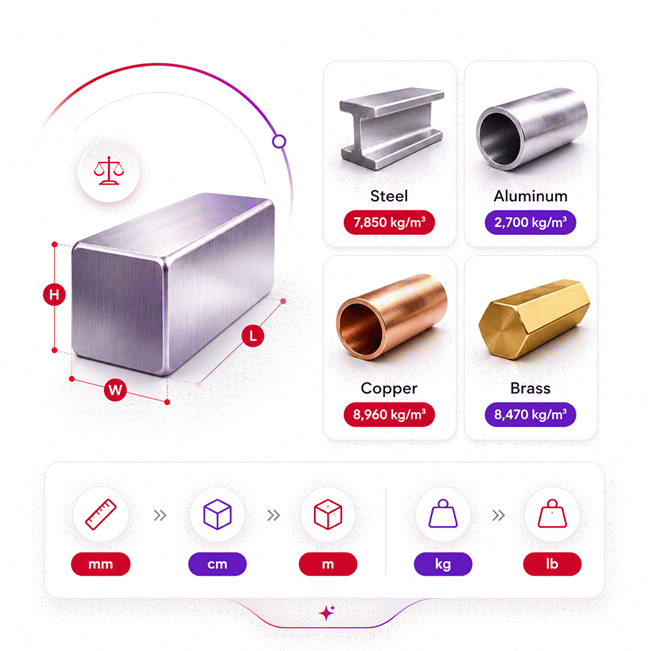
The first key choice is the metal or alloy. Different metals can have very different weights at the same size. A steel part will not weigh the same as an aluminum part. Copper and brass also behave differently. The calculator accounts for this difference through the selected material.
The second choice is shape. Shape tells the calculator how much metal exists inside the part. A solid plate contains material across its full body. A tube contains an empty space inside. A ring also contains a central void. These differences matter more than they first appear.
Change the material, and weight changes. Change the shape, and volume changes.
What Changes When the Material Changes?
Imagine two parts with the same outside dimensions. One is steel and one is aluminum. Their sizes may match exactly. Their final weights can still differ greatly.
This happens because each material has its own physical density. The selected alloy therefore affects the final result directly. This matters when comparing design options. It also matters when planning transport or handling.
A material selector saves the user from entering everything manually. It also reduces simple input mistakes. Custom material data remains useful for uncommon grades or special alloys.
Why Shape Selection Matters More Than It Looks
A common mistake starts with choosing the wrong geometric shape. The dimensions may look correct. The final result can still be wrong.
A plate needs different geometric inputs than a tube. A sphere needs fewer inputs than a hollow section. A wire also follows a different shape model. The shape selector therefore controls which fields become relevant.
This dynamic approach keeps the interface easier to use. Users see only the dimensions needed for the selected object. That reduces clutter and decision fatigue.
Why Quantity Changes Real Project Planning
One part may seem easy to handle. Hundreds of identical parts tell another story. Quantity turns a single-piece estimate into a project-level result.
This matters during purchasing, storage, loading, and workshop scheduling. A small difference per piece can become significant across a large batch.
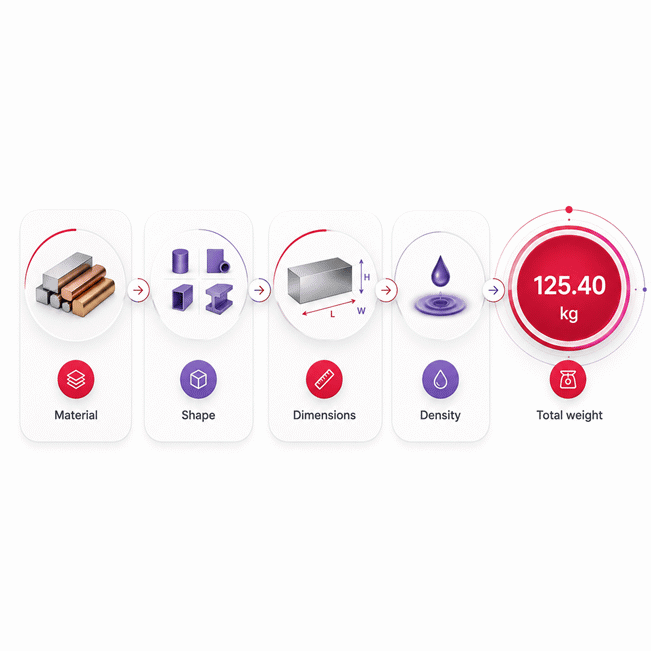
Material → Shape → Dimensions → Quantity → Total Weight
Choosing Material and Shape Without Guesswork
A user can enter perfect dimensions and still get a poor estimate. The wrong material choice can make the result misleading. The wrong shape can do the same.
The safest workflow starts with identifying the actual material grade. The next step is matching the physical form. Only then should dimensions be entered.
This order sounds simple. Yet it prevents many common mistakes. It also makes the result easier to review later.
Steel, Aluminum, Copper, Brass, and Other Metals
Metal names can be broad. Steel alone includes many grades and compositions. Stainless steel is not identical to carbon steel. Different aluminum alloys can also vary.
For quick planning, a standard material choice is often enough. Higher-risk work needs better material identification. Use the known alloy whenever that information is available.
Aluminum is often chosen when lower mass matters. Steel is common when strength and cost drive decisions. Copper is useful where electrical or thermal performance matters. Brass appears in many fittings and machined parts.
The calculator should not decide which metal is best. Its role is different. It helps show how a material choice affects expected weight.
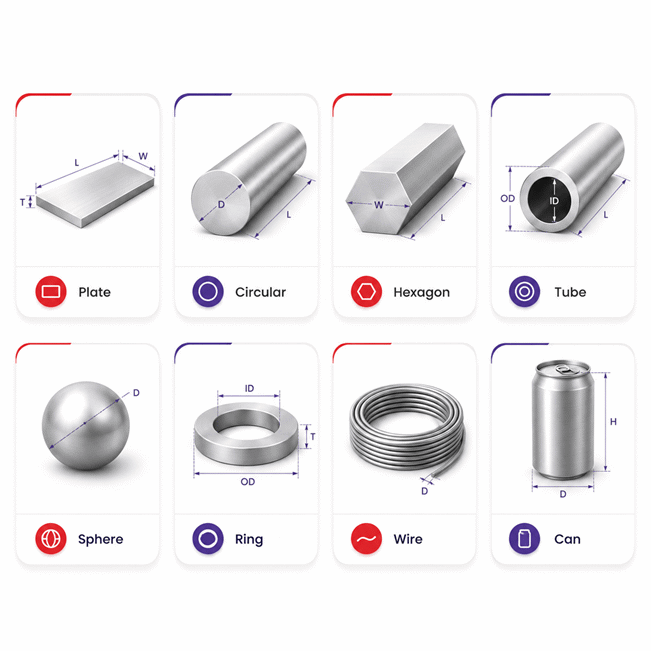
Plate, Circular, Hexagonal, Tube, Wire, Sphere, Ring, and Can Shapes
A workshop may receive material in many physical forms. Some are solid. Others are hollow. Some have simple faces. Others use curved geometry.
A rectangular prism suits plates, sheets, and rectangular solid pieces. Circular forms suit many discs and cylindrical parts. Hexagonal forms are common in bars and machined stock.
A tube must account for its internal opening. A ring also contains unused central space. A sphere uses its complete curved body. A can combines outer size with a hollow interior.
The key question is simple: where does metal physically exist? Choose the shape that answers that question best.
When Custom Material Data Becomes Important
Not every industrial alloy appears in a standard material list. Special grades can require known material data. Custom density becomes useful in that case.
Use trusted project data when available. Material certificates can also help identify the correct grade. This is especially important for specialized alloys.
A custom value can improve relevance. It does not fix incorrect dimensions or poor material identification.
The calculator is only as reliable as the material and geometry you provide.
Reverse Metal Weight Calculation: Solve Missing Dimensions, Quantity, or Density
Sometimes the known value is the total weight. One dimension may be missing. A basic one-way calculator becomes frustrating in this situation.
Reverse solving changes the workflow. The user can keep the known values. One missing parameter can then become the calculated result.
This is useful during inspection, purchasing, stock checks, and design review. It also helps when paperwork contains weight but lacks one measurement.
When Reverse Solving Saves the Most Time
A warehouse record may show total batch weight. The number of pieces may be unclear. A drawing may show most dimensions but miss one value.
A reverse-capable tool can use the information already known. The user does not need a separate calculator. There is also less need for manual rearrangement.
This workflow is especially useful when checking old records. It also helps when reviewing supplier data. A known weight can become a useful cross-check.
The process remains easier when only one value is unknown. Too many unknowns create several possible solutions. That makes the result uncertain.
Which Missing Values Can Be Solved?
The available answer depends on the selected shape and known information. A missing length can often be recovered from other dimensions. Quantity can also become the unknown value.
Custom material density may become solvable when geometry and total weight are known. Hollow shapes need enough information about both boundaries.
Reverse solving is not magic. The remaining information must define one valid physical result. Impossible geometry should not be accepted.
Why One Unknown at a Time Is the Safer Approach
Two missing dimensions can describe many possible objects. Three missing values create even more uncertainty.
Solving one unknown keeps the problem defined. It also makes the answer easier to verify. This is important in technical work.
Users should clear the value they want to solve. The remaining known values then define the problem.
Known Weight → Keep Known Inputs → Clear One Value → Solve → Verify
Common Metal Weight Calculation Errors and How to Avoid Them
A wrong weight estimate can look believable. That makes it more dangerous than an obvious error. Small input mistakes can quietly affect purchasing decisions.
The best defense is a quick review before using the result. Check material, shape, dimensions, and quantity. Then ask whether the result makes physical sense.
Wrong Material Grade and Shape Mismatch
Choosing a nearby material name can feel harmless. It may not be harmless in large quantities. The effect grows as project weight increases.
Shape mismatch is another common issue. A solid bar should not be treated like a tube. A ring should not be treated like a full disc.
Visual inspection helps. Compare the selected shape with the actual part. If metal is missing from the center, choose a hollow model.
Custom density should not become a random adjustment tool. Use it only when better material data exists.
Holes, Cutouts, Coatings, and Finished Parts
A drawing can show a large outer size. The final component may contain many cutouts. Those missing areas reduce the actual material present.
Basic shape calculations often represent ideal geometry. Machining can remove material later. Drilling, slots, pockets, and edge trimming also change weight.
Paint and plating can move the result in the opposite direction. They add material to the finished component. Their effect may be small or meaningful.
Complex fabricated parts may also include weld metal. Fasteners can add more mass. These details deserve attention when close accuracy matters.
Nominal Dimensions Versus Measured Dimensions
A product name may describe a nominal size. The actual part may differ slightly. Manufacturing tolerance can explain that difference.
Use measured dimensions when checking a finished item. Use specified dimensions during early planning. Keep the purpose of the estimate clear.
A believable number is not automatically a correct number. Check the inputs first.
Theoretical Metal Weight Versus Actual Weight in Real Projects
A calculated value and a scale reading may not match perfectly. This does not always mean the calculator failed. Real metal parts are not ideal mathematical objects.
The calculated result represents the material described by the entered geometry. Actual parts can contain dimensional variation. They may also include surface treatments or removed material.
This difference matters most when the result supports physical handling. Transport planning also needs care. Large batches can magnify small variations.
Why Manufacturing Can Shift the Final Weight
Rolling, extrusion, drawing, casting, and machining create real production tolerances. Finished dimensions may vary within allowed limits.
Material composition can also vary within a grade specification. That can affect physical properties. Surface condition can create another small difference.
Cut edges may remove a little material. Welding may add some. Grinding can remove more.
None of these effects makes theoretical calculation useless. The result remains valuable for fast planning. The key is understanding its purpose.
When an Industrial User Should Verify the Result
Some decisions carry little risk. Others affect equipment limits or worker safety. Those cases need stronger checks.
Use verified actual weight for critical lifting decisions. The same caution applies to rated transport limits. Structural decisions may also require project-specific engineering review.
A calculator can help detect unusual values before work begins. It should support judgment, not replace it.
Transport, Handling, and Workshop Capacity
Weight affects more than material cost. It can change forklift needs and crane planning. It also affects storage racks and transport arrangements.
A good estimate helps teams plan early. Verified data should take over when safety limits become critical.
Using Metal Weight Results for Buying, Fabrication, and Logistics
A purchasing team can know dimensions but still lack a useful weight estimate. That creates uncertainty around quotations and freight. It can also slow supplier comparison.
A fast weight check helps turn dimensions into useful planning data. The result supports better questions before an order is placed.
Better Material Purchasing Decisions
Metal is often quoted around size, quantity, and mass. Buyers need a quick way to check whether figures look reasonable.
Estimated total weight helps compare alternative materials. It can also reveal a possible quantity mismatch. Large differences deserve a second review.
A calculator also improves internal communication. Purchasing can share one result with fabrication and logistics. Everyone starts with the same estimate.
This does not replace supplier documentation. It helps users review that documentation with better context.
Fabrication Planning Before Material Arrives
Fabricators often plan cutting and handling before stock reaches the workshop. Weight affects how material should be moved.
Large pieces may require lifting equipment. Smaller parts may become heavy when stacked. Batch weight therefore matters before production starts.
The result can also support rough storage planning. It can help teams anticipate handling time.
Warranty, Supplier Support, and Purchase Verification
A calculator cannot create a material warranty. That warranty comes from the seller or manufacturer.
Before buying, confirm the exact grade and specification. Check supplier documentation and support terms. Review any stated tolerances or certification needs.
If a quotation includes weight, compare it with your estimate. A large difference deserves clarification before payment.
This simple check can prevent avoidable disputes. It can also expose a wrong grade, size, or quantity.
Why a Well-Designed Metal Weight Calculator Saves Real Project Time
Manual checks become slow when shape, material, and quantity keep changing. Repeating the same work also increases the chance of mistakes.
A focused Metal Weight Calculator makes those changes faster to test. Users can compare materials without rebuilding the whole problem. They can also switch shapes when the part changes.
This is where AxiCalculator becomes most useful. The tool keeps calculation tasks in one clear workflow. The goal is faster decisions with less friction.
A Fast Layer for Buyers
Buyers usually need the answer quickly. They want total weight and enough context to trust it.
The shortest workflow is simple. Select the material. Select the shape. Enter the needed dimensions. Set the quantity.
The result can then support quotation checks and transport estimates. It can also guide a supplier discussion.
A Deeper Layer for Technical Users
Technical users often ask different questions. They may need to understand why results change. They may also need reverse solving.
Material choice, geometry, and quantity remain visible. That makes the result easier to audit. A missing value can also become the target.
This balance matters. A tool should stay simple without hiding useful control.
Before You Act on the Result
Ask three quick questions. Is the material correct? Does the selected shape match reality? Is the quantity correct?
If all three answers are clear, the estimate becomes far more useful.
For critical work, compare the calculated value with verified project data. For everyday planning, use the result to move faster.
Estimate → Compare → Question Differences → Verify Critical Data → Act
Frequently Asked Questions
How should I account for cutting waste and scrap when estimating metal weight?
Can I calculate the total weight of a mixed batch containing different metals and shapes?
What should I check when a supplier’s stated metal weight differs from my calculation?
Can calculated metal weight help me compare materials before purchasing?
How should I calculate a hollow section when only outside dimensions and wall thickness are known?
Why can reverse solving fail when several metal dimensions are unknown?
Should engineers adjust material density when calculating metal weight at high temperatures?
Our engineers are here to help you get it right.