Plate Weight Calculator
- Last formula update:
Decimal & Rounding Policy
- Keep full precision during all plate area, volume, density, quantity, and total weight calculations.
- Do not round intermediate values; apply rounding only when displaying the final calculated value.
- Display results with enough decimal places to preserve practical accuracy for plate weight calculations.
- Remove unnecessary trailing zeros while keeping meaningful decimal precision.
- Unit conversions must use the unrounded internal value before formatting the converted result.
- Reverse-calculated values should follow the same precision policy to maintain consistent real-time results.
Valid range
- Material: Select a supported material preset or use a valid custom material density.
- Density: Must be a finite positive value greater than 0 in the selected density unit.
- Length: Must be greater than 0 when used for a rectangular plate calculation.
- Width: Must be greater than 0 when used for a rectangular plate calculation.
- Side: Must be greater than 0 when calculating the area of a square plate.
- Radius or Diameter: Must be greater than 0 when defining a circular plate.
- Area: Must be a finite positive value greater than 0 in the selected area unit.
- Thickness: Must be a finite positive value greater than 0 in the selected length unit.
- Volume: Must be a finite positive value greater than 0 in the selected volume unit.
- Quantity of Plates: Must be greater than 0; whole numbers should be used for physical plate counts.
- Total Weight: Must be a finite positive value greater than 0 when entered or reverse-calculated.

Reviewers:
Elvarine Jexmont
Fenrick Zorquell
Check our editorial policy
August 15, 2026
1.0.0
Initial calculator and formula release.
Our engineers are here to help you get it right.
How Does a Plate Weight Calculator Help You Estimate Plate Weight Accurately?
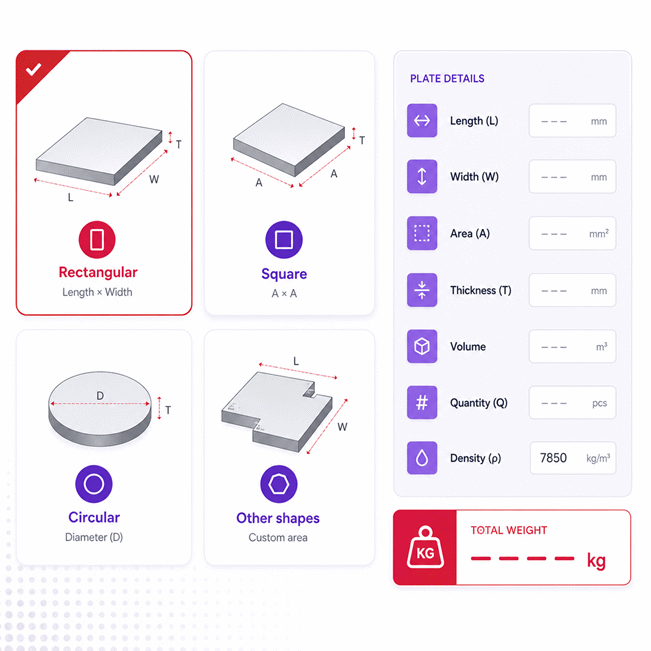
Plate Weight Calculator helps you estimate total plate weight from geometry, thickness, material density, and quantity. It supports rectangular, square, circular, and custom-area plates while solving only values that have one unique mathematical answer.
- Plate area is determined from the selected shape or entered directly.
- Plate volume is determined from area and uniform plate thickness.
- Total weight depends on plate volume, material density, and quantity.
- Reverse solving can determine missing area, thickness, volume, dimensions, density, or quantity.
- Unknown values remain unresolved when the available information allows multiple possible answers.
- Material changes affect density without changing plate dimensions or shape.
- Shape changes update geometry without changing the selected material density.
- Rectangular plates use length and width, while square plates use side length.
- Circular plates can be defined using either radius or diameter.
- Custom shapes use the known net plate area for weight estimation.
- Actual plate weight can differ because of tolerances, cutouts, coatings, and fabrication changes.
The Plate Weight Calculator is especially useful for fabrication planning, purchasing, material estimating, shipping preparation, and checking incomplete project data. For higher-risk decisions, use verified dimensions, material properties, and final measured loads.
Assumptions used in this calculator
- Plate thickness is assumed uniform across the entire plate surface.
- Material density is assumed homogeneous and constant throughout each plate.
- Entered dimensions are assumed to represent finished plate dimensions accurately.
- Rectangular, square, and circular plates are treated as ideal geometric shapes.
- Other shapes rely on the user-entered net plate area.
- Cutouts and holes are excluded unless reflected in the entered area.
- Coatings and attached components are excluded unless incorporated into supplied values.
- Material presets represent nominal densities and may differ from certified material data.
- Manufacturing tolerances can cause actual plate weight to differ from calculated results.
- All unit conversions preserve the same physical quantity before calculation.
- Plate quantity represents identical plates using the same geometry and density.
- Reverse calculations assume provided values define one unique mathematical solution.
- Critical industrial decisions should use verified dimensions and certified material properties.
Results are rounded for display.
Internal calculations use full precision.
Formulas Used in Plate Weight Calculator :
1. Unit Conversion to the Internal Base Unit
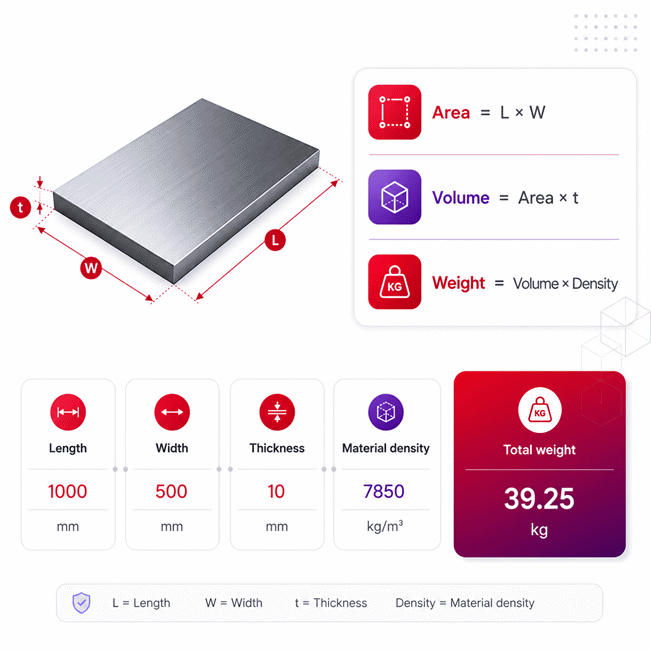
2. Rectangular Plate Area
3. Square Plate Area
4. Circular Diameter to Radius
5. Circular Plate Area
6. Plate Volume
7. Total Plate Weight
- xb = value converted to the calculator's internal base unit.
- xu = numerical value entered or displayed in the selected unit.
- cu = conversion factor from the selected unit to the internal base unit.
- A = plate surface area.
- L = rectangular plate length.
- W = rectangular plate width.
- s = square plate side length.
- r = circular plate radius.
- D = circular plate diameter.
- V = plate volume.
- t = uniform plate thickness.
- ρ = material density.
- N = quantity of plates.
- WT = total weight of all plates.
For Other shapes, the plate area is entered directly. The real-time solver algebraically rearranges the same equations whenever exactly one dependent variable has a unique solution. Intermediate calculations retain full precision, unit conversion is performed before solving, and rounding is applied only to displayed values.
Variables & Definitions
View a complete list of all variables used in this calculator, including definitions and units
Plate Weight Calculator Variables and Measurement Parameters
| Variable | Meaning | Role in Calculation | Internal Base Unit |
|---|---|---|---|
| xb | Base-unit value | Physical value after conversion to the calculator internal unit | Depends on quantity type |
| xu | Selected-unit value | Value entered or displayed in the user-selected unit | Selected unit |
| cu | Unit conversion factor | Converts a selected-unit value into its internal base unit | Unit-dependent factor |
| A | Plate area | Calculated from plate geometry or entered directly for other shapes | m² |
| L | Plate length | Defines rectangular plate area with width | m |
| W | Plate width | Defines rectangular plate area with length | m |
| s | Square side length | Defines the area of a square plate | m |
| r | Plate radius | Defines the area of a circular plate | m |
| D | Plate diameter | Alternative circular dimension used to determine radius | m |
| V | Plate volume | Calculated from plate area and thickness | m³ |
| t | Plate thickness | Determines plate volume together with area | m |
| ρ | Material density | Converts plate volume into mass according to the selected material | kg/m³ |
| N | Quantity of plates | Multiplies the weight of one plate by the number of plates | Dimensionless |
| WT | Total plate weight | Final weight calculated from volume, density, and quantity | kg |
Unit Conversion Table
Plate Dimension Length Unit Conversion Table
| Unit Group | Unit Name | Symbol | Equivalent in Meters | Used For |
|---|---|---|---|---|
| Popular Units | Millimeter | mm | 0.001 m | Length, Width, Side, Radius, Diameter |
| Popular Units | Centimeter | cm | 0.01 m | Length, Width, Side, Radius, Diameter |
| Popular Units | Meter | m | 1 m | Length, Width, Side, Radius, Diameter |
| Popular Units | Inch | in | 0.0254 m | Length, Width, Side, Radius, Diameter |
| Popular Units | Foot | ft | 0.3048 m | Length, Width, Side, Radius, Diameter |
| Scientific Units | Micrometer | µm | 0.000001 m | Length, Width, Side, Radius, Diameter |
Plate Thickness Unit Conversion Table
| Unit Group | Unit Name | Symbol | Equivalent in Meters | Used For |
|---|---|---|---|---|
| Popular Units | Millimeter | mm | 0.001 m | Thickness |
| Popular Units | Centimeter | cm | 0.01 m | Thickness |
| Popular Units | Meter | m | 1 m | Thickness |
| Popular Units | Inch | in | 0.0254 m | Thickness |
| Popular Units | Mil | mil | 0.0000254 m | Thickness |
| Scientific Units | Micrometer | µm | 0.000001 m | Thickness |
Plate Area Unit Conversion Table
| Unit Group | Unit Name | Symbol | Equivalent in Square Meters | Used For |
|---|---|---|---|---|
| Popular Units | Square Millimeter | mm² | 0.000001 m² | Plate Area |
| Popular Units | Square Centimeter | cm² | 0.0001 m² | Plate Area |
| Popular Units | Square Meter | m² | 1 m² | Plate Area |
| Popular Units | Square Inch | in² | 0.00064516 m² | Plate Area |
| Popular Units | Square Foot | ft² | 0.09290304 m² | Plate Area |
| Scientific Units | Square Micrometer | µm² | 0.000000000001 m² | Plate Area |
Plate Volume Unit Conversion Table
| Unit Group | Unit Name | Symbol | Equivalent in Cubic Meters | Used For |
|---|---|---|---|---|
| Popular Units | Cubic Centimeter | cm³ | 0.000001 m³ | Plate Volume |
| Popular Units | Cubic Meter | m³ | 1 m³ | Plate Volume |
| Popular Units | Cubic Inch | in³ | 0.000016387064 m³ | Plate Volume |
| Popular Units | Cubic Foot | ft³ | 0.028316846592 m³ | Plate Volume |
| Popular Units | Liter | L | 0.001 m³ | Plate Volume |
| Scientific Units | Cubic Millimeter | mm³ | 0.000000001 m³ | Plate Volume |
| Scientific Units | Cubic Decimeter | dm³ | 0.001 m³ | Plate Volume |
Material Density Unit Conversion Table
| Unit Group | Unit Name | Symbol | Equivalent in kg/m³ | Used For |
|---|---|---|---|---|
| Popular Units | Kilogram per Cubic Meter | kg/m³ | 1 kg/m³ | Material Density |
| Popular Units | Gram per Cubic Centimeter | g/cm³ | 1000 kg/m³ | Material Density |
| Popular Units | Pound per Cubic Foot | lb/ft³ | 16.01846337396 kg/m³ | Material Density |
| Popular Units | Pound per Cubic Inch | lb/in³ | 27679.904710203125 kg/m³ | Material Density |
| Scientific Units | Kilogram per Liter | kg/L | 1000 kg/m³ | Material Density |
| Scientific Units | Gram per Milliliter | g/mL | 1000 kg/m³ | Material Density |
Total Plate Weight Unit Conversion Table
| Unit Group | Unit Name | Symbol | Equivalent in Kilograms | Used For |
|---|---|---|---|---|
| Popular Units | Kilogram | kg | 1 kg | Total Weight |
| Popular Units | Gram | g | 0.001 kg | Total Weight |
| Popular Units | Pound | lb | 0.45359237 kg | Total Weight |
| Popular Units | Ounce | oz | 0.028349523125 kg | Total Weight |
| Popular Units | Metric Tonne | t | 1000 kg | Total Weight |
| Popular Units | US Short Ton | US ton | 907.18474 kg | Total Weight |
| Scientific Units | Milligram | mg | 0.000001 kg | Total Weight |
Example Calculation
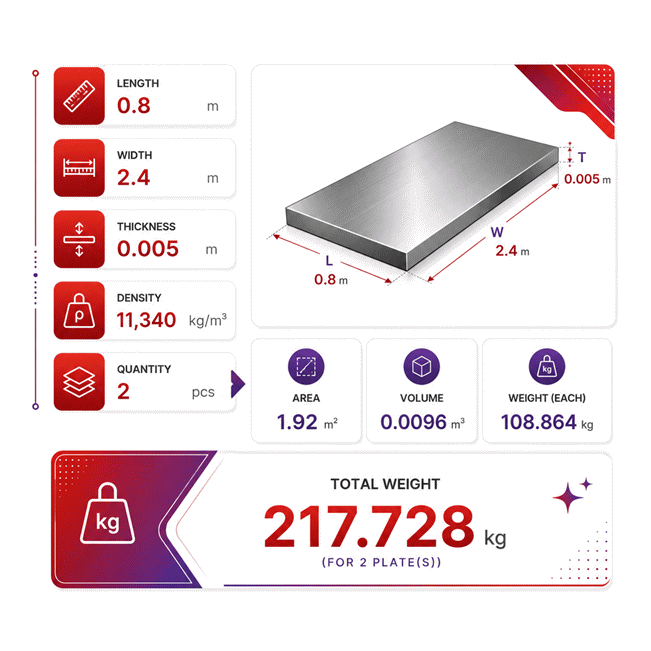
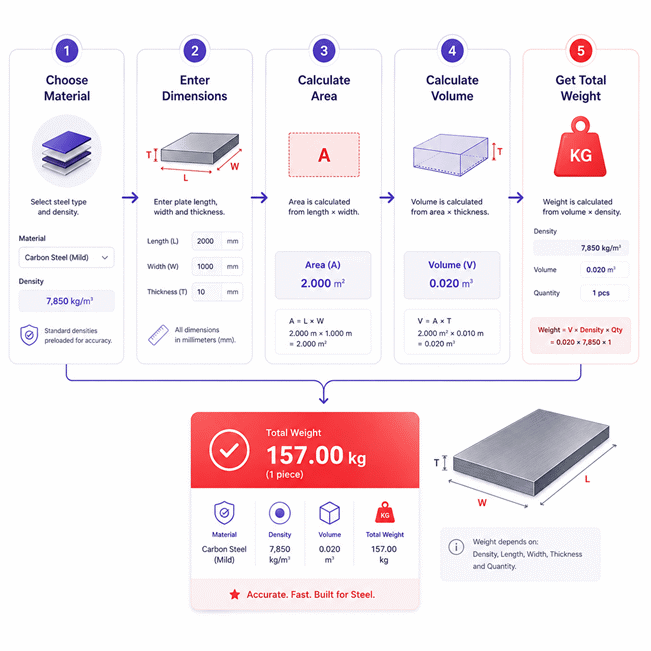
The plate area is calculated first from its rectangular dimensions. Multiplying the area by thickness gives the volume of one plate. The plate volume is then multiplied by material density to determine individual weight. Finally, individual plate weight is multiplied by quantity to calculate total weight.
The known total weight, density, and quantity uniquely determine the volume of one plate. The known thickness then allows the plate area to be solved without estimating any dimension. Because the rectangular plate length is also known, the missing width has one unique solution. If the length were unknown, the calculator would leave both length and width unresolved.
Results are rounded for display.
Internal calculations use full precision.
Calculations Disclaimer
How Does a Plate Weight Calculator Determine Total Weight?
A Plate Weight Calculator answers a simple question with several hidden layers. A Plate Weight Calculator must understand geometry, material, thickness, and quantity together. Missing one layer can change the final project decision.
The first real problem often appears before fabrication begins. A buyer knows the plate size but not its handling weight. A fabricator may know total weight but not the missing thickness. A logistics team may need payload data before material arrives. A simple one-way calculator cannot solve every situation.
A better tool treats every known value as useful information. It then solves only values that have one clear answer. Nothing should be guessed. This matters when several dimensions are still unknown.
Consider a rectangular plate with known length and width. Its surface size becomes known at once. Add thickness, and the physical volume becomes known. Add material density and plate quantity, and total mass becomes available.
The same process can move backward. Known total mass can reveal volume under the right conditions. Known volume and thickness can reveal surface area. Known rectangular area and length can then reveal width.
This creates a more useful workflow for real projects. Users do not need to restart every calculation. They can enter the information already available.
One important rule protects the result. The calculator should stop when more than one answer remains possible. Suppose only volume is known. Surface area and thickness are still linked. Neither value has a unique answer. Creating either value would be an assumption.
This distinction separates calculation from guessing. It also improves confidence during estimating and checking.
Material selection should affect material properties only. It should never alter plate geometry. Shape selection should control geometry only. It should never change material density.
User-entered values should also remain easy to identify. Calculated values should look visually different. This helps users understand what they entered and what the solver produced.
▶ The key idea: known data should reveal only what mathematics can prove.
This approach is especially useful during design changes. A changed thickness can update related results immediately. A new material can update mass without rebuilding the plate dimensions.
For practical work, this saves more than a few clicks. It reduces repeated manual calculations and transcription mistakes. It also makes checking another person’s estimate much easier.
How to Calculate Plate Area for Different Shapes
A common mistake starts with the wrong interpretation of plate shape. The outside dimensions may look simple. Yet different shapes need different geometric information.
Rectangular Plate Area Using Length and Width
A rectangular plate needs two independent plan dimensions. These are its length and width. Once both are known, its surface area becomes unique.
This shape is common in stock plates and fabricated blanks. It also creates useful reverse-solving paths. Known area and length can determine width. Known area and width can determine length.
The danger appears when users treat two dimensions as interchangeable inputs. A solver should preserve the values entered by the user. It should calculate only the missing dimension.
Another issue appears after cutting. Gross rectangular dimensions describe the original blank. They may not describe the finished component. Large openings can reduce real material mass significantly.
Square Plate Area Using Side Length
A square plate needs only one side dimension. All plan sides have equal length. This removes one unknown from the geometric relationship.
That makes reverse solving especially clean. When square area is known, one unique side length exists. The solver can therefore recover that dimension without guessing.
Users should still confirm that the real component is truly square. A nearly square rectangle should remain rectangular. Small dimensional differences can matter on large or thick plates.
Circular Plate Area Using Radius or Diameter
Circular plates create a different input choice. Drawings often give either radius or diameter. The calculator should support whichever dimension the user actually has.
The radius and diameter are directly linked. Knowing either one uniquely determines the other. The plate area can then be found from that circular geometry.
This is useful for flanges, covers, discs, blanks, and circular machine parts. It also helps when drawings use diameter while inspection records use radius.
⚡ A simple diameter mistake can multiply through the entire weight estimate.
How to Calculate Irregular Plate Weight from a Known Area
Irregular plates need a different approach. Length and width may not describe the real material footprint. The most reliable input is then the known net area.
That area may come from CAD, nesting software, drawings, or measured geometry. Once accepted, the calculator can continue from that known surface size.
Cutouts require special attention. Gross area includes material that may later disappear. Net area represents the material that remains after openings are removed.
For purchasing, gross area may be more useful. For finished-part mass, net area is usually more relevant.
Reverse Plate Weight Calculations: Solve for Missing Dimensions and Properties
Real projects rarely provide every value in perfect order. One document may show dimensions. Another may show total shipment mass. A supplier sheet may give density. Reverse solving connects these scattered facts.
How to Calculate Plate Thickness from Total Weight
Thickness can become the unknown when other physical data is known. This often happens during inspection or material verification.
The solver first checks whether the available data creates one unique thickness. Total mass alone is not enough. More information must restrict the possible solutions.
When surface area, material density, and quantity are known, thickness can become solvable. The result can then be compared with drawing information.
This is useful for checking a suspected plate specification. It should not replace direct measurement when inspection accuracy matters.
How to Calculate Plate Area or Volume from Known Weight
Sometimes the measured or documented weight is available first. Geometry may be incomplete. The tool can work backward if density and quantity are also known.
This can reveal the required material volume. If thickness is also known, surface area can then become unique.
The sequence matters. The solver should not invent area while thickness remains unknown. Many area and thickness combinations can produce the same volume.
That is where a disciplined solver becomes valuable. It refuses to manufacture certainty.
How to Find Length or Width from Rectangular Plate Area
A known rectangular area still leaves two dimensions possible. Add one known dimension, and the other becomes unique.
This is useful during drawing checks. An engineer may know required area and available plate length. The missing width can then be recovered immediately.
The same logic works in the opposite direction. Known area and width can reveal the required length.
How to Find Radius, Diameter, or Side Length from Plate Area
Square and circular geometry offer stronger reverse paths. Their defining dimensions are directly tied to area.
A known square area can reveal one side length. A known circular area can reveal radius. Diameter then follows from that radius.
The calculator should still respect the selected geometry. Circular values should never populate square fields. Old geometry dependencies should clear after a shape change.
How to Calculate Material Density or Plate Quantity from Weight
Material density can also become the unknown. Known volume, total mass, and quantity can make density uniquely solvable.
This can support a quick reasonableness check. It cannot prove alloy identity by itself. Many materials have nearby density values.
Quantity can also become solvable. Known total mass, volume per plate, and density can reveal plate count.
For physical inventory, the resulting quantity should make practical sense. A fractional count usually signals partial material or incomplete information.
▶ Reverse solving is powerful because it reduces re-entry, not because it guesses.
Material Density and Its Effect on Steel, Stainless Steel, Aluminum, and Other Plates
Two plates can share identical dimensions and still have different mass. Material density creates that difference.
This matters during quoting, lifting, transport, and material comparison. A change in alloy can alter the total load without changing geometry.
Steel is often treated as one material in quick estimates. Real steel grades can vary slightly in composition and density. Stainless grades can also differ from carbon steels. Aluminum is much lighter for the same volume.
A material selector should therefore work as a density preset. It should save time without locking the user into one value.
If project documentation provides a verified density, that value deserves priority. Supplier documentation may better represent the actual grade being purchased.
Manual density editing should not silently preserve a misleading material label. The interface should clearly show that a custom density is being used.
This becomes important when checking specialty alloys. A user may select a common metal first. They may then enter a project-specific density from technical documentation.
The geometry should remain untouched during that change. Length, width, thickness, area, and shape describe the component. Density describes the material.
Keeping those two data groups separate prevents confusing side effects.
Density also creates a useful purchasing comparison. A lighter material may reduce transport and handling loads. Yet weight alone cannot determine the best material.
Strength, corrosion resistance, temperature limits, fabrication method, and cost still matter. The calculator should support the weight decision, not replace engineering selection.
⚡ Same dimensions do not mean the same handling load.
For industrial buying, users should confirm the exact grade before final ordering. They should also check traceability documents when required.
Material certificates can provide grade and heat information. Purchase documents should match the project specification. These checks matter more than a generic material name.
Warranty and technical support should also be checked separately. Their scope depends on the supplier and product agreement. They are not determined by calculated weight.
A useful buying process separates three questions. What material is required? What does the plate weigh? What commercial support is included?
Keeping those questions separate produces clearer purchase decisions.
Theoretical vs Actual Plate Weight: Tolerances, Cutouts, Coatings, and Manufacturing Effects
A calculated plate mass can be correct and still differ from a scale. This surprises many first-time users.
Theoretical weight describes an ideal geometric model. Real material comes from manufacturing processes. Actual dimensions can differ slightly from nominal dimensions.
Thickness variation is often especially important. Small changes can affect the entire plate volume. On large plates, that difference becomes easier to notice.
Cutouts create another gap. A blank may begin as a full rectangle. Machining can later remove holes, slots, corners, or large internal openings.
Using original dimensions after machining will overstate finished-part mass. Net geometry gives a better finished estimate.
Coatings can move the result in the opposite direction. Paint, plating, lining, or bonded layers add material. These additions may be small or significant.
Surface contamination also changes measured mass. Water, oil, dirt, and scale can add real weight. They are not part of the ideal base plate model.
Welded attachments matter too. Stiffeners, brackets, studs, and hardware add mass. A plate-only calculation does not automatically include them.
Fabrication planning should therefore distinguish three stages.
Each stage can have a different mass. A procurement team may need blank weight. A crane operator may need assembly load.
This distinction becomes critical for large structures. Transport limits may apply to the fabricated assembly. Lifting limits may include rigging and attached components.
Do not treat a plate-only result as a complete assembly load.
Actual material density can also vary slightly. Composition and production route can affect real values. For routine estimating, nominal density is often adequate.
Higher-risk work deserves better input data. Certified project values should replace generic assumptions when available.
Another common issue involves stock dimensions. Suppliers may describe plates using nominal sizes. The finished component may have different dimensions after cutting.
Use the dimensions that match the decision being made. Use stock dimensions for buying the blank. Use finished dimensions for finished-part mass.
▶ The best result comes from matching the model to the real project stage.
Common Plate Weight Calculation Errors and How to Avoid Them
Most bad plate estimates begin with simple input mistakes. The mathematics is rarely the hardest part.
The first error is choosing the wrong shape. A circular blank should not use rectangular geometry. An irregular profile should not be forced into simple dimensions.
The second error is confusing radius and diameter. A drawing may show one while the user enters the other. Circular calculations can change sharply after this mistake.
The third error is using gross area for a heavily cut plate. Large holes and openings remove material. Their effect should be reflected in finished geometry.
The fourth error is selecting the wrong material. Similar-looking plates can have different densities. This directly changes the calculated mass.
The fifth error is using a generic density when exact grade data exists. Project documentation should guide the final technical estimate.
The sixth error is changing material and accidentally changing geometry. These data groups must remain independent.
The seventh error is changing shape without clearing old geometry relationships. Previous dimensions can become irrelevant after the new shape is selected.
The eighth error is forcing an answer from incomplete data. A solver should leave a field unresolved when several solutions remain possible.
This is especially important during reverse calculations. Known volume alone cannot reveal both area and thickness.
The ninth error is treating a calculated plate result as an assembly result. Welds, brackets, fittings, and hardware can add meaningful mass.
The tenth error is using calculated mass for safety-critical lifting without verification. Lifting decisions involve more than the plate itself.
Rigging, attachment points, load distribution, and equipment limits also matter. These factors require project-specific review.
A simple checking habit prevents many problems. Ask what is known, what is calculated, and what is still unknown.
This three-state view makes complex jobs easier to audit.
Visual separation also helps. User-entered values should remain visually distinct from auto-calculated values.
That gives users a fast way to trace the calculation path. It also makes unexpected results easier to diagnose.
When a result looks wrong, start with geometry. Then check thickness, material, and quantity. Finally, confirm that the project stage matches the entered dimensions.
This order is faster than changing random fields.
How to Verify Plate Weight for Fabrication, Purchasing, Shipping, and Lifting
A correct calculator result is only useful when it supports the right decision. Different teams need the weight for different reasons.
Technical Verification for Fabrication
Fabricators should compare calculator inputs with the latest approved drawing. Check the selected shape first. Then review finished dimensions and material grade.
Large cutouts should be included when finished-part mass matters. Added components should be handled separately unless already included.
Reverse solving can help during inspection. A measured mass may expose an unexpected thickness or material assumption.
It should remain a checking tool. Direct measurement still matters when dimensions can be physically verified.
Purchasing Guidance for Plate Orders
Buyers face a different problem. They need enough material without creating avoidable cost or handling issues.
Start with the required grade and stock dimensions. Then estimate the order mass and plate quantity.
Use supplier documents to confirm grade, dimensions, and commercial terms. Ask about traceability when the project requires it.
Also review cutting services, delivery method, packing, and available technical support. These items belong to the purchase decision.
Warranty coverage should be read from the supplier’s actual terms. Never assume warranty scope from material type alone.
Price comparisons should also use the same commercial basis. One quote may include cutting or delivery. Another may cover raw material only.
A lower price per plate does not always mean a lower delivered project cost.
Shipping and Handling Decisions
Logistics teams need a realistic shipment mass. Plate quantity can turn a small individual difference into a large total difference.
Include packaging when transport limits are being checked. Pallets, skids, frames, and protective materials add weight.
The plate calculation can support early freight planning. Final shipping documents should use verified shipment data.
Lifting and Site Handling
Lifting creates the highest consequence for a weight estimate. Calculated plate mass can support planning, but it is not enough alone.
Rigging weight, lifting radius, attachment method, and load distribution also matter. Equipment limits must be checked for the actual lift.
Never choose lifting equipment from a plate-only number without project review.
For everyday estimating, AxiCalculator provides a fast way to test known project values. Its reverse-solving workflow also helps investigate missing data.
Use the result as a clear engineering estimate. Then match verification depth to the risk of the decision.
That creates a practical rule for every team.
A useful calculator should reduce uncertainty, not hide it. That is the real value of a multi-directional plate solver.
Frequently Asked Questions
What information should I collect before using a Plate Weight Calculator?
Can I calculate several different plates as one project or shipment?
Can I share or export a plate weight calculation for project review?
Can I use a CAD-calculated area for a complex plate shape?
Can two different plate geometries produce the same total weight?
What should an engineer check when measured weight differs from calculated weight?
When is reverse solving reliable enough for engineering field checks?
Engineering Resources
Our engineers are here to help you get it right.