River Rock Calculator
- Last formula update:
Decimal & Rounding Policy
- River rock calculations use full numerical precision throughout all intermediate calculation steps.
- Area, depth, volume, density, wastage, and weight are calculated before final rounding.
- Wastage percentages are converted to decimal form before being applied to required volume.
- Displayed results are rounded only at the final output stage for better readability.
- Unit conversions are completed before rounding to prevent cumulative conversion errors.
- Additional decimal places may appear when needed to preserve meaningful calculation accuracy.
Valid range
- Length: Enter a finite value greater than 0 in any supported length unit.
- Width: Enter a finite value greater than 0 in any supported length unit.
- Area: Use a positive finite area or let it calculate from length and width.
- Depth: Enter a finite value greater than 0 in any supported depth unit.
- Volume: Use a positive finite volume or let it calculate from area and depth.
- Wastage: Use 0% to 100%, with 5% suitable as a typical contingency input.
- Density: Preset rock densities range from 721 to 2,700 kg/m³.
- Volume needed: Must remain positive and includes the selected wastage percentage.
- Weight needed: Must remain positive and is calculated from required volume and density.
- Price per unit mass: Use zero or any positive finite monetary value.
- Price per unit volume: Use zero or any positive finite monetary value.
- Total cost: Must be zero or positive and remains consistent with quantity and unit price.

Reviewers:
Elvarine Jexmont
Fenrick Zorquell
Check our editorial policy
August 13, 2026
1.0.0
Initial calculator and formula release.
Our engineers are here to help you get it right.
How Does the River Rock Calculator Estimate What Your Project Needs?
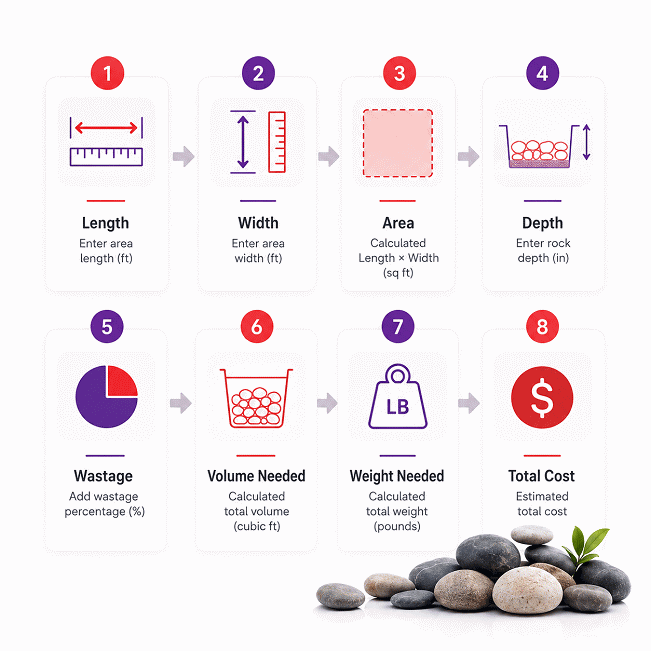
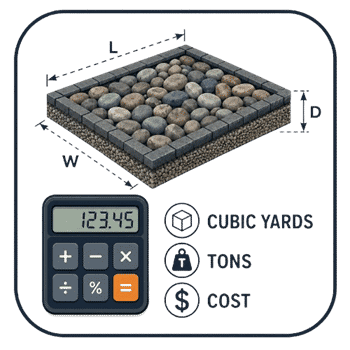
River Rock Calculator helps estimate the material quantity, coverage, weight, and cost for landscaping and construction projects. Enter the known project dimensions, planned rock depth, wastage allowance, and selected rock type to build a practical material estimate. The calculator can also work in reverse when a related value is unknown.
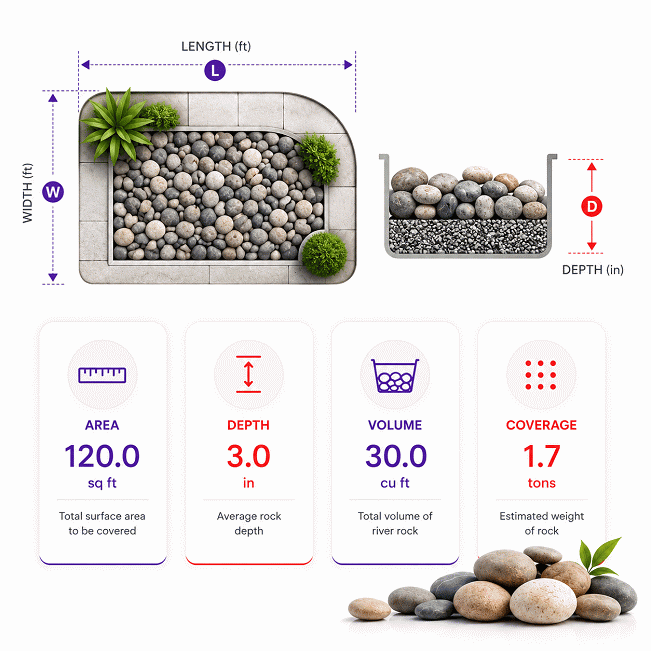
- Measure the actual coverage area inside the final project boundaries.
- Use the planned finished rock depth, not unrelated base-layer thickness.
- Area and depth determine the physical volume that must be filled.
- Wastage increases the required volume to reduce shortage risk during installation.
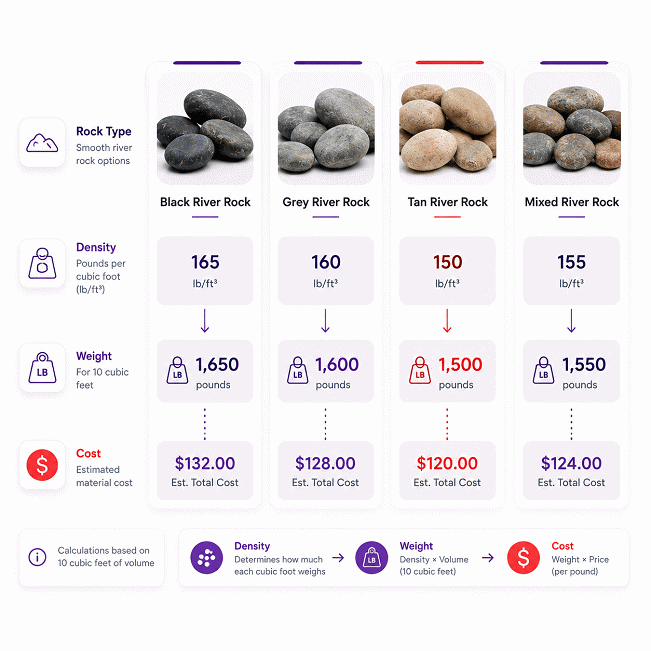
- Rock density converts the required volume into an estimated material weight.
- Bulk behavior can vary with rock type, grading, void space, moisture, and packing.
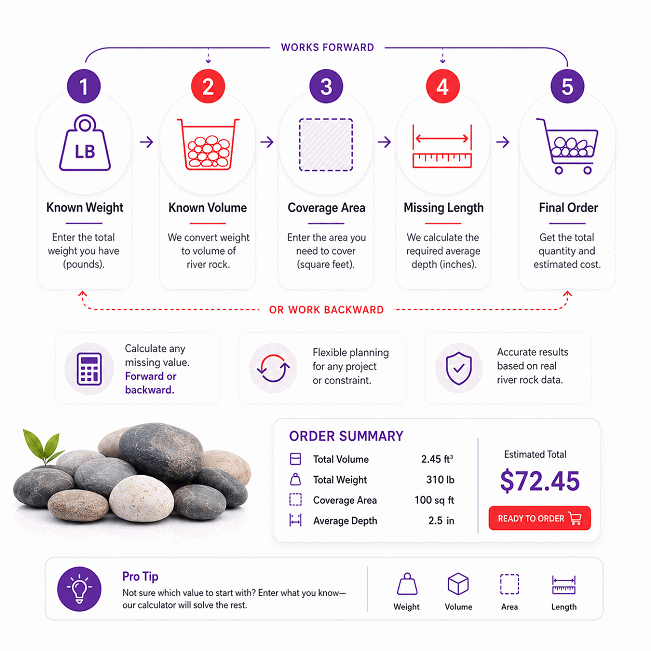
- Reverse solving can estimate missing dimensions, depth, coverage, volume, or material quantity.
- Independent unit conversions support metric and Imperial or US project measurements.
- Price inputs can estimate material cost by mass or by volume.
- Irregular or uneven areas are best divided into smaller measurable sections.
Use the River Rock Calculator as the technical starting point for planning and supplier comparison. For larger orders, compare the calculated quantity with the exact product, sale unit, delivery conditions, and material information provided for the rock being purchased.
Assumptions used in this calculator
- Calculations assume the entered dimensions accurately represent the intended rock coverage area.
- Rock depth is assumed uniform across the entire measured coverage area.
- Selected density is assumed representative of the chosen river rock material.
- Density presets are treated as nominal values, not guaranteed field measurements.
- Wastage represents additional material for contingency, placement variation, or dimensional changes.
- Area calculations assume rectangular geometry when length and width are used.
- Volume calculations assume compatible units are converted before mathematical operations.
- Weight estimates assume volume and density describe the same material condition.
- Material is assumed evenly distributed at the specified installation depth.
- Cost estimates assume entered unit prices apply to the calculated material quantity.
- Currency selection identifies denomination only and does not perform exchange-rate conversion.
- Reverse calculations assume all retained known values are valid and dimensionally consistent.
- Final quantities should be verified against supplier specifications and site conditions.
Results are rounded for display.
Internal calculations use full precision.
Formulas Used in River Rock Calculator :
1. Unit Normalization
2. Coverage Area
3. Rock Bed Volume
4. Required Volume Including Wastage
5. Required Rock Weight
6. Price per Unit Volume
7. Total Material Cost
Variables
- xbase = physical quantity expressed in its calculation base unit.
- xunit = quantity entered or displayed in the selected unit.
- kunit = exact conversion factor from the selected unit to the base unit.
- L = rock bed length.
- B = rock bed width.
- A = coverage area.
- d = rock layer depth.
- V0 = rock bed volume before wastage.
- c = wastage or contingency entered as a percentage.
- V = required river rock volume after wastage.
- ρ = selected rock density.
- M = required rock mass or weight.
- Pm = material price per unit mass in consistent base units.
- Pv = material price per unit volume in consistent base units.
- C = total material cost.
Reverse Calculation Rule
Reverse calculations use algebraic rearrangement of the same equations above while preserving the most recently supplied valid quantities. No separate reverse formula set is required.
Precision and Rounding Rule
All unit conversions and intermediate calculations retain full available numerical precision. Rounding is applied only when a value is formatted for final display or export, so rounded intermediate values do not propagate through later calculations.
Cost Calculation Rule
Mass-based and volume-based prices are linked through the selected rock density. Reverse pricing uses the algebraic inverse of the same price relationship, and the currency selector identifies the project currency without applying an exchange-rate conversion.
Variables & Definitions
View a complete list of all variables used in this calculator, including definitions and units
River Rock Calculator Variables and Measurement Definitions
| Symbol | Variable | Definition | Base or Consistent Unit | Calculation Role |
|---|---|---|---|---|
| xbase | Base-unit value | Physical quantity converted into the calculator's internal base unit. | Depends on quantity | Internal calculation value |
| xunit | Selected-unit value | Quantity entered or displayed in the unit selected by the user. | Selected unit | User input or display value |
| kunit | Unit conversion factor | Factor used to convert a selected unit into its calculation base unit. | Unit-dependent | Unit normalization |
| L | Length | Length of the rectangular river rock coverage area. | m | Geometry input or reverse result |
| B | Width | Width of the rectangular river rock coverage area. | m | Geometry input or reverse result |
| A | Area | Surface area that will be covered with river rock. | m2 | Calculated, entered, or reverse-solved value |
| d | Depth | Thickness of the installed river rock layer. | m | Volume input or reverse result |
| V0 | Base volume | Geometric river rock volume before applying wastage or contingency. | m3 | Intermediate calculated value |
| c | Wastage | Additional material allowance applied to the geometric volume. | % | Contingency input or reverse result |
| V | Required volume | Total river rock volume required after including the wastage allowance. | m3 | Primary quantity result or reverse input |
| ρ | Rock density | Density assigned to the selected river rock or aggregate type. | kg/m3 | Volume-to-mass conversion |
| M | Required mass | Estimated mass of river rock required for the calculated volume. | kg | Primary quantity result or reverse input |
| Pm | Price per unit mass | Material price expressed per consistent unit of river rock mass. | Currency/kg | Cost input or reverse-calculated price |
| Pv | Price per unit volume | Material price expressed per consistent unit of river rock volume. | Currency/m3 | Cost input or reverse-calculated price |
| C | Total material cost | Estimated material cost based on the required quantity and entered unit price. | Selected currency | Final cost result or reverse input |
Unit Conversion Table
Length Unit Conversion Table
| Unit Group | Unit Name | Symbol | Equivalent in Meters | Used For |
|---|---|---|---|---|
| Popular Units | Meter | m | 1 m | Length, width, depth |
| Popular Units | Centimeter | cm | 0.01 m | Length, width, depth |
| Popular Units | Foot | ft | 0.3048 m | Length, width, depth |
| Popular Units | Inch | in | 0.0254 m | Length, width, depth |
| SI Units | Millimeter | mm | 0.001 m | Small layer depths and dimensions |
| SI Units | Kilometer | km | 1000 m | Large project dimensions |
| Imperial / US Units | Yard | yd | 0.9144 m | Length, width, depth |
Area Unit Conversion Table
| Unit Group | Unit Name | Symbol | Equivalent in Square Meters | Used For |
|---|---|---|---|---|
| Popular Units | Square meter | m² | 1 m² | Coverage area |
| Popular Units | Square foot | ft² | 0.09290304 m² | Coverage area |
| Popular Units | Square yard | yd² | 0.83612736 m² | Coverage area |
| Popular Units | Acre | acre | 4046.8564224 m² | Large landscaping areas |
| SI Units | Square centimeter | cm² | 0.0001 m² | Small measured areas |
| SI Units | Square millimeter | mm² | 0.000001 m² | Small measured areas |
| SI Units | Hectare | ha | 10000 m² | Large project areas |
| SI Units | Square kilometer | km² | 1000000 m² | Very large project areas |
| Imperial / US Units | Square inch | in² | 0.00064516 m² | Small measured areas |
Volume Unit Conversion Table
| Unit Group | Unit Name | Symbol | Equivalent in Cubic Meters | Used For |
|---|---|---|---|---|
| Popular Units | Cubic meter | m³ | 1 m³ | Volume and volume needed |
| Popular Units | Cubic foot | ft³ | 0.028316846592 m³ | Volume and volume needed |
| Popular Units | Cubic yard | yd³ | 0.764554857984 m³ | Bulk river rock quantities |
| Popular Units | Liter | L | 0.001 m³ | Small volume quantities |
| SI Units | Cubic centimeter | cm³ | 0.000001 m³ | Small volume quantities |
| Imperial / US Units | Cubic inch | in³ | 0.000016387064 m³ | Small volume quantities |
| Imperial / US Units | US gallon | US gal | 0.003785411784 m³ | Alternative volume entry |
| Oil & Industrial Units | Oil barrel | bbl | 0.158987294928 m³ | Industrial volume reference |
Mass Unit Conversion Table
| Unit Group | Unit Name | Symbol | Equivalent in Kilograms | Used For |
|---|---|---|---|---|
| Popular Units | Kilogram | kg | 1 kg | Weight needed and mass-based pricing |
| Popular Units | Metric ton | t | 1000 kg | Bulk river rock weight and pricing |
| Popular Units | Pound | lb | 0.45359237 kg | Weight needed and mass-based pricing |
| Popular Units | US short ton | US ton | 907.18474 kg | Bulk river rock weight and pricing |
| SI Units | Gram | g | 0.001 kg | Small mass quantities |
| Imperial / US Units | Ounce | oz | 0.028349523125 kg | Small mass quantities |
| Imperial / US Units | Imperial long ton | long ton | 1016.0469088 kg | Bulk mass reference |
Density Unit Conversion Table
| Unit Group | Unit Name | Symbol | Equivalent in kg/m³ | Used For |
|---|---|---|---|---|
| Popular Units | Kilogram per cubic meter | kg/m³ | 1 kg/m³ | Rock density and weight calculation |
| Popular Units | Metric ton per cubic meter | t/m³ | 1000 kg/m³ | Bulk aggregate density |
| Popular Units | Pound per cubic foot | lb/ft³ | 16.01846337396014 kg/m³ | Rock density in US customary units |
| Popular Units | Pound per cubic yard | lb/yd³ | 0.5932764212577829 kg/m³ | Bulk aggregate density |
| SI Units | Gram per cubic centimeter | g/cm³ | 1000 kg/m³ | Material density |
| SI Units | Kilogram per liter | kg/L | 1000 kg/m³ | Material density |
| Imperial / US Units | US short ton per cubic yard | US ton/yd³ | 1186.552842515566 kg/m³ | Bulk rock density and estimating |
| Imperial / US Units | Imperial long ton per cubic yard | long ton/yd³ | 1328.9391836174336 kg/m³ | Bulk material density reference |
Currency Unit Identification Table
| Unit Group | Unit Name | Symbol | Equivalent in Selected Currency | Used For |
|---|---|---|---|---|
| Popular Units | US dollar | USD | No automatic exchange conversion | Unit price and total cost |
| Popular Units | Euro | EUR | No automatic exchange conversion | Unit price and total cost |
| Popular Units | Pound sterling | GBP | No automatic exchange conversion | Unit price and total cost |
| Popular Units | Canadian dollar | CAD | No automatic exchange conversion | Unit price and total cost |
| Popular Units | Australian dollar | AUD | No automatic exchange conversion | Unit price and total cost |
| Oil & Industrial Units | UAE dirham | AED | No automatic exchange conversion | Unit price and total cost |
| Oil & Industrial Units | Saudi riyal | SAR | No automatic exchange conversion | Unit price and total cost |
Example Calculation
The coverage area is calculated first from the entered length and width.
The layer depth is converted to meters before calculating the unadjusted rock volume.
A 7% wastage allowance increases the required volume before density is applied.
The displayed weight and cost are rounded only after the full-precision calculation is complete.
This reverse calculation starts with a known quantity of available rock instead of project length.
The known weight and selected density determine the corresponding required rock volume.
The wastage allowance is reversed before depth is used to determine usable coverage area.
With the width known, the calculator finally solves the missing project length automatically.
Results are rounded for display.
Internal calculations use full precision.
Calculations Disclaimer
How Much River Rock Do You Need for Your Project?
A project can look simple until one measurement changes the whole order. The River Rock Calculator turns site dimensions into a clear material estimate. Use the River Rock Calculator before calling suppliers or arranging delivery. It helps connect your measured area with the material you may need.
The first goal is not finding a large number. The goal is finding the right quantity. Too little rock can stop work during installation. Too much rock can increase delivery, handling, and storage costs.
Start by measuring the actual area that will receive the rock. Do not measure the whole yard by habit. Curves, borders, paths, walls, and planting zones can change usable space.
Next, decide the planned rock depth. Depth has a direct effect on material demand. A small depth change can create a large volume change. This becomes more important on wide landscaping areas.
The selected rock type also matters. Different materials can have different bulk behavior. Rock size, grading, moisture, and void space can affect delivered weight.
This is why a good estimate should separate geometry from material behavior. Area and depth define the physical space. Material properties then help estimate the required weight.
Measure the real area. Confirm the depth. Check the rock type. Then estimate quantity.
For a small decorative bed, minor errors may have limited impact. Large projects are less forgiving. A small percentage error can become several extra loads.
Think about the estimate before thinking about the purchase. This simple order reduces rushed decisions. It also gives you better questions for your supplier.
Your final order should match the product being delivered. Supplier units may differ from your project units. One seller may quote weight. Another may quote volume. A third may sell bags or pallets.
A clear calculator result gives you a common starting point. You can then compare offers with fewer hidden differences.
How the River Rock Calculator Works
A common project problem starts with mixed information. You may know the length and width. You may only know the total area. Sometimes you know the available material instead.
The calculator connects those known values without forcing one fixed workflow. This matters on real jobs. Site information rarely arrives in a perfect order.
The normal path begins with project dimensions. The calculator uses the measured footprint and planned depth. It then connects those values with material properties.
The result can support several project decisions. You can review coverage, required volume, estimated weight, and expected material cost.
The useful part is the relationship between these values. A change in depth affects volume. A change in volume affects estimated weight. A price change affects the final material budget.
This linked structure makes quick design checks easier. You can test a new depth without rebuilding the entire estimate. You can also compare two material choices more quickly.
Project Size → Planned Depth → Material Quantity → Estimated Weight → Material Cost
Keep one principle in mind. The calculator estimates the material requirement. It does not control field conditions. Real sites can include settlement, slopes, uneven surfaces, and hidden edges.
That difference is important for contractors and homeowners. A mathematical result may be precise. The physical project still depends on good measurements.
AxiCalculator is most useful before a purchase decision. Use the result to check project scale first. Then compare the result with supplier information.
What Measurements Do You Need Before Calculating River Rock?
Many quantity errors begin before the calculator is even opened. The wrong area is often measured. The wrong depth is sometimes assumed.
For a simple rectangular space, measure the usable length and width. Measure inside the final project boundary. Do not include areas that will stay uncovered.
Depth should describe the finished rock layer. It should not include soil below the project. It should not include an unrelated base layer.
For a top-up project, measure only the new depth needed. Using the full existing depth can greatly overstate the order.
Irregular spaces need extra care. Break them into smaller simple sections. Measure each section on its own. Then combine the sections for the project total.
Sloped areas may need more field attention. A flat plan measurement can miss real surface conditions. Steeper surfaces can also change installation behavior.
Always record the unit beside each measurement. A number without a unit is dangerous. Mixing feet, inches, meters, and centimeters can create large errors.
Before ordering, measure important dimensions twice. This takes little time. It can prevent an expensive correction later.
How Does Reverse Solving Find a Missing Project Dimension?
Sometimes the missing value is the one you actually need most. You may know the available rock weight. You may not know its possible coverage.
Reverse solving works from known project values toward the missing value. It uses the same physical relationships in the opposite direction.
Imagine that material is already stored on site. The important question changes. You are no longer asking how much to buy. You are asking how much area the material can cover.
A similar situation happens during design changes. The available volume may already be fixed. The project width may also be fixed. The missing length can then become the key value.
This feature is useful during tender reviews and site adjustments. It is also useful after a partial delivery. You can check what the remaining material may cover.
Known quantity plus one missing value can become a practical site decision.
Reverse solving reduces repeated manual work. It also keeps connected values inside one calculation path.
The result still depends on the quality of known values. Bad input does not become good data through reverse solving. Check dimensions and material information first.
River Rock Density: Why the Correct Value Changes Your Result
A project can have the right dimensions and still receive the wrong weight estimate. Density is often the reason.
River rock is not one perfectly uniform material. Different products can contain different rock types. They can also contain different particle sizes.
Density connects material volume with estimated material weight. This makes it important when suppliers sell by weight.
However, the word density can describe different conditions. That detail matters. A solid piece of stone is not the same as a loose pile.
A loose pile contains spaces between individual rocks. Those spaces occupy volume without adding rock mass. This changes the practical weight of a bulk quantity.
For planning, the chosen density should match the product condition as closely as possible. Product-specific supplier information is especially useful.
Do not treat every decorative stone as identical. Two products can occupy the same space yet have different weights.
The effect becomes more visible on large jobs. A small density difference can create a large total weight difference.
This can affect delivery planning. It can also affect truck capacity and material pricing. Weight-based quotes depend heavily on this relationship.
When comparing products, ask what the stated value represents. The answer may explain differences between two supplier estimates.
Bulk Density vs. Solid Rock Density: Which Should You Use?
The wrong density type can make an estimate look more certain than it is. Solid density describes the rock material itself.
Bulk density considers the material as a collection of particles. It includes the spaces within the bulk volume.
Landscape rock is normally purchased as a bulk product. This makes bulk behavior important for ordering decisions.
A very dense mineral does not mean a loose pile has equal density. Air spaces remain between the stones.
For that reason, product-specific bulk information is more practical for supplier comparisons. It better reflects a delivered pile or loaded container.
When product data is unavailable, treat preset values as planning values. Do not treat them as a guaranteed delivery weight.
This distinction improves project control. It also prevents false confidence in highly precise numbers.
A useful estimate should be technically clear and practically cautious. Both qualities matter on commercial projects.
How Rock Size, Voids, Moisture, and Compaction Affect Density
Two piles can contain the same rock type yet behave differently. Particle size is one reason.
Grading changes how pieces fit together. A mixture of sizes may fill spaces differently. Uniform large stones can leave larger voids.
Moisture can also change delivered weight. Wet surfaces and retained water add mass. This can affect weight-based deliveries.
Compaction changes how particles settle together. Loose material can occupy more volume. Settled material may occupy less space.
Handling also matters. Loading, transport, vibration, and placement can change packing conditions.
Rock Type → Particle Size → Void Space → Moisture → Packing Condition → Delivered Weight
This does not make calculation useless. It explains why a result is an estimate. Good planning uses both calculation and product data.
For larger purchases, ask the supplier about the specific product. Product grading and sale units can improve your final decision.
How Much Area Does River Rock Cover at Different Depths?
A common surprise appears after installation starts. The same quantity can cover very different areas.
Depth is the main reason. A deeper layer uses more material for each square unit.
This relationship is easy to overlook during visual planning. A few extra centimeters can look small on paper. Across a large area, they become significant.
Coverage should therefore be considered together with depth. A coverage figure without depth is incomplete.
Think of the project as a shallow container. The surface defines its footprint. The depth defines how much space must be filled.
A shallow decorative layer may cover more area. A deeper layer uses the same stock faster.
Do not choose depth only to reduce material cost. The finished depth should fit the intended use.
Decorative areas may have different needs from drainage features. High-traffic zones may also behave differently from protected beds.
Rock size can influence the practical appearance of depth. Larger stones may need enough depth for stable placement.
The final surface should also be considered. Uneven ground can create hidden high and low points. These can change actual material use.
A small depth increase across a large area can change the whole delivery plan.
Before buying, check the planned depth across several locations. Do not rely on one convenient measurement.
If the site has clear depth zones, calculate them separately. This gives a better result than one rough average.
This method also helps with staged installation. Each zone can be ordered and checked independently.
What River Rock Depth Should You Use for Landscaping?
Choosing depth can become confusing because projects serve different purposes. There is no single ideal depth for every site.
Start with the purpose of the rock layer. Decorative coverage needs differ from drainage work.
Then consider rock size. Larger pieces can behave differently from smaller decorative stones.
Site stability also matters. Soft ground may settle after installation. Existing surfaces may already be firm.
Edges should be planned before final depth decisions. Good containment helps keep rock inside the intended area.
Drainage conditions also deserve attention. Rock placement should not block intended water paths.
For replacement work, inspect the existing layer first. You may need only additional material. A complete new depth may be unnecessary.
Use the planned finished depth in your calculation. Then confirm the choice with project requirements.
How to Estimate River Rock Price and Total Project Cost
A low material price can still produce an expensive final order. The sale unit often creates confusion.
Some suppliers price river rock by weight. Others price by volume. Small products may be sold by bag.
These prices cannot be compared fairly without a common basis. A cheap ton may not equal a cheap cubic yard.
Start by checking exactly what each price includes. Separate material cost from other charges.
Delivery can change the final project cost. Distance, vehicle size, access, and load limits may matter.
Minimum order quantities can also change the real price. Your calculated requirement may fall below the seller’s minimum.
Taxes and local charges may apply separately. Equipment and labor may also be outside the material quote.
For a clean comparison, request the same project quantity from each supplier. Ask each supplier to state the sale unit clearly.
Also confirm whether the quoted quantity matches your selected product. A generic stone quote may not match the chosen river rock.
Large projects deserve extra attention. A small price difference per unit can become significant at scale.
Use AxiCalculator to establish the material requirement first. Then use that quantity when requesting quotes.
This creates a better buying process. Suppliers receive similar information. You receive offers that are easier to compare.
Keep delivery and support terms in writing. Ask about scheduling, unloading limits, and order changes.
Do not assume a verbal estimate includes every cost. A clear written quote protects both sides.
Should You Buy River Rock by the Ton, Cubic Yard, or Bag?
The cheapest sale format depends on project size and local supply. Bags can be simple for small jobs.
They are easy to move and store. They can also reduce leftover bulk material.
Bulk volume is common for landscaping projects. It can simplify larger area planning.
Weight-based sales are also common. They can work well when supplier scales control delivery quantity.
The key is not choosing a unit by habit. Choose the option that fits the project.
Compare the total delivered cost. Also consider handling and site access.
A bulk truck can be efficient. It can also create problems on a restricted site.
Bags may cost more per unit. Yet they can reduce handling problems in tight areas.
Before buying, compare material quantity, delivery terms, access, labor, and leftover risk.
The best purchase is the one that works on the actual site.
Common River Rock Calculation Mistakes That Can Increase Project Cost
The most expensive mistake often looks harmless at first. A rough measurement becomes a firm purchase quantity.
One common error is measuring the wrong boundary. Paths, borders, structures, and planting spaces must be handled correctly.
Another error is using an assumed depth without checking the site. The planned layer may vary after grading.
Mixed units create another serious risk. Feet and inches can be confused. Metric and imperial values can also be mixed.
Density mistakes are harder to notice. A material value may describe a different product condition.
Buying from an old estimate can also cause problems. Site dimensions may change after design revisions.
Another mistake is ignoring supplier sale units. A volume estimate cannot be treated as weight without material information.
Rounding too early can also distort large projects. Keep the estimate consistent until the purchase stage.
Do not assume all unused rock can be returned. Supplier return rules may be limited.
At the same time, ordering too little can create another delivery charge. It can also interrupt labor.
A better process is simple. Measure carefully. Review the material. Check the result. Then request a quote.
When the project changes, recalculate. Do not adjust the old result by guesswork.
How to Handle Irregular Areas, Uneven Depths, and Multiple Sections
Complex landscaping areas should not be forced into one rough rectangle. That shortcut can create large errors.
Split the site into smaller shapes. Keep each section simple enough to measure well.
Use separate sections for different depths. This is useful around trees, borders, channels, and raised areas.
Calculate each section independently. Then combine the material needs for the full project.
This approach also makes field checks easier. A crew can confirm one section before starting another.
For curved spaces, use several smaller measured zones when needed. A practical site estimate is often better than visual guessing.
Uneven surfaces need special attention. Measure several points instead of one point.
If one area is clearly deeper, treat it as another zone. Do not hide it inside an average.
Multiple sections also help purchasing. You can identify which part consumes most material.
This can support phased delivery when site access or storage is limited.
When Field Measurements Change After the Quote
Site conditions can change after a supplier quote is received. Edges may move. Depth may change.
Do not keep the old quantity after a meaningful design change. Recalculate the affected sections.
Then compare the new quantity with the quoted sale unit. This helps avoid ordering from outdated data.
If the new requirement changes delivery size, request an updated quote. Transport costs may also change.
Keep the latest measurement set with the final order. This creates a cleaner project record.
How to Use Reverse Solving for Real Project Decisions
Not every project starts with an empty site and a shopping list. Sometimes the material already exists.
A contractor may have leftover rock from another area. A homeowner may already have a delivered pile.
In these cases, the question changes. You need to know what the available material can achieve.
Reverse solving helps connect available quantity with possible coverage. It can also identify a missing project dimension.
This is useful during design changes. A fixed material budget may limit the final area.
It is also useful after partial installation. The remaining quantity can guide the next section.
Reverse solving can support procurement checks too. You can compare a supplier quantity with your planned area.
This makes the calculator useful after the first estimate. It becomes a planning tool during the project.
Keep the known values current. An old weight or depth can mislead the reverse result.
The method works best when the retained values are reliable. Good field data remains the foundation.
What Can You Solve from Known Weight or Volume?
A known weight can help estimate available material volume when density is known. That volume can support coverage planning.
A known volume can help estimate a possible area when depth is known. This is useful during layout changes.
A known area and volume can help identify an implied depth. That can reveal a planning mismatch.
A known area and width can help identify a missing length. This supports rapid field layout checks.
Cost information can also support purchasing review. A known material total can help compare unit pricing.
These relationships reduce manual recalculation. They also help users test more than one project path.
The main benefit is flexibility. The calculator does not require every project to begin the same way.
When Reverse Solving Saves Time on Site
Reverse solving is especially useful when material arrives before final layout. It can guide a realistic coverage limit.
It also helps when a crew changes one project dimension. The other connected value can be updated quickly.
Another use appears during stock checks. Remaining material can be compared with unfinished work.
This can reduce unnecessary emergency orders. It can also show when another delivery is likely needed.
For the best decision, combine the calculated result with current site measurements. Then compare it with supplier information.
Use the final AxiCalculator result as a planning record. Export or share it with your team when needed.
A clear estimate makes the next decision easier. Measure first, calculate second, and purchase with better context.
Frequently Asked Questions
How should I calculate a project that has several separate river rock zones?
Can I reuse a previous calculator result after the landscape design changes?
What should I do if my supplier sells river rock in bags instead of tons or cubic yards?
How can I compare two river rock quotes that use different sale units?
What should I do when verified supplier or laboratory density differs from the calculator preset?
Why might a field measurement conflict with a reverse-solved calculator value?
How should river rock quantities be documented in a tender or professional quantity takeoff?
Our engineers are here to help you get it right.