Steel Plate Weight
- Last formula update:
Decimal & Rounding Policy
- Calculations use full internal precision for plate area, volume, density, and total weight to minimize rounding errors.
- Intermediate values are not rounded before they are used in subsequent steel plate weight calculations.
- Displayed results are rounded to a practical number of decimal places while preserving meaningful measurement accuracy.
- Very small values, such as plate volume, retain enough decimal places to prevent loss of significant information.
- Final weight values may show fewer decimal places for readability, without changing the higher-precision value used internally.
- Unit conversions are performed before display rounding so switching units does not alter the underlying physical value.
Valid range
- Length: Must be greater than 0 and represent a physically valid plate length.
- Width: Must be greater than 0 and represent a physically valid rectangular plate width.
- Side: Must be greater than 0 when calculating a square steel plate.
- Diameter: Must be greater than 0 when calculating a circular steel plate.
- Thickness: Must be greater than 0 because zero or negative thickness produces an invalid plate volume.
- Area: Must be greater than 0 whether entered directly or calculated from the selected plate shape.
- Volume: Must be greater than 0 and remain consistent with plate area and thickness.
- Density: Must be greater than 0 and use the selected steel density or a valid custom density.
- Quantity of plates: Must be a positive whole number of 1 or greater.
- Total weight: Must be greater than 0 and remain consistent with volume, density, and plate quantity.

Reviewers:
Elvarine Jexmont
Fenrick Zorquell
Check our editorial policy
August 13, 2026
1.0.0
Initial calculator and formula release.
Our engineers are here to help you get it right.
How Does the Steel Plate Weight Calculator Give You a Reliable Result?
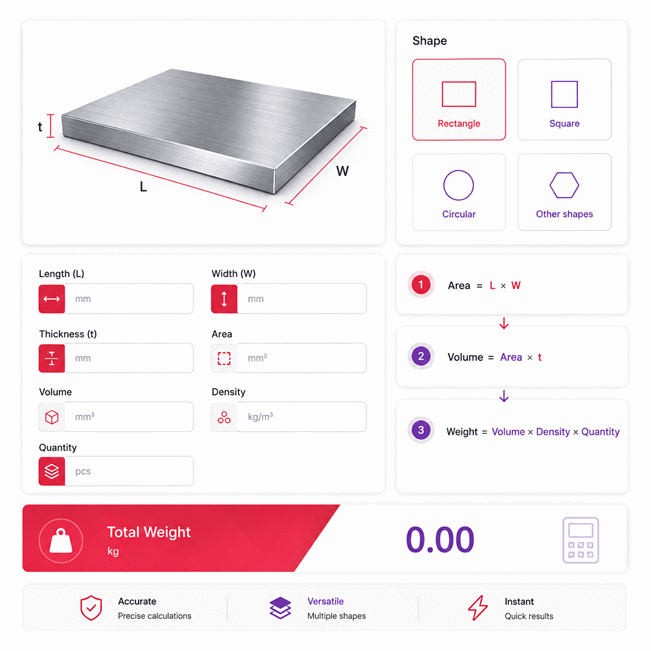
Steel Plate Weight Calculator helps you estimate plate weight from shape, dimensions, thickness, steel density, and quantity. It supports rectangular, square, circular, and custom-area plates while keeping the calculation process clear. The Steel Plate Weight Calculator can also reverse-solve missing values when enough related data is available, making it useful for fabrication, purchasing, transport planning, and technical verification.
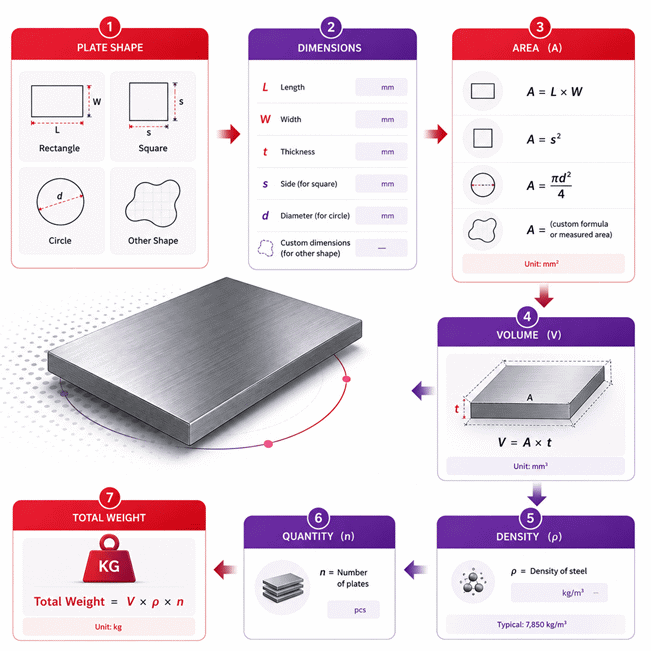
- Plate area depends on the selected shape and its required geometric dimensions.
- Plate volume is determined from surface area and the selected plate thickness.
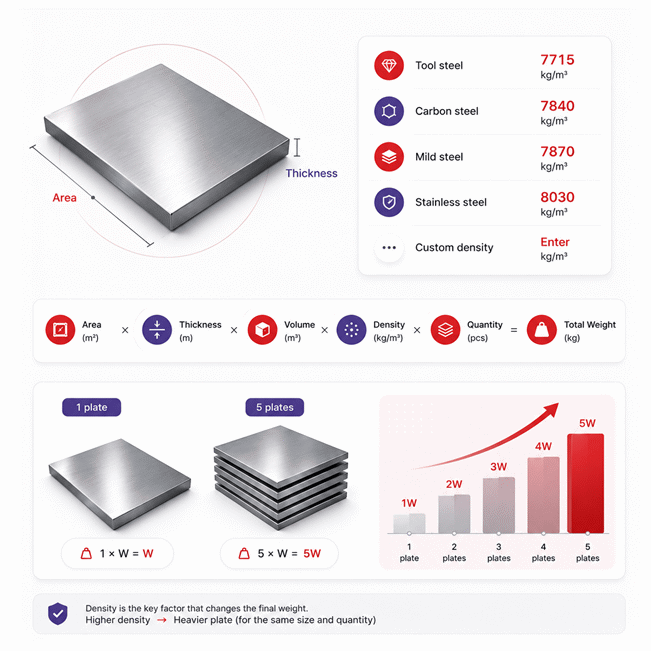
- Total weight depends on plate volume, material density, and the number of plates.
- Different steel grades can produce different weights even when plate dimensions remain identical.
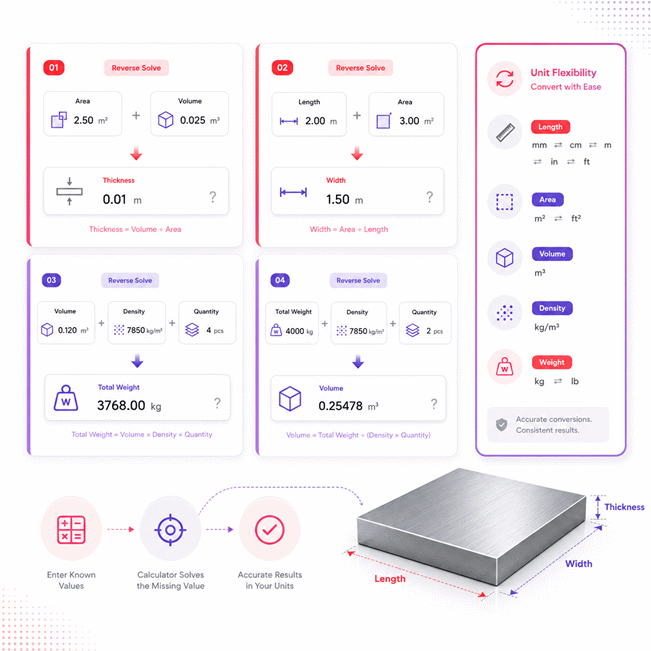
- Reverse solving can determine missing thickness, width, length, volume, density, or quantity.
- Blank dimensions should be used for purchasing, while finished geometry suits component-weight checks.
- Large holes, cut-outs, raised patterns, and coatings can change actual finished plate weight.
- Manufacturing tolerances can create differences between calculated weight and measured plate weight.
- Batch weight should be checked carefully because small per-plate differences increase with quantity.
- Calculated results can support estimating, freight planning, material handling, quotation checks, and fabrication preparation.
For the best practical result, confirm the plate shape, dimensions, steel type, thickness, and quantity before relying on the final weight. When project-specific material data is available, use the matching density rather than assuming every steel grade behaves identically.
Assumptions used in this calculator
- Plate dimensions are assumed uniform across the entire measured geometry.
- Steel density is assumed constant throughout each individual plate.
- Selected steel density represents the material grade used in calculation.
- Custom density values are assumed accurate and supplied by the user.
- Plate thickness is assumed consistent across the full plate area.
- Rectangular plates are assumed to have perpendicular sides and uniform dimensions.
- Square plates are assumed to have four equal-length sides.
- Circular plates are assumed to be geometrically round with uniform diameter.
- Entered area for other shapes is assumed geometrically accurate.
- All entered measurements are assumed accurate and expressed in selected units.
- Manufacturing tolerances, coatings, cutouts, and surface treatments are not included.
- Calculated weight represents theoretical mass rather than certified measured weight.
- Critical industrial decisions should use verified drawings, specifications, and certified material data.
Results are rounded for display.
Internal calculations use full precision.
Formulas Used in Steel Plate Weight Calculator :
1. Unit Normalization
2. Rectangular Plate Area
3. Square Plate Area
4. Circular Plate Area
5. Plate Volume
6. Total Steel Plate Weight
- qSI = physical value expressed in the calculator's SI base unit
- qdisplay = value entered or displayed in the selected unit
- funit = conversion factor from the selected unit to the SI base unit
- A = plate area
- L = rectangular plate length
- W = rectangular plate width
- s = square plate side length
- d = circular plate diameter
- V = volume of one plate
- t = plate thickness
- ρ = steel density
- n = quantity of identical plates
- Wtotal = total weight of all plates
Variables & Definitions
View a complete list of all variables used in this calculator, including definitions and units
Steel Plate Weight Calculator Variables and Units
| Variable | Meaning | SI Base Unit | Used For |
|---|---|---|---|
| qSI | Physical value converted to the calculator's SI base unit | SI unit | Internal unit normalization and calculation |
| qdisplay | Value entered or displayed in the selected unit | Selected unit | User input and displayed results |
| funit | Conversion factor from the selected unit to its SI base unit | Conversion factor | Unit conversion |
| A | Area of one steel plate | m² | Shape geometry and plate volume |
| L | Length of a rectangular steel plate | m | Rectangular plate area |
| W | Width of a rectangular steel plate | m | Rectangular plate area |
| s | Side length of a square steel plate | m | Square plate area |
| d | Diameter of a circular steel plate | m | Circular plate area |
| V | Volume of one steel plate | m³ | Plate weight calculation |
| t | Thickness of the steel plate | m | Plate volume calculation |
| ρ | Density of the selected steel material | kg/m³ | Steel plate weight calculation |
| n | Number of identical steel plates | Count | Total weight calculation |
| Wtotal | Total weight of all steel plates | kg | Final calculated result |
Unit Conversion Table
Steel Plate Length Unit Conversion Table
| Unit Group | Unit Name | Symbol | Equivalent in Meters | Used For |
|---|---|---|---|---|
| Popular Units | Millimeter | mm | 0.001 m | Length, width, side, diameter, thickness |
| Popular Units | Centimeter | cm | 0.01 m | Length, width, side, diameter, thickness |
| Popular Units | Meter | m | 1 m | Length, width, side, diameter, thickness |
| Popular Units | Inch | in | 0.0254 m | Length, width, side, diameter, thickness |
| Popular Units | Foot | ft | 0.3048 m | Length, width, side, diameter, thickness |
| Scientific Units | Micrometer | µm | 0.000001 m | Very small plate dimensions |
| Scientific Units | Kilometer | km | 1000 m | Large-scale length conversion |
Steel Plate Area Unit Conversion Table
| Unit Group | Unit Name | Symbol | Equivalent in Square Meters | Used For |
|---|---|---|---|---|
| Popular Units | Square millimeter | mm² | 0.000001 m² | Plate area |
| Popular Units | Square centimeter | cm² | 0.0001 m² | Plate area |
| Popular Units | Square meter | m² | 1 m² | Plate area and volume calculation |
| Popular Units | Square inch | in² | 0.00064516 m² | Plate area |
| Popular Units | Square foot | ft² | 0.09290304 m² | Plate area |
| Scientific Units | Square kilometer | km² | 1000000 m² | Large-scale area conversion |
Steel Plate Volume Unit Conversion Table
| Unit Group | Unit Name | Symbol | Equivalent in Cubic Meters | Used For |
|---|---|---|---|---|
| Popular Units | Cubic millimeter | mm³ | 0.000000001 m³ | Small plate volume |
| Popular Units | Cubic centimeter | cm³ | 0.000001 m³ | Small plate volume |
| Popular Units | Cubic meter | m³ | 1 m³ | Plate volume and weight calculation |
| Popular Units | Cubic inch | in³ | 0.000016387064 m³ | Plate volume |
| Popular Units | Cubic foot | ft³ | 0.028316846592 m³ | Plate volume |
| Scientific Units | Milliliter | mL | 0.000001 m³ | Small-volume conversion |
| Scientific Units | Liter | L | 0.001 m³ | Volume conversion |
Steel Density Unit Conversion Table
| Unit Group | Unit Name | Symbol | Equivalent in kg/m³ | Used For |
|---|---|---|---|---|
| Popular Units | Kilogram per cubic meter | kg/m³ | 1 kg/m³ | Steel density and weight calculation |
| Popular Units | Gram per cubic centimeter | g/cm³ | 1000 kg/m³ | Steel material density |
| Popular Units | Pound per cubic foot | lb/ft³ | 16.01846337 kg/m³ | Imperial steel density |
| Popular Units | Pound per cubic inch | lb/in³ | 27679.90471 kg/m³ | Imperial steel density |
| Scientific Units | Metric tonne per cubic meter | t/m³ | 1000 kg/m³ | High-density material conversion |
Steel Plate Weight Unit Conversion Table
| Unit Group | Unit Name | Symbol | Equivalent in Kilograms | Used For |
|---|---|---|---|---|
| Popular Units | Gram | g | 0.001 kg | Small steel plate weight |
| Popular Units | Kilogram | kg | 1 kg | Total steel plate weight |
| Popular Units | Pound | lb | 0.45359237 kg | Imperial plate weight |
| Popular Units | Ounce | oz | 0.028349523125 kg | Small imperial plate weight |
| Popular Units | Metric tonne | t | 1000 kg | Heavy plate quantities and total weight |
| Scientific Units | Milligram | mg | 0.000001 kg | Very small mass conversion |
Example Calculation
The rectangular plate area is calculated from its length and width.
Thickness is converted to meters before calculating the plate volume.
Plate weight is obtained by multiplying volume by the selected steel density.
The final total is calculated by multiplying one plate's weight by quantity.
The solver first uses total weight, density, and quantity to recover total plate volume.
It then divides volume by thickness to determine the rectangular plate area.
The known length and resolved area provide enough information to calculate width.
Each solved value becomes available to the next reverse-solving step automatically.
Results are rounded for display.
Internal calculations use full precision.
Calculations Disclaimer
How to Calculate Steel Plate Weight Accurately Without Costly Guesswork
A steel order can become expensive when one small input is wrong. A Steel Plate Weight Calculator helps prevent that mistake before purchasing begins. The Steel Plate Weight Calculator uses the plate geometry, material choice, thickness, and quantity together. This gives a practical weight estimate within seconds. The result can support fabrication, purchasing, transport, and handling decisions.
The first step is simple. Confirm what you actually know about the plate. Do not assume missing dimensions. Check the plate shape first. Then check its measured or specified dimensions. Next, confirm the steel type. Finally, confirm how many identical plates are involved. This order reduces avoidable mistakes.
Steel Plate Dimensions That Have the Biggest Effect on Weight
Large weight errors often begin with a small dimension error. Length and width define the surface size of rectangular plates. A square plate depends on one equal side dimension. A circular plate depends on its diameter. Thickness then determines how much material exists through the plate depth.
Thickness deserves special attention. A small thickness change can affect every plate in a batch. The impact becomes larger when plate area increases. It becomes larger again when quantity increases. For purchasing work, use the ordered dimensions. For an existing plate, measured dimensions can give a better estimate.
Why Steel Type Changes the Result Even When Dimensions Stay Identical
Two plates can have identical dimensions but different weights. Their material density may be different. This matters when comparing mild steel, carbon steel, stainless steel, and other grades. The visible plate size alone cannot reveal its exact mass.
Use the material selection that matches the real plate. Use custom density when project data provides a specific value. Do not change the selected material only because a calculated result seems unexpected. Recheck the grade and dimensions first.
How Plate Quantity Changes the Real Project Load
A single plate may look manageable. A full order can tell another story. Quantity scales the total load across every identical plate. This matters for trucks, racks, cranes, storage areas, and purchasing budgets.
When plates differ in size, calculate each matching group separately. Combine the group totals afterward. This approach is clearer than forcing different plates into one average value.
When Plate Shape Becomes the Hidden Source of Error
A common mistake is treating every plate as a rectangle. That works only when the geometry is rectangular. Square and circular plates use different geometric relationships. Irregular plates may require a known or measured area. Choosing the correct shape keeps the calculator aligned with the real object.
How Plate Shape Changes the Result More Than Many Buyers Expect
A purchasing team may know thickness and material but still miss the correct weight. The reason can be the plate shape. Geometry controls how much surface area exists before thickness is considered. That makes shape selection an important first decision.
AxiCalculator separates common plate shapes instead of treating them as one case. This gives users a clearer workflow. It also helps prevent incorrect assumptions. The user chooses the real geometry. The calculator then works with the dimensions that belong to that geometry.
Rectangular Steel Plates for Fabrication and Stock Cutting
Rectangular plate is common in fabrication, machine bases, frames, brackets, and structural work. Length and width describe the main surface. Thickness describes the plate depth. These values must represent the same physical plate.
Do not mix drawing dimensions with trimmed dimensions without noticing. A purchased blank may be larger than the finished part. That difference matters when estimating purchased steel. It also matters when comparing supplier quotations.
Square Steel Plates and Why One Side Can Simplify the Check
Square plates have equal side lengths. This reduces the amount of geometry data needed. It also gives a quick way to detect input mistakes. If a supposedly square plate has different side dimensions, confirm the drawing before continuing.
Square plates appear in base plates, mounting plates, supports, and equipment pads. Their simple geometry makes them easy to estimate. Yet thickness and material still control the final mass.
Circular Steel Plates, Discs, and Round Blanks
Circular plates can create surprisingly large errors when diameter is misunderstood. Diameter crosses the full circle. It is not the same as radius. Entering one as the other produces a major geometry error.
Round plates appear in flanges, covers, machine components, discs, and fabricated assemblies. Use the actual finished diameter when estimating finished mass. Use the blank diameter when estimating purchased stock.
Other Shapes, Cut-Outs, and Real Fabrication Geometry
Not every plate fits a simple shape. Irregular profiles may already have a known area. In that case, area can represent the geometry directly. Holes and cut-outs can reduce the real finished weight. Large openings deserve attention because removed steel is no longer part of the final component.
Patterned or raised surfaces can also change weight. A plain flat-plate estimate may not fully represent that extra material. When supplier data exists for a special plate product, compare it with the calculated result.
Which Steel Type Should You Choose Before Trusting the Weight?
A plate can look exactly right and still produce the wrong estimate. The hidden variable is often material selection. Steel is not one single material with one universal density. Different steel types can produce different weights for the same volume.
The safest workflow starts with the material specification. Check the drawing, purchase order, mill information, or project document. Then select the matching material. If the exact density is known, a custom density option can improve project-specific calculations.
Mild Steel and Carbon Steel in Everyday Fabrication Work
Mild steel and carbon steel are common choices in fabrication. They are used for frames, supports, brackets, machinery, platforms, and structural components. Their densities are close, but not always identical.
For small parts, the difference may appear minor. Across many large plates, the difference can become noticeable. This matters when total tonnage affects freight, lifting plans, or purchasing costs.
Do not choose a familiar steel type merely because it gives a convenient number. Match the material to the actual specification. A correct material choice improves every dependent result.
Stainless Steel and Higher-Density Plate Materials
Stainless plate may weigh more than a same-size lower-density steel plate. The geometry does not need to change. The material itself changes the result.
This becomes important when replacing one material with another. A redesign may keep every dimension unchanged. Yet transport weight and support loads can still move upward. Checking weight after a material change is a fast project safeguard.
Custom Density for Grade-Specific or Project-Specific Material Data
Some projects provide a specific material density. In that case, custom density can be more useful than a general preset. This is especially helpful for uncommon alloys or controlled engineering specifications.
Enter only data that belongs to the actual material. Do not tune density just to force the calculator toward an expected weight. If the result disagrees with project data, investigate the reason first.
When Supplier Grade Data Should Override a General Material Choice
A generic material selection is useful for routine estimates. Grade-specific project data is better when higher accuracy matters. Supplier documentation can also reflect the exact material being purchased.
This distinction matters most for large orders. A small percentage difference can become meaningful across many tonnes. Procurement teams should compare like with like before approving an order.
How Reverse Solving Finds a Missing Plate Value From What You Already Know
A real workshop rarely starts with perfect information. Sometimes the weight is known but one dimension is missing. Sometimes the area is known but thickness is uncertain. A conventional one-way calculator can stop at that point. A reverse-solving calculator can continue.
AxiCalculator treats calculated values as connected values. When enough valid information exists, the missing value can be resolved. This makes the tool useful for checking drawings, verifying stock, reviewing quotations, and investigating unexpected weight data.
Finding Plate Thickness When Other Plate Data Is Already Known
Thickness is often the missing value during field checks. A plate may have known area and known material volume data. In that situation, thickness can become the unresolved dimension.
This can help when a drawing is incomplete. It can also help when checking whether a listed weight is plausible. The resolved value should still be compared with a real measurement before fabrication decisions.
Finding Length or Width From Known Rectangular Plate Data
A rectangular plate can be solved backward when area and one side are known. This is useful for stock checks and drawing reviews. It can also reveal a data-entry mistake quickly.
Suppose an area is already fixed by project data. If the known length changes, the required width must respond. The calculator can expose that relationship immediately. This helps users see whether dimensions agree with each other.
Resolving Volume, Material Density, or Quantity From Total Weight
Total weight can sometimes be the value you trust most. A shipping document may provide it. A batch record may provide it. A verified scale may provide it. Other values can then be investigated from that known result.
Reverse solving can help identify a missing volume. With a custom material setting, density may also be resolved from sufficient known information. Quantity can be investigated when the remaining plate data is known.
When Reverse Solving Should Trigger a Data Check Instead of Blind Trust
Reverse solving is powerful because it exposes relationships. It does not make conflicting measurements disappear. If several user-entered values disagree, stop and check the data source.
Look for swapped dimensions, wrong steel grades, incorrect quantities, or misunderstood plate geometry. The newest input should not automatically make old project data true.
Using Steel Plate Weight for Fabrication, Purchasing, Shipping, and Final Verification
A correct calculation has value only when it improves a real decision. Steel plate weight affects more than a number on screen. It can influence purchasing, cutting plans, transport, handling, storage, and cost checks.
Use the result according to the stage of the project. Purchasing teams care about ordered stock. Fabricators care about blanks and finished parts. Logistics teams care about shipment loads. Engineers may care about component mass and assembly changes.
Fabrication Planning Before Steel Reaches the Cutting Table
Fabrication problems often begin before cutting starts. The wrong stock size can create waste. The wrong thickness can affect both cost and handling. A fast weight check gives another way to review the job.
Calculate matching plate groups before production. Keep different sizes separate. This gives a clearer material picture. It also makes changes easier to trace when drawings are revised.
When a finished part contains large holes, slots, or cut-outs, blank weight and finished weight differ. Keep those two concepts separate. Procurement may need the first. Handling of the final component may need the second.
Shipping and Lifting Decisions Need More Than a Convenient Estimate
Transport becomes risky when estimated weight is treated as verified load data. A calculator can support planning. It should not replace confirmed shipment information for critical lifting work.
Use calculated totals to compare options early. Then verify the final load before selecting lifting equipment or transport limits. Large batches deserve extra care because small per-plate differences accumulate.
PDF and spreadsheet exports can help teams share the resolved calculator state. A shareable link can also help another person review the same inputs.
Purchasing Checks That Can Expose Expensive Plate Order Mistakes
A low plate price can hide a higher delivered cost. Weight affects freight and handling. It can also reveal whether quoted dimensions appear reasonable.
Before placing an order, compare the plate size, thickness, steel type, quantity, and expected total mass. Then compare those details with the supplier quotation. This creates a simple second check without slowing the purchasing process.
For an online calculator, physical product warranty language does not apply. The useful trust signal is consistent tool behavior. Clear inputs, repeatable outputs, export tools, and accessible support matter more.
Why Calculated Weight and Actual Plate Weight Can Still Differ
Real plates are manufactured objects. Their dimensions can vary within production limits. Coatings can add mass. Holes can remove mass. Raised patterns can add material. Finished parts may also differ from purchased blanks.
The fastest verification workflow is simple. Confirm the geometry. Confirm the steel type. Confirm the thickness. Confirm the quantity. Then compare the calculated value with project documents or measured data.
Common mistakes include mixing blank and finished dimensions. Users may also select the wrong material. Some enter diameter as radius. Others combine different plate sizes as one batch. Each mistake can look small at first. The total error can become expensive.
Before the next steel order, run the plate set through AxiCalculator. Check the result before the purchase becomes difficult to change. A few seconds of review can prevent hours of correction later.
Frequently Asked Questions
Can I use the calculator when my plate dimensions come from a drawing instead of physical measurements?
Should I calculate each plate separately when an order contains several different sizes?
Can calculated steel plate weight help me compare two supplier quotations?
What should I check first when the calculator result looks much higher than expected?
How should an engineer handle a plate that includes many holes, slots, or machined pockets?
What is the best approach when calculated batch weight disagrees with a certified weighbridge result?
Can reverse solving be used to investigate an unknown plate specification from measured mass?
Our engineers are here to help you get it right.